Desertcart purchases this item on your behalf and handles shipping, customs, and support to India.
🔊 Elevate your workspace sound—minimal setup, maximum impact!
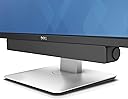
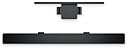
The Dell Stereo SoundBar AC511M is a sleek, USB-powered soundbar designed to attach effortlessly to compatible Dell monitors, delivering clear stereo audio with 2.5 watts of power. It requires no additional software or power cords, making it an ideal space-saving audio solution for professionals seeking quality sound without desktop clutter.


| ASIN | B07FZY2MJN |
| Additional Features | Lightweight |
| Age Range Description | All Ages |
| Antenna Location | For Computers |
| Audio Driver Size | 40.6 centimeters |
| Audio Driver Type | Dynamic Driver |
| Audio Output Mode | Stereo |
| Battery Average Life | 1 hours |
| Best Sellers Rank | #49 in Home Audio Sound Bars #86 in Computer Speakers |
| Brand | Dell |
| Built-In Media | Soundbar USB to USB extension cable Aux-in cable Documentation Soundbar mount |
| Color | black |
| Compatible Devices | Desktop, Laptop |
| Connectivity Protocol | USB |
| Connectivity Technology | USB |
| Control Method | Touch |
| Controller Type | Corded Electric |
| Customer Package Type | FFP |
| Customer Reviews | 4.2 out of 5 stars 3,088 Reviews |
| Enclosure Material | Plastic |
| Frequency Response | 20000 hertz |
| Global Trade Identification Number | 00884116311843 |
| Is Waterproof | FALSE |
| Item Dimensions D x W x H | 1.5"D x 15.9"W x 1.9"H |
| Item Type Name | Dell Stereo SoundBar (520-Aaot) |
| Item Weight | 16 ounces |
| Manufacturer | Dell Marketing USA, LP |
| Maximum Range | 20 meters |
| Model Name | AC511M |
| Model Number | AC511M |
| Mounting Type | Plug Mount,Bar Mount |
| Number of Audio Channels | 2 |
| Number of Items | 1 |
| Number of Power Levels | 1 |
| Power Source | Corded Electric |
| Speaker Maximum Output Power | 2.5 watts |
| Speaker Size | 40.39 centimeters |
| Speaker Type | Soundbar |
| Specific Uses For Product | personal, gaming, business |
| Subwoofer Connectivity Technology | Wired |
| Total USB 2.0 Ports | 1 |
| UPC | 884116311843 |
| Unit Count | 1 Count |
| Warranty Description | 1 year Limited Hardware Warranty |
| Warranty Type | Limited |
| Water Resistance Level | Waterproof |
| Wireless Technology | Bluetooth |
| Woofer Diameter | 40.6 centimeters |
J**.
Works great with just a USB cable: No aux cable required!
I was hesitant to buy this speaker for my Dell U2415 monitor based on so many reviews that said it didn't work as advertised (i.e. that it needed both a USB connection for power as well as an aux cable for the sound signal "THAT ISN'T EVEN INCLUDED!!!). Some folks even said that it didn't work with both a USB and aux cable connected. But I wanted a speaker that wouldn't take up any space on my desk and I don't need disco club volume nor thumping base, so I went for it. I figured worst case I'd need to use an aux cable (or worst worst-case it wouldn't work for me at all and I have to return it, but hey, returning stuff is one of Amazon's strengths, right?) So anyway it delivered next day after ordering (the joys of living in a metropolitan area!), I pulled it out of the box and connected the speaker's USB cable into one of the monitor's USB hub outlets and voila, sound was coming out of the speaker even before Skype and all of the other annoying Microsoft bloat-ware had finished starting up after I powered my computer on. Absolutely no setup of any sort required from me on the computer side of things. See the attached picture to this review for how the computer shows the speaker in the audio output section after all is said and done. So easy and I'm running Windows 8 on this machine, for Pete's Sake! Which leads me to wonder; do people not realize that if you plug this speaker's USB plug into one of the monitor's USB ports that the monitor itself has to ALSO be connected to the computer independently via its own USB cord? Even if you don't have your monitor hub connected (or don't have a monitor hub at all), the attached USB plug on the speaker has quite a long cord so hypothetically it would easily plug directly into the computer itself. I haven't tried that, but am absolutely confident it would work just fine. Even better, theoretically, since plugging the speaker into the monitor USB port instead of the computer's means the audio has the extra complexity of going through the USB hub in the monitor. Not that I've noticed any problems at all with that but I suppose if you were doing high data-rate transfers through the hub the sound could take a hit because of it. Sound is perfectly fine, even great, for the size and price of this thing. Again, I don't need disco club volume nor thumping base nor battlefield realistic sound for my application so you may feel differently. Actually I had to lower the speaker, computer, and music app volumes all down to the lower ends of their respective sliders while playing some test tracks since my kid's bedroom is right next to my "office" and the sound output was pretty significant when I first plugged it in. My U2415 has two slots in the bottom of it that were covered up with some glorified tape pieces. Once I pulled the tape off with a mini-screwdriver the two tabs on top of the speaker slotted right into the monitor slots and it looks just like one of the photos Amazon has posted for this item. If you go to Dell's page for this speaker, click on the "Tech Specs" tab, and scroll down to "Compatibility" you'll see a long list of Dell monitors this speaker is designed to work with. I'd guesstimate 2 out of 3 or maybe even 4 out of 5 in that list don't need the included monitor stand mount (the list differentiates which do or don't). Mine was one of those that don't so I can't speak to people's issues with the monitor stand mount, but I'm wondering if their monitor is even on that list at all.
C**S
For the price, you can’t go wrong.
I bought this to pair with my Dell UltraSharp U2720Q 27 inch 4k monitor. Now I understand that they say that it is not compatible with that monitor, but hear me out. When you try to attach it, you will notice that is does not fit, but if you take out the rubber part, you can clap it onto the base of your monitor’s stand. So far, it has worked wonders and it looks great. The sound is not top notch but I got mines on sale for like $25 and for that price, I found it to be a steal. It can get pretty loud without distortions, and you really only need the volume to go half way.
A**O
Good for the money
The mounting brackets on the top and the included mount are built exclusively for dell products, so it didn’t really mesh well with my current setup and just has to sit on my desk under the monitor. Slightly disappointing, but to be expected. It’s not theater level quality, but it works as intended, the volume seemed to max out at 45% but I cannot complain because a comfortable listening volume is closer to 15%. Over all it was an easy plug and play item, my computer automatically recognized it and started pumping out sounds. Cheap and great for anyone who doesn’t have a lot of desk real estate
J**R
Sound quality is big improvement over older Dell soundbar
I bought this for the external monitor on my office computer. I attach my laptop through a dock when I am at my desk, and I wanted a clutter-free speaker that was compatible with my Dell external monitor. So I'm not doing any gaming or listening to high-fidelity music, but I do have times when I have to play very low-quality audio and video recordings and make out what is being said, and my Dell laptop speakers are insufficient for that. This replaced a monitor-soundbar setup I'd had since 2015. The sound quality here is MUCH better than it was with that older soundbar, and this speaker also seems to get louder and stay clearer at the louder range. I haven't tested that much yet, but it is important when I am listening to very soft recordings that I have to turn way up to hear. Obviously, for $30 you are not going to get world-class audio. But after reading some of the reviews, I was more than pleasantly surprised by the quality of sound coming out of these for a business computer. As for connecting the sound, as others have mentioned, the only input is a USB cable. I prefer to plug the USB cable directly into one of the USB ports on my monitor, to minimize cable clutter. (I mounted the bar fairly high on the monitor pedestal so you cannot see the cable running from behind the speaker into the monitor when sitting at my desk). I've tried several combinations and unfortunately my monitor does not seem to receive/pass through audio using either a DisplayPort or HDMI cable. So the two options are either (1) plug the speaker's USB cable directly into your computer, or (2) run a USB A-B cable from your computer to the monitor. That USB cable is what carries the sound and allows the monitor to output sound through it's own USB cable. I chose to run a separate cable because I did not have any vacant USB ports on my dock. By running a single USB cable to my monitor, I can have use of 4 USB ports on my monitor for other devices, essentially turning my monitor into a USB hub. So in addition to this soundbar, I now plug my external webcam into a port on my monitor, and also plug my diaphragm microphone into the monitor on the rare occasions I use it, but once the monitor is connected to the computer by USB, you should be able to run most USB devices through it.
F**D
Bare minimum sound solution.
Sound and power are both drawn from USB. Plug and play. This will work with any PC, but will likely only mount to a Dell-branded, compatible monitor. The quality isn't great - the bare minimum to have sound come from your computer. Unless you absolutely need a soundbar attached to a Dell monitor, I urge customers to look elsewhere.
M**M
Couldn't be more pleased
I couldn't be more pleased with this soundbar. Easy setup. Big sound. Small price. I have side-by-side Dell monitors and have the speaker sitting on my desk between the two. I have not experienced any hum or buzz, as others have mentioned. In fact, I bought this soundbar to replace older Dell speakers that had developed an annoying buzz. Very happy with this purchase.
D**N
Minimal controls, inconsistent connectivity, white noise
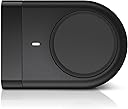
If it's not clear from the photos and description, the sound bar has a single control -a volume knob. You can turn this knob perpetually in any direction to lower/raise volume (volume control is done in Windows, not hardware). There is no off switch. The main selling point of the unit, the single required connection - a USB cable - is integrated into the unit and cannot be replaced. I have an Alienware M15 R6 and Dell XPS 13. The XPS 13 connects with no issues. The Alienware has has an issue to connect since Day 1., unable to play sounds through the bar. The sound bar will show that it is powered (LED is on, white noise is being emitted), but Windows cannot play through it. I've spent too much time uninstalling drivers and troubleshooting. It will start working and then overnight somehow lose connection again. I wouldn't think the white noise would be that big of a deal, but I have unplugged the sound bar (since there is no OFF switch) after a few hours of listening to white noise and realized that my ears were still ringing. I would return this if I didn't already recycle the packaging. What a waste of time and money.
H**E
excellent sound, flexible connectivity
I mounted the control below my compatible Dell monitor, plugged into a USB slot on my laptop, and booted up my system. The sound bar worked immediately. Sound was great. I verified that I could operated the soundbar by plugging the USB cable into a USB hub connected to my laptop. If the USB connection did not offer sound, my understanding is that an audio cable purchased separately would work, but I did not check this out. If my Dell monitor did not have slots to support mounting the sound bar, I verified that the sound bar does attach to the Dell monitor stand. If you have a different, incompatible monitor, you can place the sound bar on your desktop. One of the nice side benefits of this sound bar is that you can adjust the volume by touching the sound control on the right hand side of the bar. The control does not spin. It is sensitive to the movement of your finger. There is no need to open a volume control window by a separate action. The window opens automatically when you touch the control disk. You still have control of volume through a mouse or touchpad if that is more convenient in your setup. The best thing about the soundbar is the sound reproduction. It is surprisingly good, and greatly improves reproduction of youtube musical videos over what is available from my laptop speakers.
J**Y
Sound is superb
The sound control knob is a little difficult to use but it doesn't matter as its easily done using the 'puter.
D**G
Seamless attachment for instant better sound
Very easy to install, plugs into an USB slot at the back of the monitor and presto, the tinny laptop sound gets an instant upgrade. Maybe not theatre quality, but can't beat it for the price! Note the laptop has to be connected to the monitor via USB-C.
M**Y
Nice product
Worth for Money
C**N
DELL AC511M Altavoz soundbar 2.0
Barra de sonido que se adapta perfectamente al monitor mediante unas pestañas o a la barra del pedestal del mismo mediante accesorio incluido, se tienen las dos opciones, en mi caso monitor Dell U2415. Buen sonido, sin exagerar, pero mucho mejor que si viniesen los altavoces integrados en el monitor. Excelente calidad de materiales.
C**E
Ausgewogener Sound, unauffällige Optik, leichtes Gewicht, simple Handhabung
Dieser Lautsprecher ist optimal zum "mit doppelseitigem Klebeband eine Soundbar unten an seinen Monitor kleben, der saumiese integrierte Lautsprecher hat". Es sei denn natürlich man hat den passenden Monitor von Dell dazu, dann muss man kein Klebeband verwenden:) Aber genau dafür ist diese Dell Soundbar gemacht und diesen Zweck erfüllt sie sehr, sehr gut. Und übrigens, falls ihr das in den Bewertungen gelesen habt: ja, der Lautsprecher rauscht wenn er eingeschaltet ist. Dieses Rauschen ist aber sehr, sehr leise und nur deutlich hörbar wenn man nahe mit dem Ohr rangeht. Und dann ist das genauso laut wie z.B. bei einer klassischen Hifi-Stereo-Anlage. Auch die hat immer ein wenig gerauscht, das hat analoge Lautsprecher-Technik so an sich und ist kein "No-Go" für mich. Die Vorteile überwiegen bei diesem Dell Lautsprecher deutlich, und das ist vor allem der sehr ausgewogene Sound. Ich hatte schon einige Soundbars und Bluetooth Lautsprecher in Nutzung, aber noch kein Gerät war so ausgewogen wie diese Dell Soundbar. Der Sound ist optimal, um bei leiser Lautstärke und naher Distanz, also wenn man vor dem Monitor zum Arbeiten sitzt, trotzdem noch einen tollen Klang zu haben, der zum Mit-Grooven animiert ohne dabei aber zu basslastig oder unangenehm spitz in den Höhen oder irgendwie muffig zu sein. Ich würde sogar sagen, der Klang ist bei leiser Lautstärke besser als wenn man voll aufdreht. Natürlich "kann die Soundbar auch laut", dann wird der sehr ausgewogene Sound aber "langweilig". Denn dann will man schon mehr Wumms im Bass, dann braucht man einfach mehr Power. Deshalb ist dieser Lautsprecher eine Top-Wahl für Leute, die nahe am Monitor sitzen und unten (oder oben) an ihrem Monitor eine sehr kompakte, leichte, unauffällige Soundbar montieren möchten, die bei Zimmerlautstärke einen richtig tollen, angenehmen Sound liefert. Keine blinkenden bunten LEDs, keine reflektierenden Logos auf dem Lautsprecher, einfach nur schwarz und unauffällig. Das macht die Dell Soundbar richtig, richtig gut. Nicht der "große Wumms", sondern die "feinen, leisen Töne" aus nächster Nähe. Nachteilhaft ist meines Erachtens nur, dass die Lautstärkeregelung am Gerät nur funktioniert wenn man direkt mit Windows verbunden ist. Die Lautstärkeregelung ist wohl digital und daher vom Windows-Treiber abhängig. Wenn man die Soundbar also per USB mit einer xbeliebigen Stromquelle verbindet und per 3,5mm Klinke Kabel z.B. mit dem Kopfhörerausgang des Monitors, dann muss man über den Monitor die Lautstärke regeln. Das ist aber OK und nur ein kleiner Nachteil, den ja nicht jeder Nutzer hat.
Trustpilot
3 days ago
2 months ago