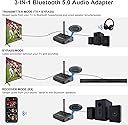
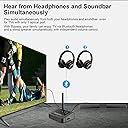
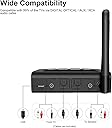
๐ถ Elevate Your Sound ExperienceโNo Strings Attached!
The Giveet 164FT Long Range Bluetooth Transmitter Receiver is a versatile 3-in-1 wireless AUX adapter designed for seamless audio streaming. With a remarkable range of up to 164ft, 40ms low latency, and a plug-and-play setup, it allows users to enjoy their favorite shows and games without the hassle of wires. The intelligent bypass mode enables simultaneous use of Bluetooth headphones and wired speakers, making it perfect for family entertainment. Plus, with a two-year warranty and lifetime technical support, you can enjoy peace of mind with every use.


| ASIN | B07R8Q19M2 |
| Additional Features | Bluetooth Transmitter |
| Audio Input | Optical TOSLINK, 3.5mm AUX |
| Audio Output Mode | Stereo |
| Audio Output Type | Headphone, Speaker |
| Bluetooth support? | Yes |
| Brand | Giveet |
| Color | Black |
| Compatibility Options | Personal Computer, Televison, Speaker, Headphones, Bluetooth-enabled devices |
| Compatible Devices | Personal Computer, Televison, Speaker |
| Connectivity Technology | Auxiliary , Bluetooth, USB |
| Connector Type Used on Cable | USB, Auxiliary |
| Customer Reviews | 4.2 out of 5 stars 143 Reviews |
| Enclosure Material | Metal |
| Hardware Interface | Bluetooth, USB |
| Includes Remote | No |
| Installation Type | Plug In |
| Manufacturer | JGZH |
| Material | Metal |
| Number of Channels | 2 |
| Power Source | Battery Powered,Corded Electric |
| Rechargeable Battery Included | No |
| Special Feature | Bluetooth Transmitter |
| Supported Application | TV, Movies, Gaming |
| Supported Media Type | MP3, WAV, AAC |
| Supported Standards | Bluetooth 5.0, aptX HD, aptX Low Latency, aptX, SBC, AAC |
| UPC | 634923459265 634923459425 634923459296 |
| Voltage | 5 Volts (DC) |
| Wireless Compability | Bluetooth |
D**R
Very user friendly and easy to use!!!!!!!!!!!!
BTI-042 Review Tested Item (BTI-042) in the bedroom and had it connected to my smart TV via TV out, the item was in a cupboard with the doors shut and I had a portable one (BTI-018) connected to some PC speakers and it worked Amazing. The thing even has a volume control and is very easy to work. My Second test was to be from my desk top PC which is in the great room and my PC speakers are in the bedroom as I spend a lot of time in there due to my disability. Well I connected the device to my speakers and set the item to RX. I then had my PC connect to the item via add Bluetooth device option and turned on the speakers. The sound quality was awesome even though there is a wall between my PC and the speakers, and the volume controls on the BTI-042 adjust the volume bar on the PC just as if you had gone to the speaker icon clicked on it and increased the volume that way, The item is bloody brilliant. My third test was using an optical cable, I made sure it was set from AUX to Optical and that it was also on TX. Next I connected my BTI-018 one to my PC speakers and the sound was wonderful plus a huge advantage of not having to use cables along the floor and I had the PC speakers behind my head so that I didnโt have to have it on to loud and thus no need for head phones or the wife hearing what was playing on the TV. You do need to make sure that if your using TX its plug into the TX socket or if your using RX its plugged into the RX socket. Otherwise its not going to work. For my fourth test I hooked the BTI-042 to my old 480p TV thatโs over ten years old via itโs TV out and then my BTI-018 to my headphones and the sound was perfect. In the past any wireless set up was crackly and had loads of static, generally horrible sound. But with the BTI-042 the sound was super clear with no noise interference, it made listening to the TV a pleasure. My fifth test was to hook up my old mini hifi system to the BTI-042 and my BTI-018 to my head phones and yes once again the sound was excellent and crystal clear as I expected it would be since every test I had run had left me more and more impressed with the item in question. My sixth test was to connect it to my MP3 player and with the other one still connected to my headphones to see how the sound would be and I just loved it. There was no difference between the Bluetooth and headphones being plugged into it directly. My final test was to pair it whilst still connected to MP3 player to, two Bluetooth Daleks and all you do is connect it to one of them and then hit the pairing button and turn the second one on the item soon finds it and you now have music coming out of both Dalek speakers. It is very, very easy to set up. And as with all the other tests It ran perfect. Now my curiosity of what I could use it for was satisfied, the items are very easy to use. Work really well and are so, so worth buying. Especially the BTI-042, in fact I plan to get a second one as I am that impressed. I also took the trouble to write a basic How too for those who are not tech minded. I promise you will not be disappointed in it, plus customer service who contacted me via email to make sure I was happy with it were super nice, which in my book is a huge bonus. So, in closing if your looking for a Bluetooth device to use on non-Bluetooth items the BTI-042 is the way to go. Here is my review of the BTI-018 and then under that a basic how too. BTI-018 This product is easy to set up, easy to use and works BLOODY AWESOME!!!!! I use it for my pc speakers in another room and sounds wonderful. plus, and this is a very, very important plus. IT'S IDIOT PROOF!!!!!!! so perfect for me :) It also works well with the BTI-042 making the headphones Bluetooth enabled and the TV as well and no need for wires. Basic BTI-042 How too TV sound out how too 1: Connect the AV cables with the 3.5mm jack on the end to the TV out sockets 2: Connect the 3.5 mm jack plug to the TX socket on Bluetooth make sure its in the TX socket by the power socket. 3: Move switch to TX and connect the usb end of power cord to either the PC of a USB power adapter and turn the item on, then tap the volume plus button to increase the sound. You can now turn on whatever Bluetooth device you have thatโs receiving the signal and your good to go. PC to PC Bluetooth speakers how too 1: Plug BTI- 042 power cord into a power adapter and plug it into the wall socket. 2: Move switch from TX to RX and plug the speakers 3.5mm jack into the RX socket next to the antenna 3: Turn device on and make sure that RX is lit up on it, if not then check to see if its on bypass it needs to be pushed over all the way. 4: Go to devices in setup and select + Bluetooth and have your pc detect the BTI-042 once connected you should have sound coming out of PC speakers. (make sure Bluetooth function is turned on. Optical How too 1: Plug the BTI-042 into a power supply like you have in earlier how tooโs and then plug the end of the optical cable into either the TX socket or the RX socket. 2: Move the switch from AUX to Optical and the switch for RX or TX to which ever one you need and then just proceed like you have in earlier hoe tooโs and your good to go. RX = Receiving TX = Transmitting
M**S
Exceeded My Expectations
I had researched several dozen of these blue tooth receivers as a way to play music wirelessly from my phone to my old, but awesome, Yamaha receiver/stereo system. All the ones I researched including this one had complaints about range, latency, quality, etc. so I was nervous about buying one. After refining and re-refining my research, I decided to take a chance on this one. All I can say is that it works flawlessly. Set up was easy, there are no cutouts, drops, or static in the playback. The range is exactly what is advertised. I have noticed no latency issues. And the sound quality is awesome. I have the device connected to my receiver using the optical cable and it is plugged into the switched outlet on the receiver so that it turns on and off with the receiver. I highly recommend this product. The price and quality make it an awesome value.
K**R
Some Bluetooth stability issues common to all systems. Not battery operated. No volume control.
Update: This does not have a volume control, even though it has volume control buttons. This is not a problem for most uses, amplifiers and headphones, which have their own volume control. It is a problem when using Apple Airbuds or Airbuds Max which need volume control from the source. With these Apple products, you get full volume and cannot turn it down. There are other Bluetooth transmitters that do have volume control. There are several different companies making the exact same thing, using the same chipsets, so get the cheapest one you can find with the features you want. This was the cheapest I found. This one has HD audio, which is rare one in this price range. The main features, low latency and high quality audio only work if your headphones are compatible. Bose headphones, for instance, are not compatible so you get standard Bluetooth performance. That means there is a slight delay between the picture on your TV and the audio. So, you will see someone's mouth move slightly before you hear the words. This is called latency. It is noticeable but really isn't that bad. Also, the sound quality is not great. To get the best sound quality and almost no latency, you need headphones that are aptX compatible. The transmission of the is unit is very good. It is too good in fact. When I was trying to set it up to listen to headphones in one bedroom, it connected to an Echo Dot and a Samsung sound base in another room on the other side of the house. I had to delete those and be careful on how I paired the headphones. Otherwise, the other items would come and play the sound of the TV every time I turned on the TV. Like all Bluetooth systems, you sometimes get issues with pairing when you power up. But, if you just flip the unit out of transmit mode and then back, it corrects itself. This unit does transmit and receive but not both at the same time. So, you can hook up a TV or other item to it and will transmit sound to your headphones. Or, you can have it receive a Bluetooth signal from your cellphone and have it play to a stereo that is connected to it through a cable. It can be connected to another system either through optical cable or a standard stereo plug. It comes with each type of cable. It will connect to most TVs, as most TVs these days have an optical out port or a headphone out socket. You need to check your TV for that. It also has a bypass mode that works as purely bypass (with both transmit and receive disabled) or when transmitting. That means, you can hook an optical cable from your TV to the unit and another optical cable from the unit to a speaker and listen to both the speaker and headphones at the same time. This unit does not have a battery. You have to provide with 5V power. It comes with a USB cable for doing that. On most TVs, you can connect it to the USB port on the TV. Then when you turn on and off the TV, the unit turns on and off with it. If you don't have a USB port on your TV (most of them have it), you can plug it into one of those chargers like an iPhone uses.
R**E
Great product from a GREAT seller!
Easy set up...comes with optical cable, stereo cable, stereo rca Y to headphone adapter, and a USB cable. There is no wall charger (i had a spare...no big deal...maybe it was just my box? No problem...). I also brought an extra y splitter (to install this for my mom at her apartment so she can watch TV or listen to music at any volume she wants any time of day)...and I'm glad I did. This does have optical in and out and headphone in and out...however, it doesn't seem to be "mix and match"...my mom's ROKU TV has optical out and headphone. I connected optical, switched the side control to optical, headphoned out to her stereo AUX IN. There was no sound. Unsurprised, I connected the stereo cable to headphone (TV to Bluetooth device), switched the control back, headphone to y cabled to the AUX IN. Up and running! Everything going to the TV now pumps directly to her much better stereo speakers. Now...the Bluetooth...if I wanted to, I could Bluetooth to any device that received Bluetooth...but I don't, so...nothing to report. Pairing her earbuds? Couldn't have been easier...I hit the sync button, pulled out the earbuds from the charging box, by the time I put them in, it said "connected" (the buds have that feature...it did the same thing when I connected to her iPhone. There's little to no latency...only noticed it when the stereo speakers and buds were both on...turned off stereo and didn't notice any "lip sync" type effect. My mom was SO HAPPY when we setup Panorama and she realized she could go ANYWHERE in the apartment and hear the music at HER desired level. That happiness was worth any price paid for the device! I may, in the future, have to help her resync things? I'm not a HUGE Bluetooth guy? I am some tech knowledge-y (get it)? But this was EASY to setup...now, this says "charge before using", so I did...I had a day or so before I went to install...but never tried to use it without the charger? So maybe this can hold a charge? I honestly don't know. I know it works It's easy to install It sounds GREAT And this seller (JGZH Direct) is an incredible seller! I'm sorry this review took so long...I wanted to make sure my mom was satisfied and that this kept working before talking about how great this is...she's very happy, so I'm good! I would gladly buy from JGZH again anytime. They contacted me days after my purchase...just to make sure I was satisfied and enjoying the product...and to offer to help connect things if I was having problems... I wasn't, but I decided to write them a nice review for their kindness...if buying and selling were always as pleasant as this, we wouldn't have angry shoppers! Thank you, JGZH!
A**R
Slightly annoying
It loses the connection when I turn off my headphones, I have to re- pair each time I turn them on.
J**H
Improved Bluetooth transmission but not really enough for block house
I am using as transmitter with to send audio from Fire TV gen 1 to two Bluetooth speakers and Harmon Kardon AVR140 receiver with optical bypass. It works pretty well with only a little delay between each speaker and receiver connected in SBC (not low-latency). It has better Bluetooth range than my iPhone XS but still fades in and out going through multiple concrete block walls. It helps to put Bluetooth speaker close to or in front of a window. It is small which is good except the weight of the cables will move it around. It really needs optical connection for good sound quality; the AUX is not good. I am not using volume control.
B**M
Bought 2. Both failed in 6 months
I bought 2 of these. Both have failed within 6 months. Volume fading in and out. Very annoying. Great until they fail. Pricy for 6 months use.
K**A
It works - but its very poor
1: The Bypass is incredibly under-powered - to the point that a "wired" splitter would blow your ear drums out. 2: You have to turn the device off entirely and turn it back on to reconnect which takes upwards of 2-3 mins to re-establish a BT connection to your headphones 3: It's highly subjective to power interference (line noise) - its not terrible but its there and noticeable. 4: And what really made me send this back? Customer service is took quick to jump to conclusions and will not read or fully comprehend the situation. Took me 3-4 iterations before they attempted to bribe me with a partial refund to help them troubleshoot an obvious fault. My setup admittedly is slightly different than you'd expect. I'm using a 12 Channel Sound Board - headphone jack feeding into the BT Device and the bypass to a set of wired headphones for the day I have to charge up my headphones. Obviously the connection is entirely analogue going from 1/4 jack to 1/8 jack cabling. Tech support kept thinking I was using optical or mixing - why would I when I said upfront I was analogue entirely. The Mixer had to be pushed beyond 0db to account for the loss with bypass in use - and gains bumped - this is very bad. I Got a wired splitter - bout blew my ear drums out and had to turn things down - so its not a source problem. This device is very poorly designed - has potential to work - great range - but beyond that - it just didn't fit my purposes. I got a (1Mii) BT Transmitter - which cost more - https://www.amazon.com/gp/product/B09JLDJGBC/ref=ppx_yo_dt_b_asin_title_o00_s00?ie=UTF8&psc=1 - but as a result I could near instantly connect to my headphones at the push of a button when it found it - bypass is very strong - no buzz - works perfect. Granted I had to return the first one due to a bad audio jack - but the replacement is spot on - AND its USB C - not Micro USB (Why are we still there?) These guys have their work cut out for them - time to step it up. This will work if your on a budget - but for 20-30 bucks more - your better off getting something else. If their customer service was more receptive and actually read what I said? I would have been willing to work with them - but being ignored 3 emails in - I asked for a full refund from Amazon.
I**N
Maybe it was the firmware but could not find anyhow how to update it
Had a shorther range than the low profile usb ones and choppy bluetooth. Wanted to take advantege of APTX HD but clearly not possible with this gear so had to send back. Tried with Earstudio bluetooth DAC and galaxy buds but both results were not good
S**B
Completely reliable headphone pairing
After establishing that a Sony KDL-50W755C television purchased in 2016 would not pair with Bose QC35 ii headphones, I tried cheap Bluetooth transmitters instead, none of which paired either. This device however is as simple as it gets. So easy to pair first time and completely reliable in use. For convenience it is powered from a spare USB socket on the TV, meaning it switches off when the TV is switched off and vice-versa. It is always powered up and connected to the headphones by the TV the TV itself has finished waking up from sleep. Audio comes from RCA output from an external amplifier to allow the headphone user to have separate volume control without cutting the loudspeakers for everyone else. This is done using the RCA and 3.5mm leads that came with the transmitter. There is a very slight sound delay but not enough to annoy, and using the same concert streamed online as a test, the sound quality is slightly inferior to when paired with a Samsung S10 smartphone - but this remains a great device perfectly suited to what I purchased it for; allowing a technophobe and hard of hearing relative to enjoy television without wrestling with technology, needing subtitles or deafening everyone else. It just works. Perfect.
B**T
Great product
I hooked it up and works great. I can walk around the house and not lose signal.
C**X
RF Radio
Yeah this is a handy little unit. Range is good can walk all over a single story apartment and still hear audio track. I don't have alot of tech so I can't comment on it latching onto many different bluetooth devices as I only have two and one wi fi router. The instructions or web specs my mention wording about phone chargers. The unit does not have a battery. I can't find a figure for the unit current consumption but we must assume that most phone chargers can power the unit. My application was to take audio from a 14" CRT TV and send it to bluetooth headphones so my neighbors aren't bothered by blazing war films and audio book MP3's in bed when I come home from shift work in the early hours. Job accomplished.
J**N
Fantastic an well worth the money
Does the job perfectly and a good price too.
Trustpilot
4 days ago
1 month ago