Desertcart purchases this item on your behalf and handles shipping, customs, and support to India.
⚡ Unlock your workspace potential with ultra-fast USB 3.0 to HDMI magic!
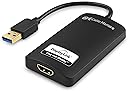
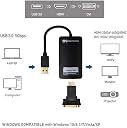
The Cable Matters USB 3.0 to HDMI Adapter transforms any available USB port into a high-definition video output, supporting resolutions up to 2560x1440. Designed for professionals on the move, it offers plug-and-play convenience, bus-powered operation, and broad Windows compatibility, making multi-display setups effortless and efficient.


| ASIN | B00BPEV1XK |
| Best Sellers Rank | #63 in DVI-HDMI Adapters |
| Brand | Cable Matters |
| Color | Black |
| Compatible Devices | Monitor |
| Connector Type | DVI, HDMI |
| Customer Reviews | 4.3 out of 5 stars 3,314 Reviews |
| Finish | Hdmi,Projector |
| Input Voltage | 5 volts_of_direct_current |
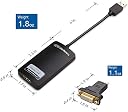
| Item Dimensions | 8.66 x 6.14 x 0.55 inches |
| Item Weight | 0.11 kg |
| Item dimensions L x W x H | 8.66 x 6.14 x 0.55 inches |
| Manufacturer | Cable Matters |
| Mfr Part Number | 103046USB3BLACK |
| Model Number | 103046-BLACK |
| Number of Items | 1 |
| Number of Ports | 1 |
| Package Quantity | 1 |
| Power Plug Type | No Plug |
| Specific Uses For Product | Monitor,Projector |
| UPC | 738435983260 |
| Unit Count | 1 Count |
K**X
Exactly what I needed, FINALLY!!
Due to my lack of knowledge, I purchased TWO wrong devices before finally got it right. I've only been using a computer for about 10 years, and while I can surf the net like a pro, I know next to nothing about their parts. My boyfriend & my kids have dual monitors, so or course, I NEEDED this too! I have a Dell Inspiron One 20 which is only 6 months old. In the very beginning, I thought it would be a breeze to hook my TV up as a 2nd display. How could a computer that's barely out of the box NOT have an HDMI port??! Shoot, this thing doesn't even have a DVI port! It did however, come with FIVE USB ports! First, I got on here & bought a display port to HDMI cable. Beware, that end that looks very similar to a USB ISN'T. Still not knowing the difference, I went on to purchase a 15' HDMI to DVI cable, with what looked to me, at the time, a USB to DVI adapter. Guess what? Still not realizing there was a difference, I bought a Display Port to DVI adapter. I was SO happy the day that they both arrived! I go over by the computer, rip open the packaging, and try to plug the adapter in. Knowing full well, just from looking (and my week old knowledge) that it's just NOT going to fit. You should have seen me, practically standing on my head looking for just ONE display port on my All In One. It simply wasn't there. Then it's back to Amazon, searching for a USB TO DVI ADAPTER. Page after endless page of Star Tech devices. As I read the reviews on this brand, I noticed over & over how unhappy people were with the product they had received. There were even some reviews that said it wasn't an actual Star Tech product, although that's indeed what the product was advertised as. I don't blame Amazon for this. They're only the middle man. It's strictly the seller, using false advertising. By the time I came across this Cable Matters device, I had literally been searching for hours. I even got on the Dell site to see what they were offering. OF COURSE, they had the Star Tech. I had nearly given up, thinking I was going to be eternally stuck with only one monitor, when I stumbled onto this product. I read the reviews, and although not ALL of them were glowing, most seemed satisfied with their purchase. I wasn't wild about spending an additional $49.99, but at this point I was practically CRAVING a second monitor. I even paid the extra $15 to have shipped here in 2 days. I practically tackled the mailman today, LOL. I had read the reviews of this product so I knew to install the driver before I ever plugged this into my machine. That 10 minute install seemed to take 10 HOURS. And it works!! My TV is now my main display, the computer is secondary. Now I have to drag & drop the desktop icons I want back to the computer, but it's sooo worth it. I honestly feel like a little kid on Christmas morning. My only complaint doesn't have anything to do with this device. I WAS going to return the 6' display port to DVI cable, and the display port to DVI adapter. Then I read the return policy. Each has to be packaged separately, and because I'd be returning them simply because I don't need them, Amazon wants to keep over half the purchase price of each. By the time I paid for packaging & shipping on each, I'd be paying THEM to take the products back. So I'll just keep them, and maybe down the road I'll find a use for them. Or maybe my kids or boyfriend will need one someday. Although I've only had the device for a few hours, I have no complaints about it at this time. My Netflix plays seamlessly on my TV now, the sound quality is excellent and I'm just lovin' this set up! It does NOT play Netflix in HD. Hey, I can live with that. It's all good because I feel like I've just now entered the 21st century!
M**N
Currently the only USB3 to HDMI device worth your money - at least for Mac users.
The first one of these I ordered was Dead On Arrival. I sent it back and ordered a replacement. The replacement works... and it's such a well done product I'm giving it 5 stars in spite of the first unit being DOA. It's one of three USB to HDMI devices I evaluated; one was by Etekcity ( http://www.amazon.com/gp/product/B00F8OPKLW ) and it gave a decent picture but I couldn't get the sound to go through its HDMI output. Second best was by StarTech.com ( http://www.amazon.com/gp/product/B00612ZPQA ) and it handled the sound alright but the video in the Startech would shear every few seconds; it could not handle the bandwidth. Useful as a screen addition for programming or spreadsheets but useless for full screen video viewing. But when I plugged this device into a USB3 port on my Mac Pro Late 2013 (the black cylinder Mac Pro) I not only got a shear-free picture on the HD projector in the home theater, I also got what looks like 5.1 output through HDMI even though I actually don't have more than two speakers (see below). In the Mac's Audio Midi Setup app (the Icon looks like a little piano keyboard) I can choose "USB3 to HDMI" - a choice I didn't see from any of the competing devices. And when I selected it I was shown six (!) volume sliders for all the 5.1 channels. And sound flows from the Mac, through this device, through HDMI cable, gets converted to optical SPDIF by a Monoprice box and goes to the home theater optically and gets decoded into hum-free perfect sound there. After 8 months of messing with it my AV setup is finally doing what I want it to do. This part was the missing piece. Four sources (Two Mac pros of different vintages, one PS/3 and an HDMI cable to the home theater that I can plug into a laptop using this beauty: http://www.amazon.com/gp/product/B00DOZHL82 ) go into a http://www.amazon.com/Monoprice-105557-Toslink-Digital-Coaxial/dp/B003L14WB8 and its output goes to my Epson projector as HDMI. But the sound is tapped from the selected HDMI and goes over an optical fiber to the theater where it is decoded by http://www.amazon.com/Digital-Optical-Analog-Converter-Adapter/dp/B005DIRI6I into powered speakers. Using the tiny infrared remote control for the Monoprice box I can select any of my four sources; sound is chosen along with it. Mute button works on all four channels. And I have reason to believe that if I had a 5.1 sound system I could make that work also.
C**.
Device Failed after 5-months of purchase - Update: Warranty Replacement
The device functioned adequately for the five months that I own it—until it simple died. It all occurred after upgrading to the new 2.5 driver and my system failed to recognized the device. So, I downgraded to the prior version and system would still not recognize it, or connect to the device. I updated my OS and it still wouldn't work. It now overheats whenever I connect it to my computer and it just doesn't work. I am debating whether or not it would be worth the hassle of contacting the manufacturer. For, I believe the first thing they would suggest would be to upgrade the driver. LOL. And the developer of the driver (note that Cable Matters and the driver developer are separate entities) would refer me to the hardware manufacturer. The device would work as an additional monitor on my computer system. I would have no other problems with it other than the very small lag which wasn't a huge problem and some applications not displaying properly but it wasn't a big problem. The device was able to play videos and dvd's smoothly enough. It appears that the hardware is not up to par. Update: I contacted Cable Matters and I was very pleased to see an immediate response and was told that since my device was under the 1-year warranty they would promptly send me a replacement after I shipped my bad adapter. I was very satisfied with their customer responsiveness and tech support as well. I am currently using the replacement adapter from Cable Matters, and thus far it works very well. Perhaps, the original adapter I got was simply a bad unit which understandably happens. The new device they sent me has been working very well for the last couple of days. I have no complains about how its working. However, given that the original failed after 5-months of usage, I will have to write another updated review later on, perhaps after using the device for 5 or 6-months.
R**R
A good solution but not perfect
I purchased this as a stopgap solution to a dual screen (with the laptop closed) option for the Macbook Pro. I have two nice 1080p monitors where I want to do some programming and research on, and for that purpose it works well. I like this product, but it's important to know its imperfections. These come from the fact that this is of course using USB instead of a dedicated video port. Because of this, there is a slight lag to the things you do. Some people might not notice this at all, but when you drag a window from a screen using the Mini Displayport to a screen using this solution, you can notice a delay in animation. Not a huge deal as I said, especially for my purpose, but if you want to watch video using this solution you might notice some lag. Additionally, there is artificating. I notice it on the Finder windows especially. It's not crazy, but it's easy to notice. Overall though, this is a good solution until I get a new Macbook pro that will have a native HDMI port and a Mini Display Port. I usually try to put a static screen on the Cable Matters screen and then I type on the other screen (I'm usually reading something, referencing some text while I work). For that it works very well, and I'm happy with the product. It's probably not really the product's fault for its shortcomings, but it's more the tech that it's using. As long as you know its limitations, you should enjoy this product. Some people may not even notice these things. I uploaded screenshots of the top of the Finder window. One is how it should look and one is how it looks on the Cable Matters connected monitor. EDIT: Ugh, the screenshots looked awful, so I took them down. Basically it just made the Finder window kind of "splotchy" is that makes sense.
A**N
Gave me the functionality that I thought I already had...
My laptop came with an HDMI out and USB-C out, so I thought I could hook up two external displays simultaneously (projector for presentations, monitor for work). As it turns out, there are two different classifications of usb-c. Mine does not support video transfer...but USB 3.0 does with this adapter. It was plug and play...I may have had to update a driver, I don't recall...but if I did, it stated how to. The monitor hdmi plugs into adapter, which I have plugged in to usb3.0 hub, which plugs into usb3.0 port. Instant external monitor. The only downside is that sometimes when I first connect my laptop in the morning, it can take up to 20 seconds for the system to register that the monitor has been plugged in. This lag could be product hardware related, product software related, computer related, or it could be caused by the hub that I run it through (I have had some other reliability issues with the hub). It is not a significant enough inconvenience to warrant a deduction in stars, especially since I don't know exactly what causes it and it does not impact the overall functionality at all. I love this adapter so much that I was going to buy one for my wife, until I discovered that her usb-c port did support video out, so she just needed a cable. Well worth the money to add an external monitor.
T**Y
Mac Displaylink drivers cause "jerky" display with no known solution per Displaylink
My system: Macbook 13-inch, Late 2009 Processor 2.26 GHz Intel Core 2 Duo Memory 8 GB 1067 MHz DDR3 Software OS X 10.9.1 (13B42) Purchased: 2 - Cable Matters SuperSpeed USB 3.0/2.0 to HDMI/DVI Adapter for Windows and Mac up to 2048x1152/1920x1200 in Black These adapters are probably good. They are controlled by the Displaylink driver program(s) that are shipped on physical disk by Cable Matters. When the drivers are installed the adapters: 1. sometimes cause the displays to not refresh or "paint" the entire display at the correct rate. The result is the same as if the processor were busy with other tasks and only intermittently sending output signals to the monitors. A check of the activity monitor or running "top" from Terminal command line reveals that this is not the case. 2. sometimes one or both of the display monitors is just blank I chose the Cable Matters adapters BECAUSE they use the Displaylink drivers. I was already using an earlier driver version to drive a single Acer plus a 24-in Samsung TV via the Mac Mini-DisplayPort to HDMI adapter. The previsou DisplayLInk software versions were Displaylink Mac 1.8 Alpha 1 Release installed May 18, 2012 and DisplayLink-OSX-1.5 installed July 21, 2010. The single display driven by DisplayLink behaved flawlessly. I decided to stop using the Samsung and got an Acer 24-LED. Since I started a new consulting job, I needed to have the display adapters be easily portable and plugged into a single USB 4 port bus. The Cable Matters adapters accomplished this. The 1.8 Alpha 1 Release of the driver would not drive the Cable Matters adapters, so I installed the version shipped with the adapters. Big mistake. It cost me an entire 1/2 day of productive time to try to make this set up work. The DisplayLink driven display would always malfunction. I finally found the following article posted by DisplayLInk after reading posts in various places by users experiencing the same problems. Notice that DisplayLInk says, "do not currently have a resolution". What?!! I understand when developing complex systems that sometimes the solution is not in a shippable state because the application doesn't deliver the intended solution. But that is the key! If the product is not in a shippable state, why then DisplayLink do you continue to ship something containing known faults??!!!! Ok, in your various posts you lay the blame at the feet of Apple not working or cooperating with third party software vendors. Ok, I get that. It's Apple's fault. Your solution doesn't work! Stop shipping and costing users combined hundreds or thousands of hours of wasted productivity! The drivers you admit that have the fault are still able to be downloaded from your site! Wake up and stop shipping until you solve the problem. If you can't solve the problem, move on to a different business segment and solve something else. But do not ship software with known faults. Bad. Bad. Bad. That is all. [...] The following text is copied from the article: "The following issues have been found on OS X 10.9 and do not currently have a resolution - Second DisplayLink display connected may be blank. - Setting rotation on one display rotates a different screen. - Some applications can show severe flickering on DisplayLink screens. Examples of applications that show this issue are Safari, QuickTime and the App store. - Some applications can show corruption and/or missing contents while updating windows contents. Examples are Maps, iBooks and the Dock. - Display arrangement is not kept when using 2 or more DisplayLink displays. - All screens black and unusable after unplugging a DisplayLink screen. This is caused by Apple's Window server crashing. This can be recovered by replugging the DisplayLink device. - On the Retina Macbook Pro, changing the layout to mirror logs the user out. Again this is caused by Apple's Window server crashing. - Apple menu icon misplaced on DisplayLink screens"
L**R
Works great
Was pleasantly surprised at how well this works. Currently trying it on an older computer (about 5 years old) with an i5 Processor and 8 GB RAM. Not using it for gaming, so I can't comment on that, however for my business applications and even watching videos (YouTube, etc), there are absolutely no issues at all. It's working just as if I plugged it into a port on my video card instead of from the USB port. I actually have a video card that will handle 4 monitors, but one port is a DVI, and I wanted to try this adapter to plug into an HDMI monitor. I am using it from a USB 3 port, so I don't know how the functionality would be if I tried it from a USB 2 port. As of now, using 4 monitors (3 from video card, and 1 from USB device), and things work great. There was just one very minor issue with installation. I did read one review that said I should download the latest driver, so I actually did that before I even received the product. When I went to install the driver, it said it couldn't continue because my USB Host Controller was outdated. So it simply directed me to a website that had a number of different USB Host Controller downloads. I had to look in my device manager for the USB controller I was using (Intel 7 Series/C216), and download that install that USB driver. After that, I tried the video adapter driver again, and it worked fine. When the product arrived, I just plugged it in, and it worked. No issues at all. I don't even know it it was necessary that I did all that, but from other reviews I read, it was. My only question is if I can use two of this product on one system, which I want to do on another system I own. I haven't seen anyone yet who has tried that, but I asked the question in the Questions section and am waiting for a response. In any case, so far this product is working great. Very happy with it.
J**N
Works with MacBook Pro mid-2012 and Mojave 10.14
I bought this to be able to run 2 identical Dell external monitors and it does the job. Also allows the internal MacBook Pro display to be on and extended to it - so 3 displays total. I am running this adapter and another HDMI cable via a Microsoft DisplayPort to HDMI adapter. Initially I had this adapter plugged into the display when doing the software driver install, which I did via the download from the DisplayLink website. I couldn't get it to work, even after doing some searching and going into the Privacy settings to allow this software. I restarted, unplugged, replugged, etc and no luck. I then uninstalled the software and reinstalled it. When going back in the Privacy settings menu I realized the display was working. Not sure what I did / didn't do, but another review suggests installing the drivers / software with the display uplugged. Give that a shot. The bottom line is... this adapter works on a mid-2012 MacBook Pro with the initial Mojave 10.14 release. I have this device plugged into one USB port directly on the MacBook, and am using the Amazon Basics 4 port USB 3 hub plugged into the other port on the Mac for my Logitech wireless mouse and wired Gigabyte keyboard. Everything is working great / seamless and I still have 2 USB 3 ports left on the USB hub for hooking up an external drive, etc. +++++++ Update from less than a day of using this setup... This Cable Matters / DisplayLink adapter plugged directly into MBP, another monitor plugged into MBP via a Microsoft Displayport adapter... I was using the Amazon Basics USB 3.0 4 Port hub (bought today) and plugged into my mid-2012 MBP via the second USB 3.0 port on the MBP. I began experiencing stuttering with a Logitech bluetooth mouse with the Logitech Bluetooth Receiver plugged into the Amazon Basics 4 port USB 3.0 hub. I have a spare Dell hardwire mouse so I decided to see whether using that as a mouse (hardwired) fixed the mouse issue. I now have the Dell hardwired mouse plugged directly into the MBP with the external Dell monitor and this Cable Matters DisplayLink adapter plugged into the Amazon Basics 3.0 Hub adapter. That seems to have fixed the mouse stuttering issue... the external Dell monitor with this Cable Matters DisplayLink adapter still works fine and the mouse issues are now gone since I switched to a hardwired mouse.
F**O
Funziona sempre bene
Ce l'ho da una vita e funziona benissimo, senza problemi su Mac e PC (lo alterno spesso tra uno e l'altro). Su mac con sistemi operativi vecchi c'è stato un periodo in cui non andava con Sierra, risolto con il successivo e funzionava con il precedente. Sui nuovi va perfettamente. Richiede installazione veloce di un driver sia su PC che su Mac, per trovare la versione più nuova basta cercare DisplayLink su internet (è uno standard di un consorzio, tipo USB o Bluetooth o Wifi, per dire, quindi il driver è solido, ben testato e aggiornato)
A**E
Perfekter Ersatzausgang für eine MacBook Pro (Early 2011) mit hardware-deaktiviertem Graphikchip
Ich habe mein MacBook Pro 8,2 (early 2011) professionell in Erfurt umbauen lassen und den defekten Graphikchip ausbauen bzw. so umbauen lassen (Hardware-Umbau, kein Software-Mod!), sodass das Gerät nur noch die prozessoreigene Graphikeinheit verwendet. Durch den Umbau können allerdings keine externen Bildschirme mehr über den Mini-DisplayPort-/Thunderbolt-Kombianschluss mehr angeschlossen werden, denn der DisplayPort ist direkt mit dem Graphikchip verbunden. Für mich ein Nachteil, denn ich nutze das Gerät im Büro und im Homeoffice normalerweise mit einem externen Bildschirm. Dieser Adapter verschafft nun Abhilfe, um externe Displays wieder über HDMI ansteuern zu können. (Ein Adapter HDMI–DVI-D) liegt dem Lieferumfang bei. Für den Anschluss eines VGA-Monitors benötigt man jedoch zusätzlich einen aktiven Adapter, der das digitale in ein analoges Bildsignal wandelt. Obwohl der Adapter für USB 3.0 ausgelegt ist und mein MacBook Pro nur über USB 2.0-Anschlüsse verfügt, funktioniert der Adapter reibungslos. Wie zu erwarten war, gibt es eine minimale Verzögerung bei Bewegungen bzw. einem schnellen Bildneuaufbau, die allerdings auch bei Videos nicht wirklich wahrnehmbar und somit auch nicht störend ist. Insgesamt ist das Bild flüssig, und man kann damit gut arbeiten. Nebenbei, die Tonausgabe über HDMI (bis zu 6-Kanalton mit 48 kHz Abtastrate) funktioniert auch tadellos. Das Spielen von Computerspielen mit diesem Adapter stelle ich mir (über USB 2.0) etwas schwierig vor, dafür ist der Adapter aber auch nicht gedacht. Vielleicht sieht die Situation mit einem USB 3.0-Anschluss anders aus, dies werde ich allerdings nicht ausprobieren, und für Büroanwendungen und gelegentliche Videoabende reicht er allemal. Da der Adapter doch recht teuer ist – die Lotterie mit den "billigen" Adaptern habe ich mir dieses Mal lieber gleich erspart – ziehe ich einen Stern vom Preis-Leistungsverhältnis ab, empfehlen kann ich ihn dennoch uneingeschränkt. Für die Verwendung unter Mac OS X ist ein DisplayLink-Treiber erforderlich, der über die Displaylink-Webseite heruntergeladen und installiert werden muss. Linux-Nutzer können den Kernel-eigenen DisplayLink-Treiber verwenden, und FreeBSD sollte (seit ca. 2015) ebenfalls mit dem Adapter umgehen können.
H**Y
It works!!
Was super skeptical this wouldn't work, but I was able to add a third external monitor to my M1 Macbook Pro 14" with this (by default only 2 external monitors are allowed)!
R**D
TRES BON PRODUIT
Super produit, installation facile. Fonctionne parfaitement avec mon MAC sous W10. La qualité du produit est au rendez-vous. N'a jamais bogué.
J**N
Works perfectly for second external monitor M1 Mac
Easy to download the displaylink software. After that, everything was plug-and-play. Bought it to be able to use 2 external monitors for my M1 macbook pro. So far no lag or other weird behaviour from the displaylink monitor.
Trustpilot
1 month ago
1 month ago