


Desertcart purchases this item on your behalf and handles shipping, customs, and support to India.
🧲 Stick your creativity where it counts!
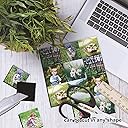
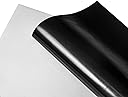
Stone City Printable Magnetic Sheets Matte (12 sheets, 8.5x11 inches) combine strong magnetic backing with a printable matte surface designed for dye-based inkjet printers. These flexible, quick-drying sheets deliver vivid colors and crisp images, easily cut by hand or electronic cutters, making them ideal for personalized magnets, signs, and DIY projects. Trusted by thousands for classroom, home, and office use.








| ASIN | B07S5J9L56 |
| Best Sellers Rank | #56,513 in Office Products ( See Top 100 in Office Products ) #235 in Inkjet Printer Paper |
| Brand | STONE CITY |
| Brand Name | STONE CITY |
| Brightness | 100 lumen |
| Color | White |
| Customer Reviews | 4.5 out of 5 stars 2,365 Reviews |
| Item Dimensions L x W | 11"L x 8.5"W |
| Item Weight | 0.72 kg |
| Manufacturer | Stone City |
| Material Features | Vibrant Colors |
| Paper Finish | Matte |
| Paper Size | 8.5x11 inches |
| Paper Weight | 20 |
| Sheet Count | 12 |
| Sheet Size | 8.5x11 inches |
| UPC | 644824536583 |
| Unit Count | 12 Count |
S**A
Easy to work with!
Used this to create whiteboard magnets for my classroom! It printed and cut with my silhouette machine really well (a tad bit duller than I expected but it is matte paper) It would also cut extremely easily with scissors alone. I added some sparkle and so far it sticks really well and looks great!
G**T
Game Changer!
Before this, I always used the magnetics that were sticky on the opposite side and you attached pictures to it. This product is a game changer. You can print directly on the magnetic. I was a bit worried that the paper would nit fit in my printer and keep jamming, but it went right through it. The paper is slightly thicker than card stock and that is what I set my printer to. I could see where the paper getting stuck could be an issue for some though. I used this paper to print some magnets for a cruise I was going on. I got tired of spending lots of money for magnets that I would probably only use once. These worked perfect for what I needed and were custom to what I wanted. This product is very easy to use. All you do is create a design, print it directly on the magnet paper and then using scissors and/or an exacto knife, cut it out as needed. Easy Peasy. The picture quality on the paper came out pretty good, but I do wish I would have went with the glossy. I needed an exacto knife to cut the fine/precision parts out of the magnet. I was very pleased. The magnets sticks on very well. It actually takes some work to get off. It worked on my refrigerator and my cruise ship room door. I will definitely be purchasing this product again. If you are considering getting this product, I highly recommend it
E**.
Nice quality, print well, but THIN
I used these to make some add-on word magnets to a set I had already bought. The sheets took the ink perfectly. I did spray them with a craft sealant just to be sure they’d hold up to a lot of wear. Happy with purchase but I will note that they are very thin. I tried to show the difference in my photos. The black one (duck) is this product. The blue one (did) is the set I had purchased already made. I don’t use them to hold anything up but I doubt they would hold much more than a single sheet of paper, if that. They are also so thin that it’s a bit difficult to pull them off the fridge. I have nails so I can get under them better but the kids either bend them or slide them off the side of the fridge to pick them off. I am purchasing a thicker set next time due to that issue but I’m still ok with these overall.
A**E
As advertised - Good with Cricut
As advertised. I purchased these to make magnets using my Cricut for our cruise stateroom door. They worked great, however the magnet is pretty thin. Maybe that's what's needed to make sure they go through the printer? Makes creating magnets with the Cricut super easy but just keep in mind they will be super thin.
A**R
Works with Cricut Explore Air 2 Cutting Machine and HP 200 series Laser Jet Printers
I made magnets (duh) that I am using on the front white board of my classroom. Each magnet was a bright colored word with a black offset to connect the letters together so each word is a single magnet. CRICUT CUTTING SETTINGS: After printing the sheet - I used HP's LaserJet 200 color series, put the magnet sheet on a GREEN mat. Be sure it it is securely attached to the mat. THE BEST cut was a DOUBLE pass of the setting for 0.35 magnet sheet with adhesive back (maybe the adhesive is what holds the paper you print on to the magnet). Double pass? Yes. Click on the Cricut C to start the machine scanning to cut your print and cut project. After cutting is finished - DO NOT REMOVE THE MAT. Instead, push the Cricut C button and cut the project for a second time. Eject the mat when finished this time. It works best to push your awesome magnet down as you pull the scrap magnetic "paper" up. Some not so good trials: Using the "more" selection instead of default for the pressure ended up in bunching of the paper and the middle unsticking while on mat. The middle bunches up and the mat was jammed. Using the 5 mm worked OK with on pass, but had some rips in the printed paper attached to the magnet. The paper bunched up around the edges of the magnet. Using the 6 mm setting for magnetic sheets also resulted in rough edges and some bunched up edges.
N**I
I'm enjoying printing on it.
I love this! The print looks amazing and bright. Brightness still depends on your printer but if you have a nice printer, you can really see the difference and the print doesn't smudge nor fade. It's so affordable yet works perfect on my office whiteboard calendar. It's almost paper thin so there's no problem fitting in any printer. It's also very easy to cut.
A**H
Great product
These printed off beautifully from my ink printer, and they took Sharpie markers well when colored on.
J**A
Weak magnets
Magnet is very weak. Tried making little picture frame magnets and will not hold up the frame at all. It’s good if you plan to just use it by itself and not hold anything. I doubt it has the strength to hold a piece of paper. Maybe if you use two together.
M**A
Mala calidad.
No se adhieren bien a superficies. Solo sirve para stickers del.refrigerador.
T**F
Prints well and stays on the fridge
Used these to make quick reference magnets for the kitchen. They went through my printer well (even having to make a u-turn from the tray), though I made sure to print one page at a time because the sheets stick together. The "paper" side took the ink well and printed clearly. Our fridge has a texture on the front/sides but it stays stuck in place. I would definitely purchase these again.
J**M
Very Thin
It was hard to know exactly how thick or thin these would be. They were thinner than I expected but printed up nicely. I don’t think they would hold anything on the fridge but are good for decorative magnets. They are easy to cut with scissors.
A**O
Buenas Etiquetas
Se pudieron imprimir en una Epson sin atorarse, fácil de cortar, quizás tenga poca fuerza pero al menos no se caen del refri
A**N
maginetic sheets
this is perfect for making fridge magnets. Print your design on them and cut them out easy to cut out with a cricut or silhouette machine. Easy to use.
Trustpilot
2 months ago
2 weeks ago