Buy anything from 5,000+ international stores. One checkout price. No surprise fees. Join 2M+ shoppers on Desertcart.
Desertcart purchases this item on your behalf and handles shipping, customs, and support to India.
โก Elevate your gaming & streaming with Archer TX3000E โ Wi-Fi that wonโt quit!
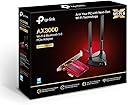
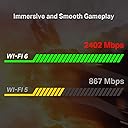
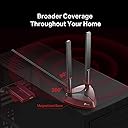
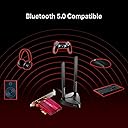
The TP-Link Archer TX3000E is a high-performance Wi-Fi 6 network adapter delivering ultra-fast speeds up to 2402 Mbps on 5 GHz and 574 Mbps on 2.4 GHz bands. Featuring magnetized multi-directional antennas for superior signal coverage and Bluetooth 5.0 for enhanced device connectivity, it drastically reduces latency by 75%, making it ideal for gamers and streamers. Designed for easy motherboard installation, it transforms PCs without built-in Wi-Fi into powerhouse wireless machines, perfect for millennial professionals craving seamless, lag-free online experiences.


| ASIN | B07YVNM1WX |
| Best Sellers Rank | 58,571 in Computers & Accessories ( See Top 100 in Computers & Accessories ) 178 in Network Cards |
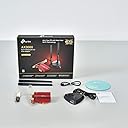
| Box Contents | Archer TX3000E, Bluetooth header cable, Low-profile bracket, Magnetized antenna base with 1 m RF cable, Quick installation guide, Two 5 dBi high gain antennas |
| Brand Name | TP-Link |
| Color | Red , Black |
| Compatible Devices | windows 11/10 computers |
| Compatible Operating System Family | Windows |
| Customer Reviews | 4.6 4.6 out of 5 stars (2,803) |
| Data Link Protocol | Bluetooth |
| Data Transfer Rate | 2402 Megabits Per Second |
| EU Spare Part Availability Duration | 1 Years |
| Global Trade Identification Number | 06935364088897 |
| Hardware Interface | Bluetooth, PCI |
| Item Dimensions L x W x H | 9.5L x 12.1W x 2.2H centimetres |
| Item Type Name | PCI Express WiFi Card WiFi Adapter 6 (AX3000) Bluetooth 5.0 |
| Item Weight | 0.2 Kilograms |
| Manufacturer | TP-Link |
| Manufacturer Part Number | Archer TX3000E |
| Minimum Required Operating System Version | Windows 10 |
| Model Number | Archer TX3000E |
| Unit Count | 1.0 Count |
B**Y
Literally saved me getting a new PC
I am so glad I gave a Wi-Fi adapter one more chance before going out of my way and buying a new motherboard. For context, the area I live in hasnโt always had the best Wi-Fi signal, however my house would get a decent connection for where it was. 40-50mb on good days. However, no matter what, unless connected to Ethernet, my PC would average 1-4mb max. This completely ruined gaming experiences as I, someone who loves playing online, had to settle for single player games. My room also does not have an ethernet port also, so that option was out the window unless I swapped rooms. Some further context quickly, my PCโs motherboard did not have in-built Wi-Fi. We recently got brand new Fibre internet installed, and to see my house in all areas having 200+mb was something else. However, I was crushed to see my PC was somehow not even picking this internet up! I thought out many things. Would I need to rearrange my room? Would I need to elevate my PC? Would I need to get a new motherboard or PC in general? I decided to give the Wi-Fi adapters one last look and this one was appearing A LOT in peopleโs recommendations. Iโd given three a try in the past, 1 that was a USB one, and two that connect directly to the motherboard: both did nothing to help. However, seeing that this one had a movable antenna base, and the good reviews, I decided to go for it. And it paid off, incredibly. My PC, even though in the exact area Iโd deemed was surely a โWi-Fi signal drop zoneโ picks up said 200mb, the FIRST TIME it has ever done that. So if you face similar problems to mine despite your house/area getting decent Wi-Fi bar your PC, give this a try!
B**!
Very reliable WiFI 6 receiver
Having upgraded my router to WiFi 6 standard, the dodgy old WiFi card in my wife's desktop PC couldn't connect to it. Curses! After a scour of the internet, I saw some pretty good reviews of this bit of kit so I picked one up. Very easy to install, if you're accustomed to rumaging around inside PCs, and an excellent receiver. You'll need to connect it to a USB plug on your motherboard (using the cable provided) if you want to use the Bluetooth connectivity, but that's no more daunting than inserting the card into the PCI-E slot in the first place. The desktop PC in to which it was fitted sits in one of the corners of my modestly large house, almost as far as it could be from the router and on a different floor, but Speedtest gets download speeds of 400Mb/s, that's three times faster than the powerline adapter that I used to use for the PC in question, and it has never dropped out in the six weeks since I installed it. My wife is very happy with her new-found high-speed reliable internet access, and I'm in her good books. So that's a buy!
T**R
Great for gaming without Ethernet!
If you're like me who loves gaming/ streaming and need good internet, this was perfect to keep great WiFi speeds as I was unable to run an Ethernet cable to the router! Make sure you follow the instructions to connect the slot into your motherboard, once assembled the antennas are easy to adjust to the optimum location for better speeds. I can now game and stream with no issues and can enjoy my evenings!
A**R
Finally a reliable wireless card
After years of issues with expensive cards of other brands as well as cheaper cards I finally bit the bullet and trawled reviews until I found this. Setup is slightly different to other cards with a USB cable that needs to be plugged into the board as well as the card being inserted into the PCIE slot however I have had nothing but stable and strong connections using this card so far. The magnetic base for the antenna is also very useful and they currently sit happily on the backside of my PC case. I would recommend this product to anyone that needs a wireless networking solution on their tower PC.
A**R
Not worth the money.
Good quality device, but sadly way over priced for what it is. After buying this I later established I could get near identical and better specked hardware for under ยฃ20 delivered from China all in on Ali Express. This was over priced and I still had to buy additional cables to make it work on my motherboard at even more cost.
ร**N
รผrรผn dandik antenin yaptฤฑฤฤฑ iลi yapamฤฑyor aldฤฑm alalฤฑ haftada bir iki kopmalar yapฤฑyor.
A**X
Despuรฉs de tres semanas de meticulosa investigaciรณn, comparando diversas opciones en el mercado, sumergiรฉndome en foros, consultando opiniones, preguntando a conocidos, e incluso visitando tiendas fรญsicas, para obtener asesoramiento directo, finalmente tomรฉ la decisiรณn de adquirir la TP-Link Archer TXE75E - Tarjeta de Red PCLe. Esta decisiรณn no solo ha cumplido, sino que ha superado mis expectativas, convirtiรฉndose en una de las mejores adquisiciones tecnolรณgicas que he hecho hasta la fecha. Antes de adentrarme en los detalles tรฉcnicos y de rendimiento de este adaptador, quiero resaltar la simplicidad de su instalaciรณn. Aunque fue necesario descargar los drivers tanto para el WiFi como para el Bluetooth, este proceso fue directo y sencillo, lo cual aprecio mucho. Instalado en un sistema Windows 10 y adquirido por 59.99 euros, este producto ha demostrado ser una inversiรณn valiosa. Os recomiendo guardar antes en el pc los drivers para despuรฉs de montarlo en vuestro pc los instaleis. Lo mรกs llamativo es el drรกstico aumento en la velocidad de conexiรณn que he experimentado. Antes de su instalaciรณn, me conformaba con velocidades que oscilaban entre 90 y 140 Mbps utilizando una antena WiFi en USB (tambiรฉn era una tp link). Sin embargo, tras la instalaciรณn de esta tarjeta, mi conexiรณn se ha catapultado a mรกs de 500 Mbps (en alguna ocasiรณn muy cerca de los 580). Considerando que tengo contratada una fibra de 600 Mbps, este rendimiento es notablemente superior y se acerca mucho a la capacidad mรกxima de mi conexiรณn a internet. Hay algunos usuarios que con un router con wifi 6 han llegado a velocidades de 2 gb. Este rendimiento es particularmente impresionante dado que mi configuraciรณn no es ideal, con una pared separรกndome del router y un televisor colocando una barrera fรญsica adicional. A pesar de estos obstรกculos, ha demostrado ser excepcionalmente eficaz, eliminando la necesidad de considerar la opciรณn de tender un cable Ethernet directamente a mi PC. No es prรกctico ni estรฉtico y mรกs si teneis niรฑos o mascotas en casa. Con las velocidades que ahora alcanzo, tal medida simplemente no tiene sentido. La elecciรณn de la TP-Link Archer TXE75E, como adelantรฉ, fue el resultado de un extenso estudio de mercado, y este adaptador Wi-Fi 6E AXE5400 Tri-Banda con Bluetooth 5.3 PCIe -es 5.3 a pesar de que el anuncio diga 5.2- ha validado cada hora que invertรญ en mi investigaciรณn. La diferencia de rendimiento en comparaciรณn, con mi anterior soluciรณn, basada en USB es abismal. La estabilidad y la capacidad de conexiรณn del Bluetooth en la TP-Link Archer TXE75E - Tarjeta de Red PCLe no son nada menos que impresionantes. Este adaptador Wi-Fi 6E AXE5400 Tri-Banda no solo eleva la experiencia de conectividad inalรกmbrica a un nivel superior con su rendimiento excepcional en internet, sino que tambiรฉn redefine la experiencia Bluetooth, asegurando una conexiรณn fluida y estable para todos mis dispositivos perifรฉricos. La inclusiรณn de Bluetooth 5.3 es un cambio de juego, ofreciendo una conectividad mรกs robusta, mayor alcance y una velocidad de transmisiรณn mejorada. Esta tecnologรญa me ha permitido conectar simultรกneamente varios dispositivos Bluetooth sin experimentar la menor disminuciรณn en la calidad de la conexiรณn. Desde auriculares hasta teclados y ratones, la capacidad de mantener conexiones estables sin interrupciones es algo que realmente destaco. La diferencia es palpable en comparaciรณn con versiones anteriores de Bluetooth, donde las desconexiones esporรกdicas y la latencia eran problemas comunes. Las antenas multidireccionales juegan un papel crucial en esta estabilidad mejorada, asegurando que la seรฑal no solo sea fuerte sino tambiรฉn constante, independientemente de la ubicaciรณn de los dispositivos conectados en la casa. Esta caracterรญstica es particularmente importante en entornos donde mรบltiples dispositivos necesitan mantenerse conectados sin interferencias ni pรฉrdida de seรฑal. Otro aspecto notable es cรณmo esta tarjeta de red maneja la congestiรณn de la red y las interferencias, algo que es comรบn en entornos densamente poblados con mรบltiples seรฑales inalรกmbricas. La tecnologรญa Wi-Fi 6E trabaja en conjunto para garantizar que la conexiรณn no solo sea rรกpida y eficiente, sino tambiรฉn increรญblemente estable. En conclusiรณn, mi experiencia con la TP-Link Archer TXE75E ha sido excepcionalmente positiva. Desde la instalaciรณn hasta el rendimiento diario, este adaptador ha transformado mi experiencia en lรญnea, proporcionรกndome velocidades de conexiรณn que antes pensaba que solo eran posibles mediante una conexiรณn directa por cable. Para aquellos que buscan mejorar significativamente su conectividad inalรกmbrica sin sacrificar la velocidad o la calidad, recomiendo encarecidamente este producto como una soluciรณn รณptima. Espero que mi valoraciรณn os haya sido รบtil y sobre todo os ahorre tiempo y quebraderos de cabeza. El envรญo por Amazon excelente. Muchas gracias.
R**N
snel besteld en geleverd en ook een topapparaat, lekker snel en makkelijk installeren. voor thuis werken werd oude usb wifi-stick niet gevonden nu wel.
R**I
Makkelijk te installeren
T**R
Amazing value, works very well, does exactly what it claims.
Trustpilot
1 month ago
2 months ago