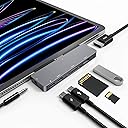
7 in 1 USB C HUB
Product ID: 204191945
Details
- BrandNXPGKEA
- ColorSpace Grey
- Compatible Devices['Tablets'
- Hardware InterfaceHDMI MicroSD C
- Special FeatureFast Charging
⚡100W USB-C PD fast charging
📺4K UHD HDMI output
🔌7 versatile ports
Desertcart purchases this item on your behalf and handles shipping, customs, and support to India.
🚀 Unlock your iPad’s full potential with the ultimate 7-in-1 hub!
The iPad Pro USB C Hub is a sleek, aluminum 7-in-1 adapter designed for iPad Pro (M1, M2, M4), iPad Air 4 & 5, and iPad mini 6. It expands a single USB-C port into HDMI (4K@30Hz), USB 3.0 (5Gbps), SD/TF card readers, 3.5mm audio jack, and dual USB-C ports including 100W Power Delivery for fast charging. Perfect for professionals seeking seamless connectivity, fast data transfer, and high-res media output in a portable, plug-and-play design.
| ASIN | B087BTVJX6 |
| Additional Features | Fast Charging, Fast Data Transfer, Lightweight, Plug and Play, Portable |
| Best Sellers Rank | #152 in USB Hubs |
| Brand | NXPGKEA |
| Color | Space Grey |
| Compatible Devices | ['Tablets', 'Projectors', 'USB Flash Drives'] |
| Customer Reviews | 4.2 out of 5 stars 2,523 Reviews |
| Data Transfer Rate | 5 gigabits_per_second |
| Enclosure Material | Aluminum |
| Hardware Interface | HDMI , MicroSD, USB, USB 3.0, USB Type C |
| Item Dimensions L x W x H | 3.8"L x 1.1"W x 0.35"H |
| Item Highlight | USBC PD Charging, SD/TF Card Reader, USB 3.0 Port, 3.5mm Headphone Jack for iPad Pro M4 M2 M1 13 12.9 11 inch iPad Air 5 4 |
| Manufacturer | NXPGKEA |
| Mfr Part Number | SB-122 |
| Model Number | 7 in 1 |
| Number of Items | 1 |
| Number of Ports | 7 |
| Operating System | Android, Windows, iOS, iPadOS, macOS |
| Special Feature | Fast Charging, Fast Data Transfer, Lightweight, Plug and Play, Portable |
| Total USB Ports | 7 |
| Total Usb Ports | 7 |
| UPC | 739515505273 |
G**Y
Great product
Great product
C**A
Excelente producto
Excelente producto compatible y funcional con IPAD 11” M5
J**G
Compatible with iPhone 15 Pro
One of the things that was annoying about shooting video with an iPhone was the inability to use more than one Lightning device at a time. For example, an external mic/sound dongle with an external battery. And of course only having internal storage being another limiting factor. With the iPhone 15 moving to USB-C this has completely changed. Now not only can you use more than one perpherial at a time, the options for external USB-C hubs are much more complete. This hub is a great example. It includes everything a run-and-gun video setup needs. If you're a vloger or phone cinematographer who doesn't want to wait for the inevitable iPhone 15 cases that do it all, this will get you started at a reasonable price. First off, it is small. Only a little wider/taller (about 1") than the iPhone 15 Pro and nearly the same thickness. It weighs in at 35 grams. Plugging it in puts a blue USB connector icon in the Dynamic Island and a white LED lights on the dongle. The charging port seems like it works just fine. The SD card reader read a Sandisk 256 GB SD card. I needed to reformat it to EXFAT before the iPhone would recognize it. As expected it showed in the Files app as an external drive with the label I assigned when I formatted. When connected the camera app will show "USB-C" if you switch to ProRes. I'm using a Class 10 micro SD card and didn't notice any dropped frames or other issues, but it's still early days. One thing to watch out for is to be careful inserting the card. First try I missed the actual reader and the card got wedged between the case and the top of the reader. Luckily I was able to remove it but if it were in further I doubt I could have removed it. Because it only weighs 35 grams my DJI Osmo 6 was able to support it and external mic cable, although with some moves the dongle hit the gimbal arm. Probably still better to record audio on an external device when using a gimbal, but totally useable for recording to SD cards instead of internal flash. The audio port uses the typical 4 pin TRRS configuration. You might need a breakout adapter for your mic/headphones. Doesn't seem to have any lag, but again this is a first impression review and I haven't really put it through its paces. Audio input/output levels are adiquate, and quality is what one would expect -my guess is this is the same chip used by almost all the cheap USB dongles, so I'll say it's OK for web content. HDMI output works as expected although the audio output from the sound port was muted and rerouted to the monitor. As with other HDMI dongles, the output is mirrored and the scaling is all screwed up but that's an iOS issue. One interesting possiblity is using this for making your iPhone into a makeshift desktop. Imagine if you're working in an office, say having a meeting, and your laptop is out in the car. You begin to respond to an email, quickly realize the response isn't one that can be composed using the onscreen keyboard, so you grab an empty desk, plug in a USB keyboard and HDMI and now you have a fairly good way to organize your thought. Of course that scenario requires you have the dongle with you, and given the shape and temporary nature, you'll probably still need to go out to the car. But it does show the potential. The USB-C 3.0 connector worked with my drone's controller, although initially the iPhone did complain about the controller pulling too much power. I think this might be due to the controller trying to charge before I powered it on. So for now this is a good solution. If it were about an inch narrower and had a pocket-friendly way to secure to the phone it would be nearly perfect for the iPhone 15 Pro. Something that could just be there ready for when you need it. After using it even for a day I know someone will make a USB-C hub/case, just a matter of when.
E**A
Pushes your iPad Pro's capabilities even further
When Apple switched to USB C in the iPad Pro, it opened tons of possibilities. Unfortunately, we only have one USB C port in the iPad and that restricts us from pushing the iPad’s capabilities. Fortunately, this USB C hub is available to push iPad’s capabilities further. At first, I was skeptical about having this dangling on my iPad and might break if accidentally bumped. But the magnetic holders are strong enough to make it feel like this dongle is just part of the iPad. It won’t move easily with accidental bumps. First thing I tried is the HDMI, and it just works perfectly on every monitor that I have. I also tested the USB C with a portable 2K monitor, and it powered the external display without issues. Although I would strongly suggest connecting either your iPad or the external display to a power supply as it will drain your iPad’s battery quick. I love having the SD card readers available. I am starting to get used to editing my photos and videos in my iPad, and these card readers just made transferring media even faster and easier. I don’t really use 3.5mm audio jack, but it is good to have in case of emergency need. So, at this point, everything works for my use case with this USB C hub. I have nothing to complain about. If you do a lot of productivity tasks in your iPad Pro, you should definitely carry this with you all the time.
A**R
Works alright
This is a really great docking station! My only complaint is sometimes I have to plug and unplug the station into my iPad a few times for it to work, and it doesn’t do so well with iPad cases. I definitely have to take my case off when using this docking station, but other than that, I have no complaints!
D**H
Not Very Robust and a Glutton for Power.
A lot wrong with this. Absolutely flimsy implementation. Perhaps it will be of value in a desktop environment, but put aside any hopes for using it even in bed or an airplane setting. it loses physical connectivity with the slightest movement of the system, the hub, a connected device or the USB power cable. One of the principal appeals of hand held devices is their portability. It takes some serious wattage to run this device. Power issues manifest themselves as 1) an apparent failure of the pass through power, 2) microSDs are detected and mounted, 3) added another device to the hub and anticipating that it works correctly is not assured, 4) even if the connected devices are "working" your system might not be charging.. Just because the hub's power LED is illuminated cannot be interpreted as the hub and connected devices are working correctly. In my case, the power draw for the hub using only an microSD chip and audio jack were sufficient to provide negative charging (the iPad pro was discharging) and I was using a dedicated 60W USB charger.
L**H
Nice BUT…
It won’t fit on the iPad with a case on the iPad. The USB C ports are right next to each other which limits what you can plug into them- ie my main reason for this purchase was to use this to charge while using my microphone that requires a usb c plug in and has some width to it.
J**S
All-in One Tool
This works on both my iPad Pro and my iPhone which is really useful. It is very compact and easy to keep in my wires bag. The SD card speed transfer is very quick for my needs.
J**Z
Muy efectivo
Es plano no es incómodo para nada lo reconoce a la 1ª tiene un microled que se enciende al conectarlo. Si queréis escuchar música es recomendable pinchar antes los auriculares al hub y luego este al IPad. La salida HDMI me ha sorprendido lag inapreciable
F**E
Bon
Ok iPad Pro 2018
W**L
So far good
Works well so far. Had to take off the plastic attachment they give you because when I had it on it would disconnect with the slightest movement. The usb c wasn’t in enough. When I removed them it was a better connection and snug fit. I can plug in other items without disconnecting the hub resulting in disconnecting another item that’s plugged in. Makes my iPad 11 pro into a proper computer replacement now (I use it as a backup computer when I work as a professional DJ)
A**D
Useful product
Exactly like how i imagined, works perfectly fine and is super fast, with alot of ports made my MAC really hassle free one time solution.
N**K
Un prodotto valido
Un ottimo iPad Pro Hub. Piccolo, compatto, compatibile sia con mio iPad M5 che con la versione del 2024. Apparecchio corrisponde perfettamente alla descrizione. Ci permette un buon collegamento tra apparecchi esterni e ha una buona velocità di ricarica. Grazie Amazon per supporto e suggerimenti. Grazie al produttore per un ottimo prodotto.
Trustpilot
5 days ago
2 weeks ago