


Desertcart purchases this item on your behalf and handles shipping, customs, and support to India.
⚡ Power up your productivity with the ultimate 13-in-1 dock!
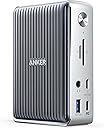
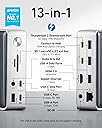
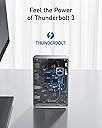
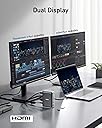
The PowerExpand Elite 13-in-1 Thunderbolt 3 Dock by Anker is a compact, high-performance docking station designed for Windows and non-M1 MacBooks. It features dual Thunderbolt 3 ports, multiple USB-C and USB-A ports, HDMI, Ethernet, SD/microSD slots, and a 3.5mm audio jack. Supporting up to 85W laptop charging and dual 4K displays at 60Hz, it consolidates all your peripherals into one sleek hub, eliminating desk clutter and boosting workflow efficiency.


| Asin | B087219P5J |
| Best Sellers Rank | #38,768 in Computers & Accessories (See Top 100 in Computers & Accessories) #1,401 in Laptop Docking Stations |
| Brand | Anker |
| Color | Silver |
| Compatible Devices | Card Readers, Laptops |
| Customer Reviews | 4.1 4.1 out of 5 stars (1,433) 4.1 out of 5 stars |
| Hardware Interface | Ethernet, HDMI, Thunderbolt, USB |
| Item Dimensions L X W X H | 3.5"L x 1.6"W x 4.9"H |
| Item Weight | 1.1 pounds |
| Manufacturer | Anker |
| Mfr Part Number | A8396141 |
| Model Number | A8396141 |
| Number Of Items | 1 |
| Number Of Ports | 13 |
| Total Number Of Hdmi Ports | 1 |
| Total Usb Ports | 6 |
| Upc | 194644031848 |
| Warranty Description | 18-month warranty |
| Wattage | 85 watts |
User
Great Dock!
This dock fits my needs perfectly. Other reviewers have said that the Caldigit Ts3 has better port selection and thats probably because they have a display port monitor, but i have an ultrawide 1440p usb-c monitor and a 4k hdmi monitor so this dock works great. The usb ports in the back are great for plugging in my mouse dongle and 256gb usb drive and the ports in the front are the powered ports, which are great for charging my other devices. I am running this on a 2017 macbook pro (Catalina) and it charges it great. It does get pretty hot, but the casing is metal and its not hot enough to cause any issues. I love that it has a power button as this is a MAJOR plus for me. At the end of the day i can sleep my macbook and just press the power button on the dock and now I don't have to worry about my macbook waking and turning on the monitors or keyboards etc in the middle of the night (which is an issue that i had before).The only thing i could not get to work was the triple monitors as advertised which was kind of disappointing. I have a Caldigit thunderbolt 3 minidock which splits one usbc into two hdmis that i use for two additional 1080p monitors. I tried to connect that to the dock along with the 4k on the hdmi and i could never get more than two monitors working out of the dock. So now i just connect the two monitors and the hdmi thunderbolt hub directly to my macbook and now i am able to get all four monitors to work.Other that that issue it does everything else i could want it to do, it looks great on my desk, and i would buy this again even though I really wish it was just a little bit cheaper.
User
A nice looking and functional Thunderbolt 3 Dock
The Good: A small thunderbolt 3 dock by Anker. The concept of a small dock seems to be mostly avoided but has been tackled by Anker in a good looking, compact package.The Bad: Poor description of specifications for the dock make it hard to find out if this is a good solution for you.The bottom Line: While it is hard to check if this product is for you, this is a Thunderbolt 3 hub with the Anker badge on it. If it doesn't fit your needs, its easy to return. If it breaks (within warranty), top notch customer service will care for you.What comes in the box:The dockA Thundebolt 3 USB C cable (Interfaces with dock and Thunderbolt device)A power brick (Interfaces with dock and power cable)A Power cable (Interfaces with outlet and power brick)The number one thing that has kept me from purchasing a Thunderbolt 3 hub is the lack of reliability, compatibility, or longevity that tends to be associated with this technology. We all have setups of varying complexity and I am hoping this helps someone with similar needs as mine.For starters, from the instruction manual, these are the listed ports and some specs:Front Pannel1. SD 4.0 Card Slot2. Micro SD Card Slot3. Top USBC 10GB/s, 5V/0.9A (4W)4. Bottom USBC 10GB/s, 5V/3A (15W), 9V/2A (18W)5. 3.5mm Jack6. USBA 5GB/s, 5V/1.5A (7.5W)Back Pannel1. Top, USBC Thunderbolt 3 port, Downstream 5V/3A max, daisy chain up to 5 devices.2. Bottom, USBC Thunderbolt 3 port, Upstream [5V/3A (15W), 9V/3A(27W), 15V/3A (45W), 20V/4.25A (85W)]3. HDMI 2.0 4k604. 3x USBA 5B/s5. Ethernet 10/100/1000 MbpsSpeed: 40 GB/sInput: 20V/9A (180W)Compatable with OSX and WinOS4.9 x 3.5, 1.6 in; 17.3Oz125.8 x 88.5 x 41.9 mm; 490gContext: 61W draw from a MacBook Pro, 2560 x 1440 monitor, mechanical keyboard, occasional SD card, 3.5mm Jack, USBC charge usage, USBA peripheral/storage use.Some things I have noticed regarding front panel ports:The most interesting thing comes in the form of the top (3) and bottom (4) USBC outs. They both have the same data rate, however, the power provided is different. If you want to charge your device, use the bottom USBC port and a cable capable of handling the power delivery.Using the 3.5mm Jack (5) means that you have to switch your output device. This is something that must be specified in your OS and had to learn about mid zoom meeting.Some things I have noticed regarding back panel ports:If you are using the downstream (1) port, make sure your device is actually making use of the Thunderbolt protocol, otherwise, this will only work at USB 2.0 data speeds, effectively invalidating the reason for purchasing this dock. I used this port for my USBC to Display port connection and it works flawlessly.The power draw from the upstream (2) port is probably using the 45W protocol since my device is limited to 61W charging. However, my usage does not seem to prevent my device from charging faster than it discharges.The USBA ports (4) do not have a power rating associated with them. However, they supply enough power to run my mechanical keyboard with backlight without issue.The ethernet (5) connector is Gigabit. The connector does not have any specifications attached to it for Power over Ethernet (PoE) or any kind of IEEE 802.3 apart from speeds achievable.Overall, this is a great Thunderbolt hub for a simple user like myself and I hope that it remains simple as I add more monitors in the future. I enjoy the convenience and simplicity of the hub and how plug and play my computer has become. I also like the small footprint of the dock, taking minimal desk space especially compared with those large hubs that seem to have a horizontal support. I will make an effort to update this as things pop and longevity milestones are hit.
User
A great dock
This dock works great, and is well constructed.Under heavy load/throughput, it will get warm, but it's designed with an aluminum body to dissipate the heat.I'm currently using this with an M1 Mac laptop, and I couldn't ask for more.One thunderbolt cable for all of the things you could possibly want to do with your system. Even charging!Edit:This device has a design flaw. Imagine you have your laptop docked to this, and while you're away the power goes out. After the power comes back on, the docking station will remain off. And your laptop will run until the battery runs out. This is silly. If it was on, it should return to being on when the power returns.
User
Works great with Linux (Until it didnt')
We now have two of these. One is used with a System76 laptop running Ubuntu 20.04 LTS, and the other with a System76 laptop running Ubuntu 22.04 LTS. The bundled documentation says that the product works with Linux, but Amazon's product page says it does not.Our experience is that this docking station is worth every penny, and it works well. It eliminates an annoying mess of cables on the desk, with just one cable connected to the laptop. It does run hot, but the sticker on top says it is designed to do that. Setup only took a few minutes.This is a follow-on to the above review. One day one of the docking stations would not mate with the laptop. No proper charging (although the laptop showed charging), no video, no USB, not even getting warm, etc. We decided to file a warranty claim. A serial number was requested but we found that the label on the bottom of these units defeats being able to read any text. After much struggle we used a large professional magnifier (with lamp) and cell phone to capture an image of the bottom, and finally reveal the serial number necessary for the warranty claim. Intentionally hiding the product serial number seems dishonest to me.Anker responded with a list of things to try out before they would issue an RMA. Investigation showed that it was no longer possible to hot-plug into either of our docking stations with either of our laptops. This used to work perfectly so the problem must be due to some change in the firmware/software on our laptops.
User
Poor performance with a high price tag
I do video editing and use my 2017 Macbook Pro with multiple monitors and external high drives. Like many Mac owners, I have gone through a pile of usb C dongle solutions (and a lot of money) in order to find a perfect solution, and with mixed results. I have been hesitant to spend the money on a true thunderbolt dock given their high price tags, but when I saw this product I decided to take the plunge and try to solve my problem by throwing some money at it.Most ports on this docking station work very well. It does get quite hot, which is expected since it passes 85W to the laptop, and all of of the usual ports perform as expected. The availability of an micro sd card slot and multiple usb 3.1 ports are big pluses, but the big selling point and the justification for the high price of this product is the thunderbolt pass through capability, which is where I have run into problems.While the first monitor connected via hdmi works just fine, I cannot establish a reliable connection to a second monitor using the thunderbolt port. I have tested multiple monitors, multiple cables, and multiple devices, including daisy chaining devices (an advertised feature of this product) all with the same result. I CAN establish a connection, but not in a reliable fashion, and as soon as my laptop goes to sleep or is restarted I am greeted with a black screen. The dock works just fine as long as I don't use the thunderbolt port, but that T3 port and pass through ability are the primary selling point of this product.My current solution is to connect a single monitor to the hdmi port, then connecting my other monitors directly to the laptop's T3 ports. As long as the T3 port on the dock is not in use, it works fine. This dongle nightmare is exactly the problem I bought this product to solve, and why I bit the bullet and accepted that premium price tag.Needless to say I am extremely disappointed that the thunderbolt capability of this thunderbolt dock is not functional, at least not in a reliable and consistent manner.
User
Perfect solution for my needs.
I have a specific setup with a single Thunderbolt 3 cable to my MacBook Pro and everything else to this Anker Docking Station: Thunderbolt to DisplayPort of LG 27” 4K screen, USB Blue Yeti microphone, and USB and HDMI to Wacom Cintiq 16. This is my perfect set up for online education/seminars and teaching. Everything works flawlessly and I really appreciate the faster 85W charging while passing 40gbps data through a single cable to my laptop. I still have plenty of ports available for other accessories. Has a convenient on/off switch. It’s solid and very well built. I’d say the only con to me is that the box can get a bit hot, but nothing I’d really complain about. I’ve had really good success with other Anker products and this one is pretty much perfect for my needs.Update: I did make an error on my original review, the fast TB3 port charging, which is 85W NOT 100W and corrected it.I also wanted to provide an update to my review as I was reading that others are not getting this dock to work with their 4K monitors. Here's more detail about my setup as dual 4K@60Hz is working just fine for me. I'm getting perfectly acceptable 4K 2160p@60Hz video to a [LG 27UD68-P 27-Inch 4K UHD IPS Monitor with FreeSync] by the 15W TB3, 40gbps port AND 4K 2160p@60Hz to the Wacom Cintiq 16 by the 4K HDMI port. My 13" MacBook Pro is last generation Intel chipset before Apple changed to M1 and attached by the 85W TB3, 40gbps port. Simultaneous 4K@60Hz streams work without a hitch. Hope that helps.
User
Solid construction and operation, but its temperature is a tad concerning
2/15 UPDATE: I returned the unit at Amazons request and replaced with an alternative brand. The new unit barely gets warm and I've had ZERO issues thus far. The Anker 577 is a lovely design from an aesthetic perspective and has the bells and whistles, but my unit fell victim to a defect or flaw. Considering other reviews that claim the unit is abnormally hot and such, I decided to go another route and so far, so good!FIRST UPDATE: The unit is getting hotter. No additional devices on it. A PC and two monitors. My keyboard and mouse are cutting out randomly when connected through the dock. Sometimes one monitor cuts out and the dock needs turned off and back on. I am returning it for another option/replacement. Maybe it is simply defective.The unit installed without an issue. My Dell Latitude thunderbolt PC accepted it immediately and my Dell displays came online without issues and zero setting changes. It would be nice to have TWO HDMI ports (seems this is still a bit of an oddity in the dock market with either one or none in favor of display port as a display connection), but a USB-C to HDMI adapter did the trick for my second HDMI monitor. No worries.The unit runs well and with only one small glitch noticed thus far. My Dell Latitude PC, which wants 90W PD as standard from Dell, likes this units 85W output unless I power the dock down and power it back on without disconnecting the thunderbolt cable from the PC. Upon dock power up, I guess it's PD wattage is momentarily low enough to spark an alert to my Dell PC that the charging power is lower than recommended. If I unplug the cable and plug it back in, it's fine... no low power alerts. PC charges efficiently in any case.This Anker unit does get pretty darn warm. I wouldn't say hot, but it's internal temps are likely much higher than the exterior aluminum casing which uses a heat sink type design. It's clearly designed (quite lovely design I may say) to dissipate heat across its external casing and should be expected to get warm, but seems a bit much for only two non-4K displays, a wireless keyboard/mouse USB receiver, headphone jacked, and the PC which is fully charged and not drawing current. Many ports not in use yet, so temps could go higher, although I do not intend to use it much harder in the long term. Time will tell if this becomes detrimental to its long term operational reliability.
User
Great Product and worth every penny!
I bought this to use with my Apple MacBook Pro 16 in. I have used other branded docks, but I like this one better. Love the fast that it has two USB-C ports in the front which I use a lot. I am running a 32" monitor, audio recording interface, hard drives, and a DSLR through this. So with one USB-C cable from the laptop to this dock it powers and connects/runs all the devices. I also use this to charge my keyboard/mouse, iPad, and cell phone. There is no moving part in it so its dead quiet. Since this is so compact I can lay it down on the desk or make it stand if I need to save some space. Always love Anker products because they are well built and made to last. The price factor is just right. I don't know if you want to buy anything too cheap and break eventually or don't even work properly or pay a whole lot a burn a big hole in your pocket. lolOnly thing I wish about this product was it was a bit cooler. It heats up a bit, may be it's because of the 100w power delivery. But other than that this is just perfect for me. I highly recommend this and I would buy it again.
User
Slowing down performance of the Laptop
I decided to purchase this product based on the brand's reputation and my need for a powerful dock that would reduce wire clutter and free up ports on my XPS15 2019 laptop, which is one of the most powerful work laptops on the market. As an artist, I use a Wacom screen tablet with 1080p resolution for work and have an additional 4K 27-inch LG C type connectivity screen. However, after using the dock for a few days, I noticed that my screen tablet and system performance were a bit laggy. Despite changing the wires of input and output ports, the performance remained affected. The dock tends to heat up quite a bit if all ports on the back are in use, but this is a standard warning on the product and is normal. When I removed the dock and went back to connecting all devices directly to my laptop, the performance was normal again. This suggests that the dock was unable to handle all the data through a C-type cable in my laptop. Unfortunately, I had exhausted my 7-day replacement period while testing various combinations to maximize performance. As a result, I am now stuck with a 50K purchase with no way of getting a refund or replacement. Anker support was unable to assist me because the product was purchased from Amazon and Amazon does not offer any warranty assistance. Although I'm not entirely sure if it was my laptop or the dock that was unable to handle the data, my laptop works fine when all the same devices are connected directly. Therefore, I caution potential buyers to be careful before making this purchase.
User
Solved intermittent USB-C connection issues on M1 MacBook Pro
I was fighting with intermittent connection issues using an Anker USB-C hub. Tried several things, but no luck. This, while substantially more expensive, has been rock solid in the 2 days I’ve used it (with the old set up, I’d have seen the monitor flicker a dozen times a day!!). I just wish it supported displaylink to permit a second monitor (obviously it would also need a second hdmi port)
User
Excellent solution for those regularly swapping laptops.
I’ve been considering a device like this for my 2019 15 inch MacBook Pro for some time but couldn’t bring myself to pull the trigger. I was relying on an Anker USB c hub and all four thunderbolt ports on my Mac to accommodate two external displays, Ethernet, two external drives and so on. Not the tidiest solution but it got the job done.However once I took delivery of a Dell laptop from my office, switching between my Mac and the Dell became quite annoying, and even more convoluted. My employer agreed to pay for a dock, so the purchase become a no brainer. The Anker 13-1 checked all the boxes for both my personal Mac and employer issued Dell.Now I only need to manage one Thunderbolt cable when I switch between laptops. Everything works as it should. The unit runs quite hot, but after 4 months of daily use there does not appear to be any issues.My work space is considerably less cluttered now, and only having to worry about one cable connected to either laptop really is a gamer changer.As for value, well it is rather expensive, but competitively priced. The build quality appears to be excellent.Highly recommended.
User
Defective Product - not compatible with Mac OS Ventura
NOTE: Anker will not service/warranty this product if purchased through SUPERSALESUSA. SUPERSALESUSA have yet to respond to my warranty claim.When it was working it worked pretty well. It did seem to have a re-connection lag when waking a computer from sleep. The device still charges my Mac and connects me to my external display but my Mac cannot recognize external drives or ethernet connections that are connected to the Anker.
User
Would be a nice dock, if it worked...
I was hopeful after reading the other reviews on this dock, but things are not so rosey.It didn't work well with my Dell XPS running Ubuntu in clamshell mode, I'd have to open the laptop to get things to wake up, and then close it. It would have been handy if the power button actually woke the computer as well.With my M1 MacBook Pro, it worked better with clamshell mode, and the laptop would wake up fine.The major downside is that the ethernet port doesn't connect at all. It is recognized on both systems, but it thinks the cable is unplugged.I had high hopes as the build quality seems great, and it is a nice piece of kit on the desk. But I will be returning it and going with something else.
Trustpilot
1 month ago
1 month ago