Buy anything from 5,000+ international stores. One checkout price. No surprise fees. Join 2M+ shoppers on Desertcart.
Desertcart purchases this item on your behalf and handles shipping, customs, and support to India.
🌍 Own the 360° revolution—capture your world like never before!
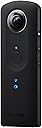
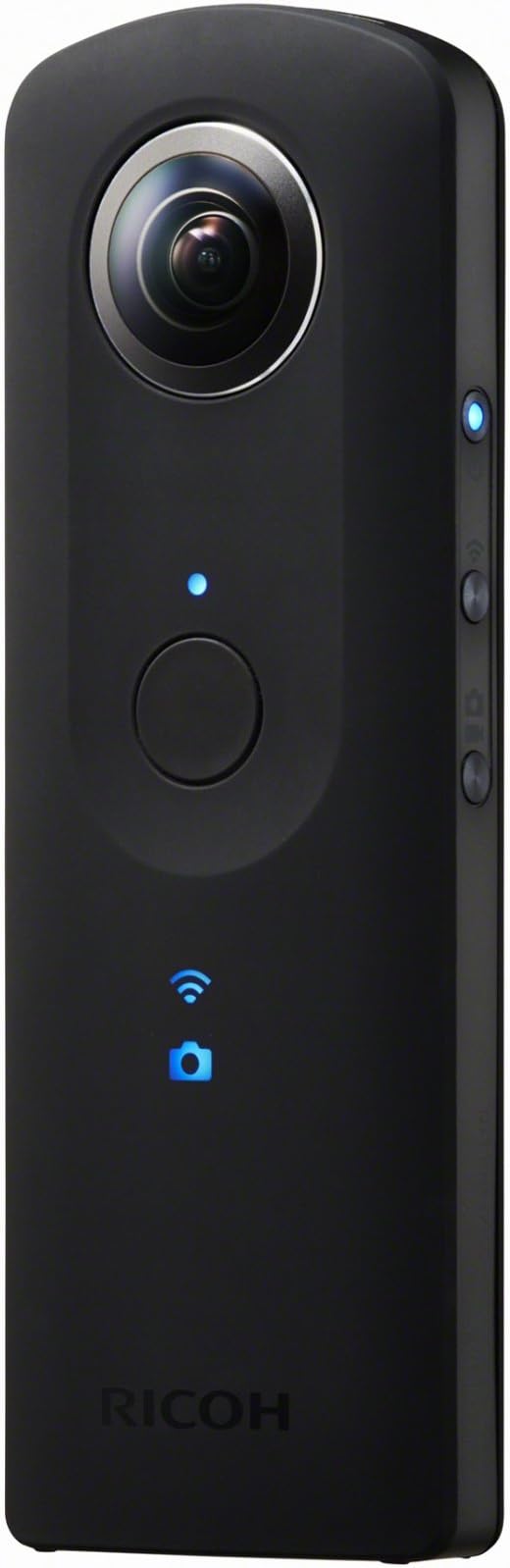
The Ricoh Theta S is a cutting-edge 360-degree digital camera featuring a 14MP CMOS sensor and Full HD 1080p video recording at 30fps. It offers up to 25 minutes of continuous spherical video capture, WiFi live preview and file transfer directly to mobile devices, and 8GB internal storage. Designed for professionals and enthusiasts entering the VR and immersive content space, its compact, lightweight form factor and advanced stitching technology deliver high-quality panoramic photos and videos with ease.


| ASIN | B014US3FQI |
| Antenna Location | Recording 360 degree images and videos |
| Are Batteries Included | No |
| Battery Average Life | 25 minutes |
| Best Sellers Rank | #147,868 in Electronics ( See Top 100 in Electronics ) #1,339 in Digital Point & Shoot Cameras |
| Brand | Ricoh |
| Built-In Media | USB Cable |
| Camcorder Type | Video Camera |
| Color | Black |
| Compatible Devices | Smartphone, Laptop, Personal Computer, Tablet |
| Connectivity Technology | HDMI, USB |
| Customer Reviews | 4.1 out of 5 stars 1,422 Reviews |
| Display Resolution Maximum | [INF] |
| Effective Still Resolution | 14 |
| Effective Video Resolution | 1080 Pixels |
| Exposure Control Type | Automatic |
| Features | Lightweight |
| File Format | JPEG, RAW |
| Flash Memory Installed Size | 8 GB |
| Flash Memory Speed Class | C10 |
| Flash Memory Type | Internal |
| Flash Memory Video Speed Class | V60 |
| Focus Type | Center |
| Form Factor | Compact |
| Global Trade Identification Number | 00026649107207, 04961311901577 |
| Has Image Stabilization | No |
| Image Aspect Ratio | 16:9 |
| Image stabilization | Digital |
| Item Dimensions D x W x H | 5.1"D x 1.73"W x 0.9"H |
| Item Weight | 0.3 Pounds |
| Lens Type | Zoom |
| Manufacturer | Ricoh Cameras USA |
| Minimum Aperture | 2 |
| Model Name | Ricoh Theta S |
| Model Number | THETA S |
| Number of Batteries | 2 AAA batteries required. |
| Photo Sensor Technology | CMOS |
| Screen Size | 1 Inches |
| Sensor Type | CMOS |
| Shooting Modes | Auto, Outdoors, Shade, Cloudy, Incandescent Lamp, Daylight, Fluorescent Lamp, Night Scene |
| Style Name | Base |
| Supported Audio Format | AAC |
| Supported Image Format | JPEG |
| UPC | 026649107207 |
| Unit Count | 1.0 Count |
| Video Capture Format | MP4 |
| Video Capture Resolution | 1080p |
| Video Resolution | 1080p |
| Water Resistance Level | Not Water Resistant |
| White Balance Settings | Auto, Cloudy, Daylight, Flash torch |
| Wireless Compability | 802.11a/b/g/n/ac |
| Zoom | Optical |
D**R
Straight to the point - The beginning of more immersive photos and videos. Best tech right now
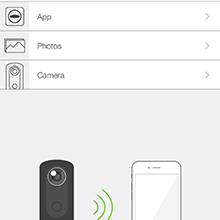
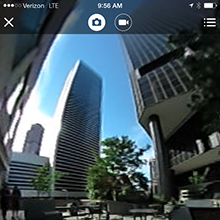
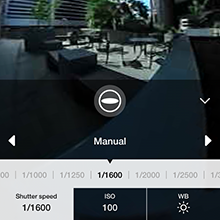
First off, the reason I bought this is because of my interest in the latest tech. I've recently been getting into virtual reality (VR) and more immersive experiences. I heard about this item and couldn't help myself. Overall, I love my purchase and would buy it again. Hope this review helps you decide whether or not to purchase the camera. My video is segmented into 4 different parts: 1: Design - how it looks and feels compared to others 2: Simple button functions 3. Phone connection and use with the app (VR and 360 preview) 4. Pictures with a video at the end ( unfortunately Amazon doesn't render the 360 video experience so you can't use it like its meant to be used. However, you get to see a bit of what its like.) 360 video capturing used to be a very expensive and tedious task- that is you had to purchase several cameras and align them then stitch the video together.That is where Ricoh came in. Ricoh started their 360 cameras several years ago and has seen much improvement since. This Theta s is a big improvement from the previous m15 model. Why? 1. Full 1080p HD video and pictures at 14MP. 2. Less stitched up looking videos as experienced with the m15. 3. You get 25 minutes of video recording in one sitting vs 6 minutes on the m15. 4. Internal memory has been extended to 8GB 5. You get live preview with this model prior to taking your picture. 6. Sound quality has improved immensely - giving you more immersion. 7. Battery life has been extended. Albeit not by much. This is a great introductory product for getting into the VR revolution that is predicted to boom this year with the release of VR headsets everywhere. It has a very sleek design with 2 cameras front and back that use fish eye view to stitch the photos and give a 360 experience. It comes with a case so as to protect the lenses when stored. They do have cases for this camera online so no worries there if you feel you need a better one. Underneath the device you can attach a stand that will be necessary as you'll see blurred pictures if you're moving too fast. The video has no problem with this. As far the tech goes, its still in its early stages and the quality of video is at its best without breaking the bank. Unfortunately, when uploading to Youtube you do get loss of quality which due to Youtube compression itself. Again, the tech is still climbing and this is where the standard is right now. The camera is at its best when taking pictures. The pictures are amazing and really good quality. To take pictures is simple. You click and voila the picture is stitched in the camera itself. If you do not want to be in the picture you can simply download the free app (iOS and Android) and use that to take the picture. You can connect to the camera using wifi and you get a distance of about 30 feet depending on how many walls are in between you and the camera. The app also allows you to preview the picture before its taken so you don't have to worry about not getting what you want. Additionally you can tweak the cameras settings to get an optimized image. The app software also allows you to experience your photos in Virtual Reality. Although it achieves this by giving you the same image twice - so you don't get a parallax effect. Thought there is software that allows you this opportunity. Overall, If you're looking to get started with the boom of VR and don't want to invest too much money this is the way to go! Comment with questions if you need clarification or if I missed something. Hope I helped in your decision.
J**T
Awesome little camera that takes decent 360 pictures and videos.
This product takes 360 degree photos or videos with one click of the button on the device. You can also pair with wifi to your mobile phone and control it through the phone. When attached to the phone it allows you to preview what the shot will look like. You also have complete control of the camera settings so you can adjust for lighting, etc.The pictures are decent quality and can be uploaded to Facebook and then displayed as in a 360 mode that Facebook supports natively now. I've included a photo I took with the camera on a tripod/selfie stick in a frontier house in smoky mountain national park. I'm around one of the corners controlling with my phone. I uploaded it a full resolution, not sure if Amazon will down size it. A couple of things that will get you started faster: 1. Download the Theta + and Theta S apps on your phone. 2. If you don't want your hand to look distorted set the camera on a flat surface and control with your phone or use a selfie stick and control with your phone. I got this selfie stick as it includes a mini-tripod on the bottom, Smatree® SmaPole Q3 Telescoping Pole / Selfie Stick +Folding 3 Legs Support Stand for GoPro Hero, Hero4, Hero3+/3/2/1 hd Cameras & 1/4" Threaded Hole Compact Cameras & Cell Phones, With Cell Phone Holder +Tripod Mount Adapter +Thumbscrew . 3. When taking a picture it puts the center of the image or the focus on the side opposite the picture taking button. So if you are taking a selfie it will look better if you put the button away from you and then struggle to find the button. This will put you in the initial focus and center when it stitches if not viewing in a 360 viewer. 4. When you share as a text message or email, which is pretty easy since it syncs with your phone, it will send as a "flattened" picture that looks a little distorted if you send as is. I would recommend downloading the Theta + app so you can edit the photos easily. 5. Sometimes, items close to the camera aren't stitch perfectly but it is still very good most of the time.
P**E
Best VR camera for the price point and easy to use!
I am a virtual reality software engineer who has had experience with the HTC Vive, Oculus Rift DK2 and new consumer version, and various other devices. I have also used the M15 in the past. The form factor of both devices was great and I ultimately chose to buy the newer model due to the ability to make longer videos. In the M15, the resolution is too low and the contrast in picture quality is not great, where colors appear undersaturated and flat. The S, in contrast, is definitely a notch above the m15. However, this device is still prone to overexposure when taking 360 photos outside. The Theta S is a big improvement than its predecessor, but in my opinion not enough to warrant purchasing an entirely new device if you have the older model. You get 25 minutes to record 1080 HD video as opposed to 6 minutes on the M15, but keep in mind that uploading it into Youtube truly skews the image quality so the videos do not truly feel like HD. However, the Ricoh Theta software will auto stitch your video while exporting which minimizes the time spent editing, saving the consumer many hours. The videos are not completely seamless and are subject to some fish-eye distortion. The S comes with live preview, which uses the WiFi capabilities enabled in the camera itself. The shutter range is small, and you must be close to the camera for reliable operation. While it is neat to have this capability, the shoddy execution from the weak range leaves something to be desired. The S comes with a neoprene sleeve that fits snugly against the camera. However, we decided to buy a hard case for added lens protection, as Ricoh does not offer a warranty in the case that the lens themselves become damaged. The S controls are extremely easy to use, and just the press of a button will take a 360 photo. However, if you want the images to look as beautiful as they can, a fair amount of post processing might still be required to get the dynamic range seen in reality. Overall, I feel like this is the best VR camera you can get at this price point. The quality will not be able to rival a GoPro VR rig, but the amount of effort required in post production is severely minimized by Ricoh Theta. With a GoPro rig, you need to spend 2,500 dollars and also buy or #D print a mount to house all of the camera together. It also requires that you sync the individual shutters and control the settings so that the VR immersion isn't disrupted by the varying exposures, which can take a lot of time. The Ricoh Theta S is a great introduction to the world of VR, and is able to fit in such a small form factor that is extremely portable. As an avid Amazon shopper, I rely heavily on reviews to research before purchasing items. I purchased this item with my own money after doing my own research on what was available. I want to help others make more informed purchasing decisions by providing reviews that accurately describe the product and my experiences with it. I have no relationships with this seller, nor am I compensated on how people vote: if you learned anything helpful about this product from my review, please click the yes button, and if you did not learn anything new, please click the no button. Your vote will help me pinpoint what types of reviews people think are most useful. Please feel free to give me any feedback or ask any question so that I could provide more information to better assist you.
C**E
The Best 360 Camera I've Found For The Money!
I've been involved in developing software and hardware products for shooting 360x360 panos for almost 18 years and this product is absolutely amazing for the price. The HDR capability for stills does a pretty decent job on indoor shots of rooms with brightly lit windows as well as saving the sky on bright sunny days! The low light image quality is MUCH better than the Ricoh Theta M15. The images I've included with this review were shot with normal room light on a bright sunny day. The Ricoh Theta S app for iPhone is a pretty decent minimalist app that is intuitive and reliable. For viewing, I recommend using the Ricoh Theta S app to save your panos/video360's to the camera roll and view with one of the numerous other apps available for media of this type. When you combine this camera with a decent Google Cardboard compatible HMD, you will thoroughly enjoy the immersive experience for both stills and video. Whether you want to simply capture the moment or the action, this camera is unbeatable for the price. Get a good free standing monopod and never go anywhere without it again!
S**D
Great still camera, overstated video quality and frustrating software.
The camera itself is a lot of fun. Photo quality is great, and you can create some really fun shots even from a quick set-up. I appreciate the ease of use, especially after using Gigapan Epic, which has tremendous output at the cost of much time and effort. Video is a bit of a disappointment. You can also do some fun things, but Ricoh is overselling the video quality. There may well be enough pixels to count as 1080p, but this is when you are looking at the full image peeled out onto a flat projection. Viewing any part of the image in spherical video is, of course, much lower quality. I am struggling to figure out a workflow to get a presentable quality video onto YouTube. Which leads me to the real disappointment of this kit: the software. It's terrible. Documentation is non existent. Labels and tooltips have been poorly translated into English, making it hard to understand what different actions are really doing. Share options in iOS are inconsistent between photos (upload to Ricoh gallery only) and videos (limited share sheet, missing some standard options). The Theta+ app does not offer an iPad version, and the output of edited photos is down-sampled and trimmed to the dimensions of an iPhone screen. I've found I get the best output by simply positioning the view and taking a screen shot. The Mac desktop software is worthless to me as the camera drive doesn't mount correctly in El Capitan. Also worth noting that while Theta S is "compatible" with Google Business View, if you're looking to be a certified BV photographer, this camera doesn't have high enough resolution output to qualify your shots for that approval. Overall, it's a great addition to my photo gear, and I'm glad I made the purchase. For still spherical photos, the Ricoh S is tops, and very easy to use. If your main use will be video you might want to shop around or wait for next year's version. I will look into 3rd-party apps and edit my review if it improves the experience any.
E**C
Loving it!
First 360º Camera I've owned, after having thought of the idea independently many years ago. I'm glad to have seen it developed so well. It's really a refined design, excellent quality photos and videos, and a very simple shooting experience. Holding it feels natural, and it's a surprisingly light feeling to know you don't have to aim before shooting. It comes with a classy pouch to keep it in when not taking photos, which is both light and easy to get the camera into and out of. Much appreciated touch. Sharing photos is very simple, sharing videos I've not yet figured out (Updated, figured it out!). Connecting to WiFi is simple, though it never connects to your home WiFi – instead it hosts its own network that you connect to when you want to download photos and videos (which works well when you're out and about). Photos download pretty fast, videos can take some time. You can also download both via USB, though surprisingly not via their (OS X, at least) app. You need to first download using any other photo app (Photos recognized it and popped open automatically on my Mac), then copy them to a folder, then copy the contents of that folder into the app to see them. Seems very convoluted for something that should be simple. Also, you cannot import videos to this app. Very strange, so I have yet to find a way to view videos except for on the app, having downloaded via WiFi from the camera. Maybe my only complaint is that I cannot turn off the sounds on the camera, so you can't be too stealthy with it. The sound is fun, but a bit cartoony (like a laser gun shooting off), so it'd be nice to be able to silence it if desired. Also, the live streaming isn't so useful because it just shows two hemispheres on a screen, which is hard to wrap your head around. Be sure to download the "Theta S" app and NOT the "Theta" app, as the latter will not work. Overall, very happy to own this thing. It's a head turner, people love it, and I really enjoy knowing I've grabbed the whole scene and left nothing out. A few rough edges to iron out software-wise, though nothing so bad as to depreciate its awesomeness. If you have the cash, and are interested, get this great toy! UPDATE 1: Figured out video, and some thoughts... YouTube : Figured it out!! Okay two things, firstly let it be noted that the raw video format is .MP4, though if you import into OS X Photos, then export, it's M4V, which will mess you up. To get the raw .MP4 from the camera, use the "Image Capture" app on OS X. Then, this video can be dropped into the Theta app on your Mac, which will convert the video to standard 360º format which can be shared via their app, or automatically detected by YouTube. Sweet. Using their app, though, you can only upload 5 Mb worth of video, which is ~11s long (YouTube has no limit, though give it a few minutes after it's live before it's detected as 360). A trade-off, it appears the quality of the video on theta360 ends up being much more crisp, see for yourself : Example using theta360 : https://theta360.com/m/j9kGfEUCFatdUePld3w7qhRrs Example using YouTube : https://www.youtube.com/watch?v=O6fAPTSkGqI Live Streaming Mode : This is NOT live streaming to the internet via their app or local wifi, but instead it's live streaming via HDMI or USB. HDMI streams to a TV, USB streams to an app like VLC which knows how to receive a Live Stream from an attached device. From an app like this, you could then stream to the internet via your computer. I've also realized what the HDMI is for now – it's not for playback of recorded video, but only for live streaming video. The video that comes out is the same as what's exported, two hemispheres. Live Preview : Live preview to the iOS controller is also cool, though limited. It's a lower resolution image at 10 fps. When in photo mode, you get a live video preview, and can tap the screen to take a snapshot. When in video mode, you get no live preview, and can only start/stop recording. WiFi : I really wish this thing would connect to my home Wifi while I'm home so that I don't need to take my iPhone off of my home wifi while interacting with the camera. Seems like it'd be easy for Ricoh to implement by allowing me to enter my WiFi credentials in their app. Update 2 : Mastered video formatting and more tips... Video metadata is unfortunately discarded during the conversion process using the Theta app on your computer. To restore the original metadata, I've created a script that uses Exiftool. Follow these steps to have perfectly converted videos (written for OS X) : 1. Download & install exiftool from http://www.sno.phy.queensu.ca/~phil/exiftool/ 2. Import a video from your Theta S using Image Capture (NOT Photos.app) 3. Drag/Drop the video into the Theta app, converting w/ default naming scheme. 4. Repeat steps 2 & 3 for as many videos as you have, the next steps do bulk processing. 5a. Download this bash script : http://pastebin.com/51VYga4c 5b. Put it somewhere on your computer (ex. ~/Desktop/moveMetadata.sh) 5c. Make the bash script executable w/ : cd ~/Desktop && chmod u+x ./moveMetadata.sh 6a. Change to the directory of your videos, for example : cd ~/Desktop/Videos 6b. Start the script! Execute : ./moveMetadata.sh The bash script will move over the metadata and modify the new video to have the same creation date as the original video. You can now discard the original video, confidently knowing that all metadata is still in place. Also discovered that when capturing images via the app, GPS data and vertical image correction is automatically applied to images! APPS! I've figured out what I believe to be the best apps for interacting with content from the camera. Here you go: KIRORU 360 - View images from the camera roll easily, designed to be used with Google Cardboard. https://itunes.apple.com/us/app/kiroru-360/id954157416 Round.me - Best place for uploading sets of spherical images. Supports Google Cardboard and has a solid web interface. Creating "spaces" is easier on the desktop than within the app. Has iOS and Android apps. https://round.me (Example : https://round.me/tour/20157/view/49383/) Google Street View - Automatically connects to Theta S and allows you to take geotagged pictures and quickly publish them onto Street View. Strips images of metadata, though, and too specific of a use case for casual image capture. In addition to realtime capture, you can also import previously-captured images into this app. https://itunes.apple.com/en/app/photo-sphere-camera/id904418768 Theta S - Obligatory. Somewhat basic, but essential. https://itunes.apple.com/us/app/id1023254741 Developer Toys : The Ricoh Theta S is compatible with the Open Spherical Camera API created by Google : https://developers.google.com/streetview/open-spherical-camera/ This python implementation is an example of how to easily interact with the camera in your own application : https://github.com/florianl/pyOSCapi
H**I
It's not a durable product.
In short: it's not a durable product. I don't recommend this product. In 2 months, wifi does not connect to the app (checked with 3 iPhones). Contacted customer support and didn't get any results. Sent for repair and received a new one. The replacement worked great ... for another two months, and it loses wifi connection again to the Theta S software. Now I'm contacting the support again. I want refund from them since I can't return this to Amazon. - Hardware is good as is. The build quality isn't great, the thread is plastic so once you break it, you won't be able to attach it to the tripod. The feeling is also cheap. - Software is very user friendly (I'm using iOS app), but it doesn't connect to the camera. I wish they make the desktop video/photo editor so at least I can transfer the files directly to PC and edit them in the PC. iPhone is a phone, not a photo/video editor. - Transfer process is fast for pictures, and very slow for video. This is understandable, but why don't they make the software in PC/Mac? The USB transfer speed is much faster. And yes, your iPhone is 'locked' during transfer process, which may take hours for video. Regardless how great the app is, iPhone is a phone, not a photo editor. - Support isn't too helpful when it comes to a problem. - Picture quality is a consumer level. Not great, but it is usable for social media. Now I'm sending this for repair. It has cost me too much time for dealing with the wifi connection problem. And yes, please do check the reviews in the iOS store, many complains about the wifi connection. Ricoh should be aware of this. As mentioned earlier: it's not a durable product.
N**A
Awesome 360 degree camera!
Have been enjoying this camera ever since I got it! The photos look great and the videos are a bit lower in quality but not to the point where it's just pixilated, still looks nice. The build of the camera feels very sturdy though it's advised to still handle with care and though it does come with a pouch, I highly recommend getting a hard case for it due to the dual lenses. Just as technology goes, a better version of this will more than likely be out by next year, though if you're hesitant on the current 360 degree cameras to buy today, highly recommend this one. Feels nice, looks nice and is slim to easily slide into your pocket unlike the others that are much more bulky. **Also one more thing (I may save a life with this review) when you download the PC/Mac application of Ricoh's software to view your photos and videos in a 360 degree view, MAKE SURE you have the latest version of Adobe Air downloaded. Many users weren't able to get their application to launch and we're not aware they needed Adobe Air support. Hope that may help if you are lost!**
V**Z
Excelente cámara
Me encantó mi compra. Su uso es muy sencillo y las fotos se ven muy bien incluso el video, sólo recomendaría que compren por aparte algún kit con tripié y selfie stick, les hará la vida mas fácil. Y recuerden que facebook comprime las fotos y el video, por si sienten que se ven muy pixeleadas.
P**X
Merveilleux appareil
Plus je m'en sers, plus il ne cesse de m'étonner ! Les 360 sont de très bonne qualité, et même en le poussant dans ses retranchements avec une partie à l'ombre et l'autre en plein soleil, il fonctionne impeccablement ! La liaison avec le smartphone est très facile et rapide, et je peux voir en direct ce qu'il est entrain de regarder, et donc le commander à distance. Très léger et discret. Un petit bijou.
F**V
Ottimo prodotto ad un ottimo prezzo
Ho aspettato di usarla almeno un pò prima di fare la mia recensione. Molte sono le ditte che iniziano a parlare di VR e a realizzare prodotti in grado di fare foto e filmati 360°, ma Ricoh già da alcuni anni si è affacciata in questo settore e la sua esperienza si vede tutta nella Theta S (terza generazione di prodotti consumer della Ricoh). Un prodotto che è molto supportato negli aggiornamenti firmware e software (ne ho già fatti 2 in un mese) e che permette di effettuare foto e filmati sia mediante app mobile (attraverso la quale vengono registrati anche i dati gps) che usando la sola Theta. L'app consente inoltre di configurare la fotocamera in modalità automatica (con o senza HDR), priorità tempo o priorità ISO, e questa configurazione resterà valida anche per gli scatti effettuati senza il cellulare. La qualità delle foto è molto buona ma consiglio di prestare attenzione alla configurazione per migliorare i risultati (non sempre gli scatti "in automatico" sono i migliori). Invece la qualità dei filmati è inferiore rispetto alle foto (ma sempre di buon livello) e spero che i prossimi rilasci risolvano questo aspetto. Per visualizzare foto e filmati potete utilizzare la stessa app mobile o anche quella disponibile sul sito Ricoh per pc/mac. Ma se volete ottenere un vero e proprio "effetto WOW" consiglio di utilizzare uno dei tanti visori VR che trovate anche qui su Amazon a partire da pochi euro. Per la condivisione ho provato sia il sito della Ricoh, che Google Foto e Youtube e per ognuno esiste sempre anche l'opzione di mantenere privato il materiale immesso al fine di condividerlo solo con chi volete. In definitiva è un prodotto che mi sento di consigliare a tutti. Scoprirete un modo nuovo di fotografare i vostri momenti speciali o i vostri viaggi e con un semplice visore da pochi euro vi sembrerà di riviverli ogni volta che volete.
黄**家
GOOD!!
この値段でこんなに面白い写真が撮れるのが凄いの一言!!どこにでも持って行っています。
�**�
Top Gadget für tolle 360 Grad, bzw VR Aufnahmen.
Rezension Ricoh Theta S Die Ricoh Theta S ist eine kleine leichte Vollspheren Kamera, mit der man 360 Grad Aufnahmen mit einem Knopfdruck machen kann. Diese Aufnahme teilt man dann z.B. auf Google Foto, oder YouTube, oder über the Theta360 Website auf Facebook. Oder man schaut sich die Aufnahmen einfach auf Handy, Tablet, oder PC, oder mit einer VR-Brille an. Spaß ist garantiert, ebenso das man Blickfang jeder Veranstaltung, bezw. Feier ist, sobald die Theta zum Einsatz kommt. Genial wird es spätens bei z.B. Veranstaltungen, oder im Urlaub bei Landschafts-, bzw Umgebungsaufnahmen. Hausbesichtigungen, oder Autobesichtigungen... alles wird mit einem Foto rundherum abgelichtet. Die Theta S bietet verschiedene Belichtungsprogramme, u.a. HDR Funktion. Der 8 GB interne Speicher ist nicht erweiterbar, fasst aber bis zu 1600 Fotos in bester Auflösung, bzw. bis zu 65 min Video. Gerät Vorstellung, Knöpfe, Bedienung Merkmale: 360 Grad Spheren Kamera Masse, Gewicht: 44 mm (B), 130 mm (H), 22,9 mm (T) 125g Theta S, Nachfolgemodell der Theta M15 und Vorgänger der kommenden Theta SC Nur in Schwarz. (Vorgänger und Nachfolger gibt es in verschiedenen Farben.) Oberfläche ist gummiert, liegt gut in der Hand. Zwei Objektive mit Fischaugeneffekt, dadurch zweimal 180 Grad Aufnahmen. Festbrennweite. Foto bis 14 MP Video bis FullHD 8GB interner Speicher, nicht erweiterbar. Bringt ihr eigenes WLAN mit. Fotouebertragung zum Telefon schnell, Videos dauern trotz schneller Anbindung lange, da sie direkt umgewandelt werden. Es gibt eine App für Android, IOS und unverzichtbar wegen Updates, für Windows. Viele Einstellmöglichkeiten bezüglich Auflösung, Belichtung, Intervalaufnahmen. (Über die APP) Seite: Einfache Bedienung, drei Tasten an der Seite. An (Ladestatus), WLAN Schalter und Moduswahl. Live View starten: An-Schalter + Moduswahl gleichzeitig drücken. Für zeitgesteuerte Aufnahmen An-Schalter + WLAN-Schalter beim Einschalten gleichzeitig drücken. Nur für Fotos. Andere Funktionen sind deaktiviert. Vorne: Auslöser, Statusanzeigen für An, WLAN, LIVE View und Aufnahmen vorne in Blau. Und Rot, oder Grün, je nach Anzeige und Einstellung. Oberseite: mic und Speaker Unterseite: USB, Stativgewinde und HDMI. USB Kabel zum Laden, bzw. Uebertragen auf den PC liegt bei. HDMI Anschluss, für Live View an PC, oder TV. (Während Live View ist keine Photo-Video-Aufnahme möglich. Die Kamera liegt super in der Hand, es ist aber besser sie entweder auf einem Stativ zu verwenden und über das Handy auszulösen, oder über Zeitsteuerung. Löst man sie über den Auslöser aus, ist der Daumen im Bild. Die Kamera selber ist nie auf dem Bild, sie blendet sich aus. Was die Qualität der Fotos und Videos angeht darf man von so einem Gadget keine Profiaufnahmen erwarten. Gute Fotos bekommt sie aber allemal hin. Videos sind eher Spielerei. Die Full HD Auflösung muß auf 360 Grad verteilt werden, da bleibt eben nicht soviel übrig. Trotzdem machen auch diese Videos noch Spaß. Ein kleiner Wermutstropfen, wenn man die Fotos bei z.B. Google Fotos, oder die Videos bei YouTube teilt, wird von der jeweiligen Website ins Bild, respektive ins Video hineingezoomt. Vermutlich wird das gemacht, um den Fischaugeneffekt zu minimieren. Alles sieht schön gerade aus. Nachteil: die Aufnahme verliert an Qualität. Die Kamera ist durch die beiden außenliegenden Objektive relativ empfindlich und sollte nicht unbedingt alleine hingestellt werden, bzw. gelegt werden. Eine Schutzhülle liegt bei. Es gibt aber auch eine sehr schöne Lederhülle in Schwarz, oder Weiß, als Zubehör zu kaufen. Ricoh TS-1 Ricoh TS-1 Ledertasche für Theta Kamera weiß Über diese Lederhülle und ein ebenfalls erhältliches Schutz Case (TH1) werde gesondert rezensieren. Die gibt es inzwischen beide hier bei Amazon zu ordern. Als ich die Kamera erworben habe, war das anders. Ricoh TH-1 Ricoh TH-1 Hard Case HS-1 für Theta Kamera transparent/schwarz Als Fazit: Wir haben die Theta S seit einem halben Jahr im Einsatz und wollen sie auch nicht mehr missen. Sie ersetzt keinen guten Fotoapparat, ist aber eine tolle Ergänzung, da sie auf einfachste Weise faszinierende Aufnahmen macht, die eben einen neuen Blickwinkel bieten. Eben rundherum. Ricoh veröffentlicht auch immer wieder Updates, d.h. das Modell wird gepflegt. Ich würde die Kamera wieder kaufen und kann sie nur empfehlen. Ich hoffe, ich konnte ein paar gute Informationen liefern und bedanke mich für das Lesen der Rezension. Gruß Filmfreak
Trustpilot
2 months ago
1 month ago