Buy anything from 5,000+ international stores. One checkout price. No surprise fees. Join 2M+ shoppers on Desertcart.
Desertcart purchases this item on your behalf and handles shipping, customs, and support to India.
โจ Stick with the best โ make your mark shine! โจ
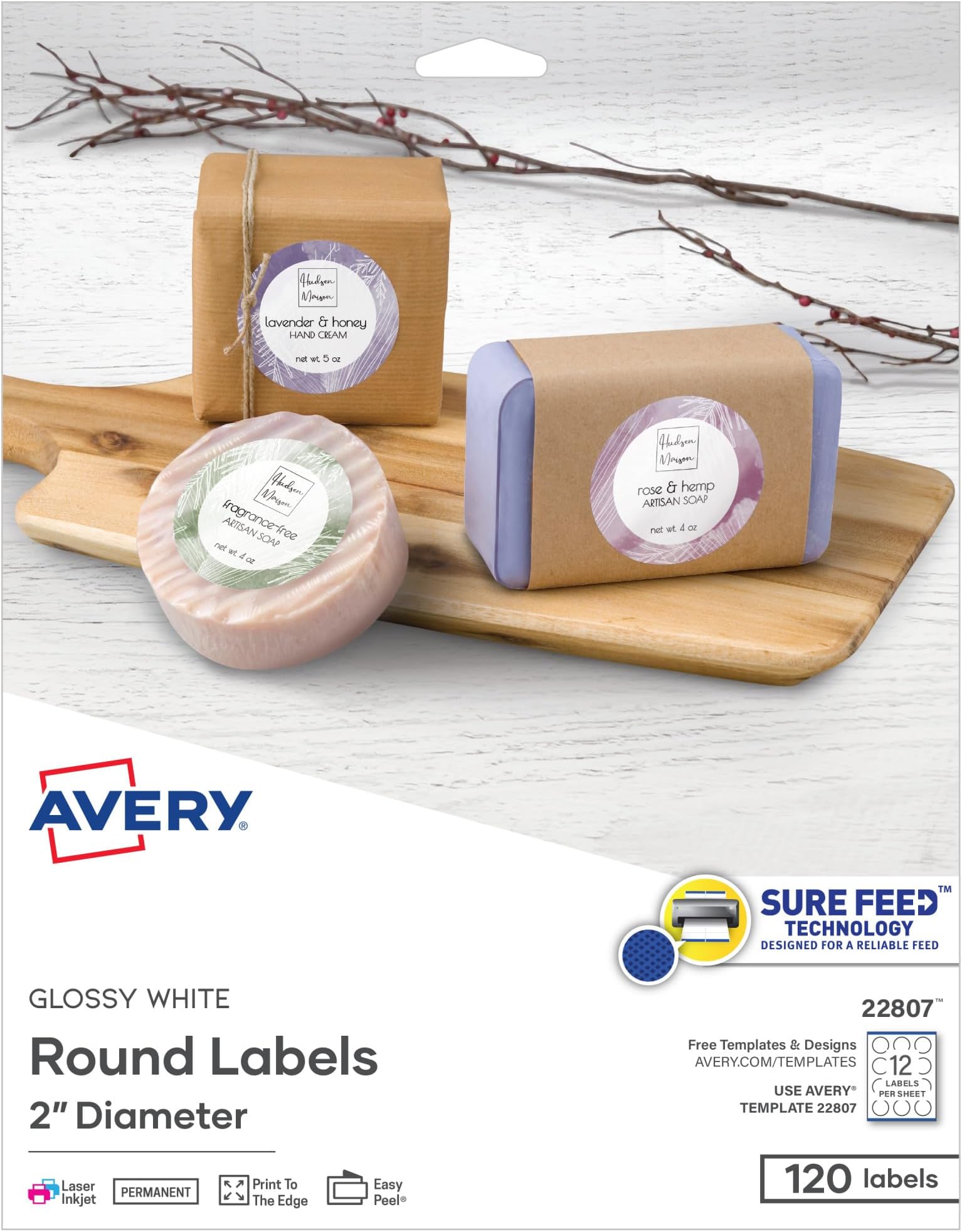
Avery Printable Round Labels (2" diameter, 120 count) feature patented Sure Feed technology for jam-free printing and an Easy Peel design for quick application. Their glossy white finish enhances color vibrancy, compatible with laser and inkjet printers, and a permanent adhesive ensures long-lasting stickiness on various surfacesโperfect for professional branding, mailing, and creative projects.

| ASIN | B005IMAKYG |
| Best Sellers Rank | #414 in Office Products ( See Top 100 in Office Products ) #4 in Laser & Inkjet Printer Labels |
| Brand | Avery |
| Brand Name | Avery |
| Color | Glossy White |
| Customer Reviews | 4.7 out of 5 stars 12,457 Reviews |
| Finish Type | Glossy |
| Global Trade Identification Number | 00072782228071 |
| Included Components | Glossy White Print-to-the-Edge, 120/PK |
| Ink Color | White |
| Is Customizable? | Yes |
| Item Shape | Round |
| Item Type Name | Label |
| Item Weight | 1 Pounds |
| Line Size | 1 inch |
| Manufacturer | Avery |
| Manufacturer Part Number | 22807 |
| Material | Paper |
| Material Type | Paper |
| Model Number | 22807 |
| Number of Items | 1 |
| Number of Labels | 120 |
| Pattern | Solid |
| Shape | Round |
| Size | 2" |
| Style | 120 labels |
| UPC | 072782228071 |
| Unit Count | 120.0 Count |
| Warranty Description | No |
A**S
Perfect product
Works great, just as expected. Another reliable Avery product. I used an HP OfficeJet 8015e to print on these sticker labels at home with the Avery template from online. Easy.
K**O
Great labels
Avery makes great products. I printed labels on these and they came out beautifully! They are thick enough and versatile as Iโve used these for closing my boxes as well. Great value for the price
M**N
LOVE! They are the perfect size for sale items like baked goods or bottles
Very easy to use. The website has a huge selection of templates. The labels are strong and waterproof. They hold printer ink very well. The size is great if using for labels on front of bottles or labeling baked goods. The stickers are thick enough to not split when wet.
A**Y
Great product. Easy to customize. Sticks well
I love these labels. The avery website makes it really easy to make custom ready to print designs. I got the waterproof ones this time and him glad I did. I have used these to label jars and to make stickers. Print quality looked great and the stickers stick well. I love that I don't have to worry about water with these. They were perfect for what I needed. I'll definitely be purchasing again. These are a matte finish, not shiny. Good for photos. No glare on stickers.
A**R
sticker labels
this are some good labels ...good quality
J**O
Perfect!
These were perfect for our party favors. It was easy to use with our printer. I didn't use anything complicated on them, so it was easy to print.
M**S
Templates Are Reasonably Easy To Use. Labels Look Professional.
I bought Avery Print-to-the-Edge Round Labels (22830) to use on widemouth canning jars. These 2.5" labels fit Kerr and Ball widemouth lids. They are a glossy white label. When printed, colors are vibrant, and the ink dries fast. I've been very pleased with them. You can find pre-designed templates for Microsoft Word on Avery's web site. There are about 75 designs available for the 2.5" round labels. None seem to be designed with canning in mind, however, so I created my own. There are some generic designs that could be used for canning. If you type the label number (22830) into Avery's search, you will get incomplete results. You will get better results if you click the Templates tab at the top of the web page and navigate to Templates > Labels > Round Labels > 2 ยฝ" diameter. There are still designs missing from that list, some of which I found using Google. To design and print the labels, you can use Avery Design & Print Online with an Avery account, or you can download templates to use on your computer. The pre-designed downloadable templates are all for Microsoft Word. Avery offers plain templates that you can use with your own designs for Microsoft Word, Apple Pages, Adobe Illustrator, Adobe InDesign, and Adobe Photoshop. I used the plain template for Apple Pages, as it is easy to work with images in Pages, and I designed my labels in Photoshop. The instructions that Avery offers for templates are to download and make any edits you want on that document, save the document, do a test print, then print your labels. But you can save the downloaded document as a template before you add or change anything, so you will have it for future use in the editing application of your choice. Once your labels look the way you want them, do a test print on paper. You can check the colors, centering, etc. and get an idea of whether the print will align correctly with the sheet of labels. I had one small problem with alignment, but it wasn't the fault of the template. The bottom row of labels was slightly off-center on one sheet, because the sheet did not feed into the printer precisely straight. I'm not sure if I can avoid this consistently, but try to make sure your sheet is completely straight in the printer tray. I could not print these with more than one sheet in the printer tray. My printer would always grab a stack. I ended up putting the sheets in one at a time, which worked fine. I wish I could figure out how to use some of the MS Word templates in Photoshop and Pages, but the frustrations with using my own designs with the Pages template were very few.
R**E
Professional Look - Easy to Use
I bought these labels to use in a DIY spice rack project, therefore the name on each label would need to be different. From reading other reviews I was a bit concerned that Avery's online templates might be difficult to figure out. However it appears they may have corrected the old issues, as I found them fairly easy to use. You will find the URL for Avery's online template on the label package. Once you chose the product and the template you want, you then proceed to the customization tab. From there choose "Edit One". This will allow you to work one the text for one label at a time. (See photo). If you are looking for the label to be precisely centered, you might need to work a little to get the design perfect. My design was more forgiving, so I didn't take the extra time to adjust. However the design was was very slightly off-center. For me this wasn't a problem, but I have included a picture to show the degree of adjustment that would be required. As for the labels themselves, they are easy to use, high quality and have a good weight to them. Generally they are perforated well and are easy to remove from the backing. However a couple were a little more difficult and I ending up tearing a corner. To remedy this, I found that if I worked the edges up from the back of the label, by moving my fingers across the backing, the label would begin to lift free from the backing. Then I would be able to see if there were any areas that required special care. I am very happy with my finished project as I added the labels to metal tins, which I am using as spice containers. I then put these on magnetic sheets that I applied to the inner door of my pantry. Great space saving spice rack!
E**Z
Muy Practico
Estas cosas antes tenia que esperar a tener un viaje a USApara poder tenerlas
A**A
Missing a sheet
Open and missing a sheet not happy
P**I
ot matching with Avery
Not matching with the Avwry layout after printing, tried many times, totally waste my papers time and money. Quality and all are good.
A**N
Great purchase
Great labels Love you can use these at home on the avery website and design and print your own
W**S
Great product
Im happy with this product
Trustpilot
1 month ago
3 days ago