Buy anything from 5,000+ international stores. One checkout price. No surprise fees. Join 2M+ shoppers on Desertcart.
Desertcart purchases this item on your behalf and handles shipping, customs, and support to India.
🎯 Take control effortlessly—because your streaming deserves precision!
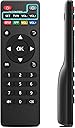
This RETROSUN replacement remote is engineered for MXQ PRO 4K Android TV Box and over 20 compatible models, delivering a flawless button layout and instant response with no setup hassle. Featuring a 26-foot range and 120-degree wide-angle IR sensor, it ensures reliable control from anywhere in the room. Crafted from durable ABS with an ergonomic design, it promises comfort during extended use. Powered by 2 AAA batteries, it’s the perfect no-fuss upgrade or replacement for your smart TV experience.


| ASIN | B08FDG77F9 |
| Additional Features | Ergonomic |
| Battery Type | Alkaline |
| Best Sellers Rank | #122,990 in Electronics ( See Top 100 in Electronics ) #8,137 in Remote Controls (Electronics) |
| Brand | RETROSUN |
| Button Quantity | 11 |
| Color | Black |
| Compatible Devices | Television |
| Connectivity Technology | Infrared |
| Controller Type | Button Control |
| Customer Reviews | 4.1 4.1 out of 5 stars (209) |
| Manufacturer | Oumeite |
| Maximum Number of Supported Devices | 1 |
| Maximum Range | 26 Feet |
| Model Name | MXQ PRO |
| Model Number | MXQ PRO |
| Number of Batteries | 2 AAA batteries required. |
| UPC | 738634164132 |
| Warranty Description | 90 day warranty |
A**E
Works perfectly
Better than the original device, works perfectly, great price, quick delivery. Best deal available.
J**T
Works well!
Very good remote.
A**.
Good
Good
S**Y
okay
sometimes it works with the tv box and other times it stops working. I am not sure if there is a short of the box has trouble communicating with it.
P**I
Perfect remote control
Paired the remote to our unblock tech 9 tv box and it works! It did not come with instructions on how to pair so if anybody is wondering how to pair look here, also do not put the batteries into the remote yet, follow these steps: 1. Go to the settings of your android tv box 2. Bluetooth 3. Go down to pair devices 4. While it’s loading, THEN you put the batteries into the remote and press Setup. The red lights should flicker and that’s how you know the remote is paired.
N**N
Garbage
This remote does not work at all,i need my money back and this crap needs to go in the garbage complete waste of time.
N**P
Fonctionne très bien
S**R
No programming instructions
Comes with no programming instructions. It's all up to you to figure it out.
Trustpilot
5 days ago
4 days ago