Buy anything from 5,000+ international stores. One checkout price. No surprise fees. Join 2M+ shoppers on Desertcart.
Desertcart purchases this item on your behalf and handles shipping, customs, and support to India.
🚀 Archer C5: Power Your Space with Speed & Style
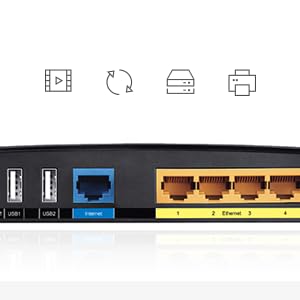
The TP-Link Archer C5 AC1200 Wireless Dual Band Gigabit Router delivers robust dual-band WiFi with speeds up to 867 Mbps on 5GHz and 300 Mbps on 2.4GHz. Featuring gigabit Ethernet ports and two USB 2.0 ports for printer and storage sharing, it offers reliable coverage even in dense WiFi environments. Its easy setup and intuitive interface make it ideal for professionals seeking seamless connectivity and strong performance in apartments or homes up to 2100 sq.ft.


| ASIN | B00JZFG6QS |
| Antenna Location | Indoor/Outdoor |
| Brand | Best Price Square |
| Built-In Media | 1 |
| Color | black |
| Compatible Devices | Laptop, Personal Computer |
| Connectivity Technology | USB |
| Control Method | App |
| Customer Reviews | 4.0 4.0 out of 5 stars (1,218) |
| Data Transfer Rate | 1200 Megabits Per Second |
| Frequency | 5 GHz |
| Frequency Band Class | Dual-Band |
| Global Trade Identification Number | 06935364070823 |
| Is Modem Compatible | No |
| Item Part Number | ARCHERC5 |
| Item Type Name | Archer C5 AC1200 Wireless Dual-Band Gigabit Router |
| Item Weight | 862 g |
| LAN Port Bandwidth | 1000 Mbps |
| Manufacturer | TP-Link |
| Maximum Upstream Data Transfer Rate | 867 Megabits Per Second |
| Mfr Part Number | Archer C5 |
| Model Name | C5 |
| Model Number | BPSCS27528-ARCHER C5 |
| Number of Ports | 5 |
| Operating System | Microsoft Windows 10, 8.1, 8 and below, MAC OS, NetWare, UNIX or Linux |
| Other Special Features of the Product | WPS |
| Security Protocol | WPS |
| UPC | 707223261125 845973070816 |
| Wireless Compability | 802.11ac |
K**T
I waited a month before reviewing the TP-LINK AC1200 Dual Band because I expected that something HAD to go wrong. I put my ISPs combo router/modem into bridge mode (DMZ I believe it was called) and connected the AC1200, getting ready to lose internet for a few days because I wouldn't have understood something right, etc. So far so good though. I had no problems at all during set up - all went incredibly smoothly. I asked for ISP about using a dual band router with their hardware before, so I knew the one or two steps I'd have to make before hand. I'd recommend anyone kind of new to this kind of stuff to do the same as the setup was incredibly easy. My best WIFI download on my ISPs router/modem was around 20 MBPs. More often was around 14MBPs. There are dozens of Wifi networks accessible from my apartment so switching the 2.4ghz channel from 1/2, 5/6, 11/12 did little. Now I run dual 2.4ghz and 5ghz bands and all the devices on 5ghz are downloading at 45 - 50 MBPs. Its literally changed how I use the internet - streaming on WiFi is incredible and I don't have to plug in to the router to have a reliable connection. Upload is around 4.5-5MBps but I believe that is the limit set by the ISP and more than enough for most things. My signal has dropped maybe once or twice since I've set up the 1200 - for a few minutes. The range of the 5GHZ is actually superior to the 2.4GHz that I had on my original hardware - I believe this is probably because the AC1200 has antennas whereas my old hardware did not. I live in a small apartment (around 750sqft) and the signal reaches everywhere - even into the corner of the (large) balcony through pretty thick walls my download is still around 35MBPs (so some loss as walls and furniture obstruct the signal but still better than before). Anywhere inside the apartment unit through regular interior walls the strength is full. The interface / software on the router (for configuring everything) is very well designed with a basic mode and nearly everything I think advanced users could want. I haven't set up a VPN yet but will update if / when I do. I don't think there are any problems with the router at all and I recommend it to anyone especially those unsure if they should try it out. It looks nice, runs great and for having a small apartment with lots of nearby wifi you'll thank yourself. I haven't tried it in a larger space so I can't give much for it in terms of range (I'm still getting near full strength / speed, through walls and furniture, about 9-10 meters in a straight line away from the router) You can't beat the price, it works excellent and there is a great interface for configuring if you want to. Update June 2017 - Router still working as expected. Have not had an issue with it yet.
H**R
Update: 5 Months Later. Great Router, especially for the Price. I have been streaming Netflix for 5 months now and this Router has Delivered. It has never skipped a beat. 5 gHz range is great for me as it streams about 60 feet through two walls. My laptop is usually about 60 feet away from the Router and speed typically is reduced from 66 mbps to 42 mbps. This is what I expect from a router: never a lost signal, consistent signal strength, and long term reliability. Great Router. I have the Version 1.2 with 3 antennas. I have owned this for one month. So far, so Good. I read many of the reviews posted here prior to purchase and especially the negative One Star reviews. I figured if it didn't work for me I would send it back to Amazon. Most reviews like mine were very Positive! * Pros: Very Easy Setup. Very fast compared to my old router. Great range on both bands: 2.4 gHz and 5 gHz. Not one single dropped connection yet and after one month of continuous use. I live in a 2100 Sq.Ft. Home and it streams Netflix about 60 feet through 2 walls with a strong HD signal. 2 Year warranty and 2 year unlimited and Free technical support. I did make one phone call to tech. support when my router seemed to Hang after a firmware update, and he provided expert and friendly support and resolved my one problem. * Cons: None as of this date, but IF problems arise, THEN I will post again. Summary: Below is a copy of speed test results comparing My Old Router to this Outstanding TP-Link Router: A Comparison of Router Performance: Linksys WRT-54GL Versus TP-Link Archer C5 {Please note: My ISP provides 66.26 Mbps Maximum Speed} Notes: All tests done using Using Old Router: Using New Router: Speedtest.net, Reported is Linksys WRT-54GL TP-Link Archer C5 an Average of 3 tests Download Speed: Download Speed: Percentage {in Mbps} {in Mbps} Increase: Computer #1: 45.38 66.26 46% Docsis 3.0 Cable Modem to TP-Link Archer C5 to LAN connect to Computer Computer #2: 18.36 66.26 261% WLAN about 50 feet and One Wall Adapter is Asus PCE-AC56 802.11ac at 1300 Mbps Computer #3: 20.32 42.38 109% WLAN about 60 feet and 2 walls Adapter is Atheros AR9285 802.11n at 150 Mbps Max {Now after 8 months of use. I still love this router. I stream Netflix movies all the time. 802.11 n works great at 60 feet plus and through 5 walls. 802.11 ac works perfectly and is fast. Not one fault to date. For the Price, you can't beat this router.}
R**O
se non volete perdere tempo in complicate procedure di settaggio e a chiamare amici smanettoni, dovete acquistare questo router. velocissimo, semplicissimo e indistruttibile. lo sto mettendo sotto stress estremo nella mia attività ormai da oltre un mese e nonostante le condizioni estreme non mi ha mai abbandonato. Consigliato il prodotto e ovviamente il servzio
J**Y
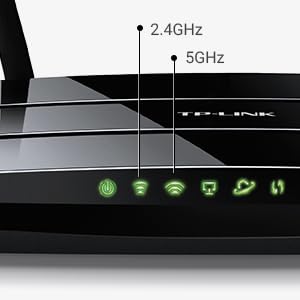
This thing is so fast and the range on it is amazing. I bought a cheaper router before this one and the range sucked and the router kept having to be reset. This one however works amazing. It is well worth the money. The antenna are for the 5Ghz signal which is a lot faster. I have 115 Mbps download and using the 5Ghz signal, I get the whole thing. The 2.4Ghz signal is very stable and the range is higher than the 5Ghz one, but it is not as fast. The 2.4Ghz is definitely more stable though. I use the 5Ghz for my laptop and the 2.4Ghz for everything else. I live in an apartment so I'm not worried about range. However there are a lot of wifi signals around here. Everyone uses 2.4Ghz so that band is very congested so I get signal interference. The old router had more trouble with the signal, but this one seems to work fine with both bands. Using 5Ghz is way better for me because higher speed and less interference from my neighbor's signals. The menu is easy to use and setting up was a breeze. There is guest access and there are so many more features with this thing, some that I don't even use. It has 2 USB ports on the back for file sharing with the network. The antenna are for the 5Ghz signal, the 2.4Ghz antenna are inside the router itself, so they are not visible. You can turn the router off with a simple button on the back, same with the wifi. Some devices can't use 5Ghz, but most new ones within the last few years can. This router is really fast and reliable. I recommend it for any home, but mostly for apartments.
J**R
Lo quería para sustituir el router que te entrega Movistar Fibra, e instalarle OpenWRT. Tuve dudas y estuve a punto de cancelar el pedido porque OpenWRT sólo es compatible con la versión v1.2 de este router que viene con el chipset Atheros. La versión 2 viene con el chip Broadcom que no es compatible. Finalmente me llegó con la versión 1.2.que sí es compatible y todo fue de maravilla. Ahora me permite ver la tele sin problemas en la tablet, a parte de abrir me instalar más servicios. Sólo una pega. En un TV-Box con Android y Kodi con el addon de MovistarTV (PVR) y en el ordenador con el VLC la tele se corta cada cierto tiempo. En cambio usando Kodi y VLC pero a través del udpxy del router, no hay ningún problema.
Trustpilot
1 month ago
2 weeks ago