Desertcart purchases this item on your behalf and handles shipping, customs, and support to India.
🎨 Elevate your digital canvas—create anywhere, create flawlessly.
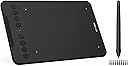
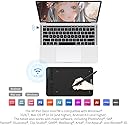
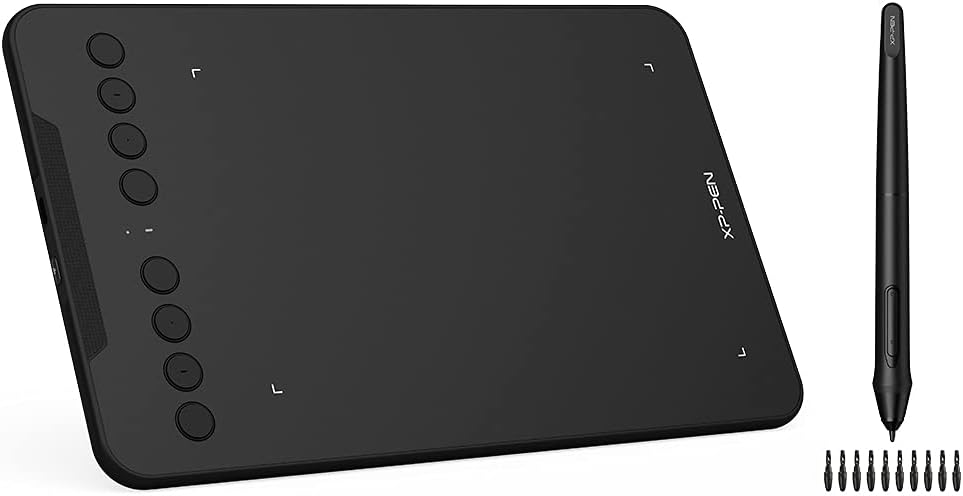
The XPPen Deco mini7 V2 is a portable 7-inch graphics tablet featuring 16,384 levels of pen pressure sensitivity and a battery-free stylus with 60° tilt support. Compatible with major creative software and multiple operating systems, it offers 8 customizable shortcut keys to optimize workflow, making it ideal for professionals and creatives seeking precision and mobility.


| ASIN | B08Q3PBKMH |
| Active Surface Area | 17.85 cm x 11.12 cm |
| Best Sellers Rank | 64,750 in Computers & Accessories ( See Top 100 in Computers & Accessories ) 112 in Graphic Tablets |
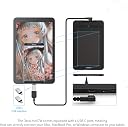
| Box Contents | pen tablet,battery free stylus,wireless receiver,pen clipper,10 x pen tips,usb to usb c cable,usb to usb c adapter,usb to micro usb adapter,quick start guide |
| Brand | XP-Pen |
| Brand Name | XP-Pen |
| Colour | Black |
| Compatible Devices | Desktop |
| Connectivity technology | RF , USB |
| Customer Reviews | 4.2 out of 5 stars 161 Reviews |
| Display Type | LCD |
| Item Dimensions L x W | 26L x 17.8W centimetres |
| Item Weight | 330 Grams |
| Manufacturer | XP-PEN |
| Manufacturer Part Number | XP-Deco min7 W |
| Model Name | Deco Mini 7W |
| Model Number | Deco mini7W |
| Model name | Deco Mini 7W |
| Native Resolution | 5080 LPI |
| Network Connectivity Technology | RF, USB |
| Operating System | ChromeOS, Linux |
| Operating system | ChromeOS, Linux |
| Pressure Sensitivity | 8192 Levels |
| Pressure sensitivity | 8192 Levels |
| Product Features | Portable |
| Product Warranty | 1 Year Warranty Against Manufacturer Defects |
| Screen Size | 7 Inches |
| Special feature | Portable |
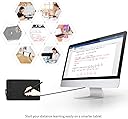
| Specific Uses For Product | 3D Modelling, Designing, Editing, Online Education, Painting, Remote Work, Working at a distance, Writing |
| Target Audience | Teacher |
R**N
Compact wireless writing/drawing tablet!
I was looking for a replacement tablet for my old wired Wacom tablet. I needed it to be compact and wireless and this was perfect! The writing surface with the pen has a good feel (although felt a bit squeaky to start with but this goes away) and I have been using it to annotate lecture notes. I cannot comment on the XP-PEN software as I am using OpenTabletDriver but it works great with this on Windows.
W**.
Xp pen deco mini 7w drawing tablet
Excellent drawing tablet very easy to set up just starting to try to draw some of the drawing apps are very good so much to learn on them the drawing tablet and pen are really good
C**A
You get what you pay for
I was bought this as a birthday present. It's ok and it works after a fashion. It's very basic but it does everything I want from it, which is basic masking for photography. Although it's supposed to be wireless it will only work when wired. My Windows 11 laptop refuses to recognise the driver despite having the most recent version. I wanted this model specifically for the wireless connectivity so my husband could have saved a few quid if I'd known about the wireless issue. Also, I have to reconfigure the user settings for left handed use and disabling the pen button keys each and every time I use the tablet on startup. If left unused for any length of time the pen tablet reverts to default and I have to reconfigure again. Overall the tablet is usable but is extremely frustrating to use because of the faults mentioned above. There are plenty of YouTube videos but 99.9% of them are in Hindi so I guess the tablet is aimed at a different market to UK. I wouldn't buy it again and when I can afford it I shall buy a more reputable brand.
A**D
Not User Friendly
I bought this product to use in my online tutoring lessons. Its not as straightforward to use as I thought. The app is also a bit tricky to set up the pen functionality. Selecting and deselecting pen options is not user friendly. I am using it for more than a month but still struggle to get grip on it.
S**H
Excellent so far. For the money, it does what it's supposed to.
Excellent so far. For the money, it does what it's supposed to. The battery in the pad lasts for quite a while between charges as well, so it doesn't prevent you from getting on with whatever you are producing. Not much else to say.
M**S
Great tool for teaching
Great to use as a teacher to write on PowerPoint from the back of classrooms
A**Y
Almost perfect mini tablet
Fantastic budget tablet. I have a large tablet display for my PC setup already but wanted something portable to use in another room. It's nice and responsive with good pen pressure and features an auto turn off feature to save battery which is nice. What I would have liked is Bluetooth functionality, as the wireless adaptor doesn't penetrate through walls very well. (I have my PC setup in another room, and also connected to my TV in my bedroom) I can get around this by purchasing a USB extender, I can't imagine too many people will have this issue anyway as they will likely be using it within closer range.
A**R
its ok
I had an issue with gaining the software and never received a reply from the help desk The tablet itself is compact easy to use with apps such as Teams but not so defined enough to be able to actually draw and edit whiteboards and slides etc Cheap and compact and allows some form of collaboration via a whiteboard for brainstorming etc
G**G
Marche très bien sur Mac
C’est la première fois que j’utilisais une tablette graphique. N’ayant pas de tablette, je me suis dit que ça pourrait être intéressant pour faire des dessins, signatures ou annoter un document. Elle arrive dans un boite contenant le stylet, un cable usb, 10 mines de rechange et 2 adaptateurs : un usb vers usb c et un usb vers micro-usb. Je trouve ça vraiment bien qu’il y ait ces adaptateurs, ayant un Mac j’en avais déjà mais c’est un petit plus ! Lors de la première utilisation il suffit de suivre le guide d’installation et de télécharger le pilote de la tablette graphique sur le site de XP-PEN, disponible aussi bien pour Mac que Windows. Très facile à installer, il permet de calibrer le stylet et la zone d’écriture. Vous pouvez soit brancher la tablette sur votre ordi, soit l’utiliser en bluetooth, elle s’est connectée rapidement et fonctionne très bien sur mon MacBook Pro 2017. Personnellement je l’utilise avec Paint X mais peut être utilisée avec n’importe quel autre logiciel graphique. Bon rapport qualité prix, idéal pour les dessinateurs.
D**.
Fiabilidad y compromiso
Todo perfecto 👌 y conforme con lo dispuesto en el artículo,y a tiempo. Muy satisfecho con la marca y el artículo.
F**K
The best budget friendly XP
The smoothness and the ease of use is just next level. Specially when used with official XP drawing software. The onlt issue I encountered is how to program the side keys.
N**D
Best quality and value for money 💰
It's an Excellent product. So far it's going well
S**K
Gutes Preis-/Leistungsverhältnis
Für den Preis ein Top-Gerät, einfach in Betrieb zu nehmen. Funktioniert gut mit MS Whiteboard.
Trustpilot
1 month ago
1 month ago