Desertcart purchases this item on your behalf and handles shipping, customs, and support to India.
๐ Connect. Control. Conquer your home theater setup.
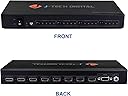
The J-Tech Digital 4x4 HDMI Matrix Switcher empowers professionals and tech-savvy millennials to effortlessly route 4 HDMI sources to 4 displays with 4K@30Hz resolution and advanced HD audio support. Featuring remote control options and built-in signal optimization, itโs designed for seamless multi-room entertainment setups. While praised for performance and flexibility, some users report durability concerns, balanced by responsive customer service and a 1-year warranty.


| ASIN | B01IDSASVQ |
| Best Sellers Rank | #234 in Audio & Video Selector Boxes |
| Brand | J-Tech Digital |
| Cable Type | HDMI |
| Color | black |
| Compatible Devices | Gaming Console |
| Connector Type | HDMI |
| Connector Type Used on Cable | HDMI |
| Customer Reviews | 4.2 out of 5 stars 147 Reviews |
| Item Weight | 3.2 pounds |
| Manufacturer | J-Tech Digital INC |
| Mfr Part Number | JTD-HD4x4-HIFI |
| Model Number | JTD-HD4X4-4K |
| Number of Items | 1 |
| Number of Ports | 4 |
| UPC | 766150279122 766150278446 |
| Unit Count | 1 Count |
| Warranty Description | 1 Year Manufacturer Warranty |
T**D
My J-Tech is a delight to use--compared to the previous video router.
This J-Tech is a delight. I say this after using an Expert Connect 4x2 HDMI Spiltter for two years. I have a simple setup of two TVs 12 feet apart and a OTA antenna. I had to turn the far TV on first in order to not upset the near TV. The remote was so bad I resorted to switching by hand. Their support was non-responsive. After two years the Expert Connect died completely. So I bought the J-Tech. Even though it cost a lot more it is worth it. The J-Tech works perfectly no matter what TV or input I switch to. The remote is excellent. It makes the task of switching HDMI with a video router transparent and easy. "Quality is remembered long after the price is forgotten."
T**Z
Amazing switch wish I bought 1 sooner
So I bought this for a unique situation I was trying to solve and it worked better than expected the only issue is finding a bracket to mount it but I used a few angle brackets and it worked for what I needed but Iโm designing one that Iโm going to 3d print
A**.
Works great! Easy enough to automate. Annoying beep, but easily fixed with SMT soldering tools.
Like the title says, it works great! No problems there. But the beep when changing channels is annoying at best and could easily be obtrusive if used theatrically. Fortunately, the beeper drive circuit is right out in the open once the cover is off, and easy to disable with a hot air pencil and tweezers. First, take the nut off of the power jack, and two screws out of the bottom, next to the HDMI jacks. Keep the feet on; that's *all* those screws do. Then the cover slides off to expose the PCB. To disable the beep, either remove, or turn like I did, the 0603 resistor R538. I'd recommend turning it to connect like I did, because that keeps the transistor turned off a tiny bit better, and it keeps everything there in case you ever want to re-enable it. Then close it back up like it was, and you're done! No more beep, and everything else unchanged. To control it on RS232, the manual that ships with it says how to use an app that is not included, so it's not all that useful. And for theatrical automation, you'd want to use your own software anyway. The message format is binary, so this is hexadecimal data, not ASCII characters: 5B A5 02 03 __ 00 __ 00 00 00 00 00 __ The 1st __ is an input number: 01 to 04 The 2nd __ is an output number: 01 to 04 The last __ is a checksum, so that the entire message sums to zero (if you get this wrong, the message does nothing) Send that at 19200 8N1, and the specified output switches to the specified input. Repeat for each output that needs to change. No feedback on RS232, and I haven't found any other messages. But you can see the lights and picture change, and a beep if you haven't disabled that. Example bash script for a Linux-based controller, that can be called by anything: #!/bin/bash PORT=/dev/ttyUSB0 stty -F $PORT 19200 # baud #\x5B\xA5\x02\x03\xii\x00\xoo\x00\x00\x00\x00\x00\xcc | i=input, o=output, c=checksum to zero echo -en "\x5B\xA5\x02\x03\x01\x00\x01\x00\x00\x00\x00\x00\xF9" > $PORT # Output 1: Audience <- Input 1: Program Display echo -en "\x5B\xA5\x02\x03\x02\x00\x02\x00\x00\x00\x00\x00\xF7" > $PORT # Output 2: Rear Screen <- Input 2: Confidence Monitor echo -en "\x5B\xA5\x02\x03\x03\x00\x03\x00\x00\x00\x00\x00\xF5" > $PORT # Output 3: A/V Capture <- Input 3: Stage Input echo -en "\x5B\xA5\x02\x03\x04\x00\x04\x00\x00\x00\x00\x00\xF3" > $PORT # Output 4: Overflow <- Input 4: Live Stream The user that it runs as, must be a member of the 'dialout' group. To ensure this: sudo usermod -a -G dialout <replace_with_username> reboot
A**X
Clear Picture and Great Product
I recently remodeled an older (1930s) home and had all of my TV receivers, Blu-Ray Player, and RoKu run into a central closet. This 4 x 4 matrix is the perfect item to distribute the signals to the TVs I have across my house (I am using HDBaseT TXs and RXs to distribute the HD video signal and IR signals across the home). The 4 x 4 matrix switcher has been great to switch between the inputs to the various outputs across the home. I have only switched the matrix from inside the closet as I am still building out my IR system. My plan is to use a Logitech remote to universally switch the inputs from the various home locations. Overall, the product provides very clear signals to the three TVs I currently have running through the switch as well as the two receivers, Blu-Ray player, and RoKu. I am not a 4K expert but the picture is very clear and I would say there has been no difference in image from before I used the switch to after using the switch. As I continue to build out my system, I anticipate using more J-Tech products as they are a good product for the price.
B**9
ZERO Stars.. Original matrix failed less than 8 months after purchase. Warranty replacement failed after only 15 minutes!!!!!
I cannot recommend this product... it may work well for 8 months or now even for 15 minutes, but I'm now 0 for 2 on this matrix, awaiting a reply from customer service. My second unit (the warranty replacement for my original unit) just had a power failure after only 15 minutes of use! At this point, I believe that they should simply refund my purchase price and let me buy some other unit. So what happened? The whole story thus far............. My original matrix worked really really well for approx 8 months, but then for no apparent reason, Output 1 failed entirely... Then approx 4 weeks later, Output 2 failed entirely. All 4 Inputs still worked fine. I contacted J-Tech via Amazon, and they quickly agreed to replace the matrix under the 1-year mfr warranty. I shipped the defective unit (at my own cost) to them on 7/5/2018, and the replacement arrived on 7/13/2018. I just plugged in the replacement unit, and it had a complete power failure after only 15 minutes. It worked perfectly for those 15 minutes, and then nothing......... all power dead, which is an entirely different problem from the first unit which I just returned. When working, I give the 4x4 matrix 4 Stars for OPERATION(the screen blackout on all outputs while switching sources is the only significant complaint), but the fact that 2 channels failed in 8 months would lead me to give it 1-2 Stars at best for DURABILITY. I had given J-Tech 5 Stars for CUSTOMER SERVICE, especially for Nathan promptness, politeness, and professionalism in all communication, but good service on a bad product is still bad overall.
T**M
This is awesome for a presentation like application
4 by 4 matrix. It works great, and sound comes through without a lag that I notice. I have only used it for presentations, but it saved the business a fortune!
G**Y
Good performer!
I purchased this unit to allow more flexibility for viewing options from our satellite TV system and our audio systems. The unit currently has a Hopper 3, and one Joey connected to Input 1 and 2. A DVD player is connected to Input 3. A Google Chrome streamer Is connected to Input 4. Output 1 feeds a large HD plasma TV in the living room. Output 2 feeds the HD LED set in the M. Bedroom, and another HD LED set in the kitchen via an amplified splitter. Output 3 feeds two 13 inch HD LED sets, one in the office and the other in a spare bedroom through an amplified spliter. Output 4 feeds tandem amplifiers that drives ceiling mounted speakers throughout the house and garage. The system allows any of the four sources to provide a signal to any TV or the amplifier. Picture quality is great! Joey 2 feeds three analog sets in the mother-in-law apartment via a distribution amplifier, and Joey 4 feeds another HD Plasma set in the sunroom. This is the coolest little gadget and opens up many viewing choices.
M**A
This piece of equipment is super cool for what it is supposed to do
This piece of equipment is super cool for what it is supposed to do. My only regret is that I wasted my money because it did not do what I wanted it to do. Let me explain: This matrix will let you switch and control any inputs to any outputs. For example, I can use a computer with an HDMI cable and have it displayed on 2 external monitors, while my PS4 is displayed on a third monitor. OR, with the push of a couple buttons, I could have my computer displayed on 1, and the PS4 displayed on 2. What I WANTED it to do, was see 3 external monitors as 3 separate displays from 1 HDMI cable coming from my computer. It successfully DUPLICATED on all 3 monitors, but did not EXTEND the displays. I basically had Display 1, Display 2, Display 2, and Display 2. What I wanted was Display 1, Display 2, Display 3, and Display 4 using this matrix. I even tried using an HDMI splitter before connecting multiple HDMI cables to multiple inputs (from same computer) โ no dice. Long story short, you need a graphics card with more than 1 video port. While my USB port replicator (3.0, with 2 HDMI and 1 DP ports) works the way I want it to with multiple monitors, it has its own graphics software, and the video is choppy when I do anything on the computer. Great piece of hardware, but that made me a sad panda.
Trustpilot
1 week ago
2 weeks ago