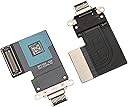
Charging Port Repalcement for iPad Pro 11 1st 2nd / iPad Pro 12.9 3rd 4th Gen
Product ID: 377245611
⚡Reliable fast charging port
🔌Precision dock connector fit
🛠️Durable flex cable design
₹ 1428
1
Sold byAmazon IndiaDelivered byDesertcartCustomer service byDesertcartReturns14 days · 30 with PRO
Buyer Protection · Full refund if your order doesn't arrive as described.
Desertcart purchases this item on your behalf and handles shipping, customs, and support to India.
Secure transaction
Description
⚡ Power Up Your iPad Pro Like a Boss — Don’t Let a Dead Port Slow You Down!
- SEAMLESS COMPATIBILITY - Tailored for iPad Pro 11" (1st & 2nd Gen) & 12.9" (3rd & 4th Gen) models—know your model, upgrade with confidence.
- PREMIUM QUALITY ASSURANCE - Each dock connector is rigorously tested to ensure flawless performance and longevity—quality you can trust.
- RESTORE FULL CHARGING POWER - Fix intermittent or failed charging issues and get your iPad Pro powered up like new—no more guessing which charger works.
- PRO INSTALLATION RECOMMENDED - Designed for tech-savvy pros—ensure flawless installation and avoid costly screen damage.
- COST EFFECTIVE APPLE ALTERNATIVE - Save hundreds on repairs—professional-grade replacement at a fraction of Apple’s repair cost.
This high-quality dock connector replacement flex cable is engineered exclusively for iPad Pro 11" (1st & 2nd Gen) and 12.9" (3rd & 4th Gen) models. It restores reliable charging functionality, eliminating intermittent power issues. Professionally tested for durability and performance, it offers a cost-effective alternative to expensive Apple repairs. Note: Professional installation is strongly recommended to avoid damage.

Specifications
| ASIN | B095221XR5 |
| Best Sellers Rank | #43,364 in Electronics ( See Top 100 in Electronics ) #11 in Tablet Flex Cables |
| Date First Available | May 16, 2021 |
| Item Weight | 0.2 ounces |
| Item model number | FBA-TPIPDOCK-PRO11-B |
| Manufacturer | TPhaelay |
| Product Dimensions | 6 x 3 x 0.3 inches |
Common Questions
Yes, all products are sourced from reputable international marketplaces in US, UK, and UAE. We have a robust verification process to ensure product authenticity, and each item is inspected at our warehouse before shipping to customers. Every product comes with applicable warranties and our standard return policy for your peace of mind.
We typically deliver within 4-9 business days to major Indian cities. Each order is trackable end-to-end through our system. We handle all customs clearance and use reliable courier partners for last-mile delivery. You'll receive regular updates about your order status via email and our app.
Desertcart is an international e-commerce platform operating since 2014. We securely process thousands of orders globally each day. Every product goes through our quality verification process before delivery, and we provide end-to-end order tracking, 24/7 customer support, and a comprehensive returns policy to ensure a safe shopping experience.
All products are sourced from US, UK, and UAE. Our prices include international shipping costs, customs duties, payment processing fees and logistics handling to ensure smooth delivery to India. We handle all customs clearance so you don't face any hidden charges later.
Trustpilot
TrustScore 4.5 | 7,300+ reviews
Shop Global, Save with Desertcart
Value for Money
Competitive prices on a vast range of products
Shop Globally
Serving millions of shoppers across more than 100 countries
Enhanced Protection
Trusted payment options loved by worldwide shoppers
Customer Assurance
Trusted payment options loved by worldwide shoppers.
Desertcart App
Shop on the go, anytime, anywhere.