

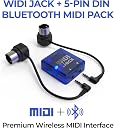




CME WIDI Jack + DIN-5 Cables Premium Bluetooth MIDI Adapter
Product ID: 394403359
Details
- BrandCME
- Connectivity Technology5-pin DIN MIDI
- Number of Channels16
🎵3 ms ultra-low latency
🔌Powered via MIDI Out or USB-C
🔗Bluetooth 5.0 MIDI wireless
Desertcart purchases this item on your behalf and handles shipping, customs, and support to India.
🎹 Unleash your MIDI freedom—wireless, flawless, and ready to jam!
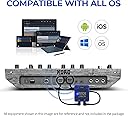
The CME WIDI Jack + DIN-5 Cables is a premium Bluetooth 5.0 MIDI adapter that transforms traditional 5-pin DIN MIDI devices into wireless MIDI controllers. It delivers ultra-low 3 ms latency and sub-1 ms jitter for precise timing, powered via MIDI Out or USB-C. Compatible with iOS, macOS, Windows 10/11, and Android, it includes automatic pairing with WIDI devices and manual connection options for other platforms. The WIDI app enables firmware updates, personalized settings, and multi-device Bluetooth MIDI group management, making it an essential tool for clutter-free studios and seamless stage performances.


| ASIN | B09K46681M |
| Audio Input | USB |
| Best Sellers Rank | #2,910 in Musical Instruments ( See Top 100 in Musical Instruments ) #6 in Computer Recording MIDI Interfaces |
| Brand | CME |
| Brand Name | CME |
| Compatible Devices | Android via Bluetooth MIDI integrated apps, DIN-5 MIDI Devices & Instruments via 5-PIN DIN MIDI Out, Pair automatically with other WIDI devices and standard BLE MIDI Controllers, Pair manually with iOS and macOS., Works with Windows 10/11 via Korg BLE MIDI Driver Compatible Devices Android via Bluetooth MIDI integrated apps, DIN-5 MIDI Devices & Instruments via 5-PIN DIN MIDI Out, Pair automatically with other WIDI devices and standard BLE MIDI Controllers, Pair manually with iOS and macOS., Works with Windows 10/11 via Korg BLE MIDI Driver See more |
| Connectivity Technology | 5-pin DIN MIDI I/O, Premium Bluetooth MIDI, TRS MIDI Type A/B via optional cables |
| Customer Reviews | 4.4 out of 5 stars 1,510 Reviews |
| Global Trade Identification Number | 08885011101364 |
| Included Components | 1x WIDI Jack (S-WJ00B11) + 5-PIN DIN (2x) Accessory MIDI Cable Option (S-AW00C51) |
| Item Highlight | 5-pin DIN hardware, Ultra low 3ms Latency, Power via MIDI Out or USB-C |
| Item Type Name | Wireless MIDI Interface via Bluetooth 5.0 with 5-PIN DIN MIDI cables included. Powered by MIDI Power or external via USB-C |
| Item Weight | 2.3 ounces |
| Manufacturer | CME |
| Manufacturer Part Number | S-WJ00B21 WIDI Jack DIN-5 Pack |
| Model Number | WIDI Jack |
| Number of Channels | 16 |
| Number of Items | 1 |
| Operating System | Compatible OS via Bluetooth - With iOS, macOS and Android via integrated BLE MIDI. With Windows 10/11 via Korg BLE MIDI drivers., USB-C port for power only, not data! |
| Supported Software | Works with all Bluetooth MIDI software – For non-Bluetooth MIDI programs, simply add bridge apps such as midimttr (iOS), MIDI BLE Connect (Android), or the Korg BLE MIDI driver (Windows) to enable full compatibility. Supported Software Works with all Bluetooth MIDI software – For non-Bluetooth MIDI programs, simply add bridge apps such as midimttr (iOS), MIDI BLE Connect (Android), or the Korg BLE MIDI driver (Windows) to enable full compatibility. See more |
| Unit Count | 1 Count |
| Warranty Description | 1 year manufacturer. |
S**S
Works flawlessly with Roli Piano (Lumi Keys)
Windows 11's built in Bluetooth has weird quirks & limitations with Roli Piano (Lumi Keys) and most midi Bluetooth controllers. The Widi Bud Pro worked flawlessly after performing the USB and Bluetooth firmware update. I recommend being very close to the Widi Bud Pro when updating the firmware with your phone. Roli is now instantly recognized the second I turn it on. I can't notice any sort of lag whatsoever It's almost as if the unit is plugged in via USB when it's not. Simply amazing! I finally found the solution I'm so happy!
K**N
Perfect Bluetooth MIDI fix for iPad 9th Gen & Donner DDP-80
If you own a Donner DDP-80 and use an iPad (9th Generation) for lessons like Piano Marvel, this is the solution you need. We switched to this because the iPad 9th Gen only has one port; using this Bluetooth adapter allows us to connect the piano and charge the iPad at the same time. The Highlights: Zero Latency: I was worried about a delay between hitting a key and the iPad registering it, but the response is instant. There is no noticeable lag. Visual Feedback: A blue light on the WIDI flashes with every keystroke, confirming the signal is active. Cleaner Setup: It removes the bulky USB cable between the piano and tablet. Children broke a few of these... The Trade-offs: Price: A bit pricey for an adapter. Power: It requires its own separate power cable to stay active. Note: This is an honest review based on my personal experience; I am not affiliated with the company and this is not a paid advertisement. Quick Setup Guide: App First: Download the CME WIDI app. Pairing: Hold the small button on the side of the device to connect via Bluetooth. Firmware: Use the app to run the firmware updates. Important: There are two separate updates to complete! Launch Lessons (App): Open Piano Marvel. It detects the device automatically and works perfectly. It’s an investment, but it’s the best way to keep the iPad charged during long practice sessions on the DDP-80.
L**.
Works great.
The device is exactly what you'd want for a point to point wireless MIDI connection base station. Used in a system with CME's WIDI-core remote module, it pairs reliably. Latency is as advertised (3mS) in any reasonable signal condition but seems to increase a bit right before you reach range limits. The overall range of the is not huge, but certainly adequate. A range improvement could be had using the CME WIDI-core module which uses an external Bluetooth antenna, if you have room for that (which I didn't). Bluetooth paring is always a sketchy business, but in normal operation this kit is as good as I've seen and will not be an issue. The only troubles I had were during the external firmware development process where I smacked it around in ways that would not be found in normal operation, so I don't count that against CME. CME handles the acquisition and loss of lock to the remote system well: it seems to provide "ALL NOTES OFF" on loss of lock and at first acquisition of lock. This is vital to avoid embarrassing stuck notes. All in all, very satisfied and will use CME's products in future projects.
T**E
WIDI Master: tricky installation but impressive technology
For Android, its quite complicated to setup the WIDI device. First, the firmware must be updated with the WIDI app, and sometimes de WIDI device it's not even detected by the Android phone, so one or more resets are required. Then, another app for Bluetooth MIDI must be installed in the Android Device ("Bluetooth MIDI Connect" or "MIDI+BTLE"). Once the connection is established with that app, there must be another app installed that can receive and send MIDI messages through Bluetooth. So it's quite and hit or miss process to find one that works. So far, "MIDI Keyboard", "MIDI Sequencer" and "Super MIDI Box", are the only ones that have worked for me. Even "Roland Zenbeats" does not detect the external MIDI device via Bluetooth. Guess Android's Bluetooth implementation requires some fine tuning still. However, when the setup works, it's quite impressive. The MIDI messages are so small, that there's no latency at all. You play the keys in your smartphone, and the sound comes out from the external MIDI sound device with the WIDI connectors installed, almost inmmediatly. The best use for me, is to create a MIDI sequence and put it to play in loop while I jam with other instrument. No need to invest in a hardware sequencer. However, the downside is that the setup is not 100% reliable: sometimes there are ghost notes, and sometimes the sound freezes or stops and you need to reset everything. Maybe not too reliable for live playing at this moment, but wonderful for fun at home. I guess in iOS devices, those problems are rare. Anyway, the price tag is low enough to justify the purchase.
J**S
Original OP-1 & EP-1320 Bluetooth MIDI upgrade 👏
I've been wanting to experiment with MIDI more but am limited by USB MIDI on the OP-1, so I finally decided to try out CME WIDI and I am very pleased with how simple it was to set up both WIDI K.O. II plus the WIDI Uhost together. The user guide could use some work because they're trying to account for all of the WIDI devices (which to be fair are practically identical in how they're set up) but it was very alarming at first when all I had to do was update them to get them working properly with each other. I am now having loads of fun figuring out the possible MIDI route setups and I only wish the WIDI Uhost was able to be powered by the OP-1 as it does with the OP-Z. The WIDI K.O. II has been fun to swap between the EP-40/EP-1320 and I already want another one as they look great with the added Medieval stickers! I was not expecting the WIDI Uhost to practically be the size of a quarter, it's very tiny and comes with a magnet to attach to stuff so hopefully it won't get lost but I guess that just makes it also super portable. I've had no issues to report so far, I will know more once I am able to start pushing MIDI to it's limits but it's been able to keep up with whatever I throw at it - in either direction. 10/10 would buy again - especially used, for the discount 👍
Z**.
A real life saver
I am using this with: Windows PC Android Tablet Meta Quest 3 and Quest 2 VR headset (PianoVision app) -I have a Kawai digital piano and did not want to run a USB cable around to my devices. However, I had trouble connecting my piano's Bluetooth to anything other than official Kawai apps. Windows requires 3rd party hacks for Bluetooth MIDI and they do NOT work well. -This device saves me the headache on everything. I had some troubles updating the firmware but eventually got it squared away. Once I had set the device up, it's SUPER easy. Just plug it into any device, the piano immediately connects with no noticeable latency, and it stays connected. It bypasses your devices bluetooth stack all together which is great, because many android apps don't support bluetooth midi. Please note - when I move my receiver 8 ft from my piano it starts to cut out notes. This is most likely a limitation on my piano's bluetooth transmission power, but something to keep in mind. I highly recommend this product. I would have given up on using my keyboard's bluetooth midi if i hadn't found this device.
G**D
Appealing in theory, but many pitfalls!
I bought these to send MIDI to my guitar pedal board from my MPC Live, and to transmit note data from a Roland SPD drum pad to the MPC Live. These mostly work good at home, but take caution: 1. Prepare for these to fail when playing out! As with any consumer-grade wireless music tech, this is hopefully intuitive to you. Bring a long-enough backup MIDI cable. Bluetooth operates on the 2.4GHz frequency band which can be unpredictably noisy outside of a controlled environment. Despite working great at home, I could not connect to the WIDI Master out of three shows I played in small DIY venues. If you absolutely must risk it, bring an extra MIDI cable or two when it fails to connect. 2. Limited options for powering the device: Drawing power from the MIDI Out port of your device is *the only way* to power the WIDI Master. This design is hacky as MIDI output ports are not universally designed to power other devices, even though popular products like MIDI Solutions boxes use the same design. In theory you could power the WIDI Master from a different pedal's MIDI Output port, but a) the cable is short and flimsy, and b) my Strymon pedals don't present power on their output ports. I ended up returning one WIDI Master for a WIDI Jack which can be powered by USB-C. 3. Limited use as a wireless MIDI "receiver". Not every MIDI device has an Output port. This is probably best for sending MIDI from a keyboard to e.g. a DAW. I wanted to send MIDI wirelessly from my MPC Live to my Line 6 Helix Stomp, and pass that MIDI data through to other pedals on my board. But, because I had to sacrifice the Helix's Output port to power the device, I couldn't send MIDI data from the Helix to other pedals. 4. Uncommon adapter cable form factor: The WIDI line of products uses 2.5mm TRS MIDI cables, which are proprietary as far as I can tell. As a consumer you are basically stuck with buying adapter cables from CME. With the increased popularity of 3.5mm TRS MIDI in the past several years, it would have been nice if CME used the same form factor. The smaller size feels more fragile than the 3.5mm "standard" 5. I noticed occasional latency when transmitting from a Roland SPD drum pad to my MPC Live. It's somewhat rare, but not great if you are playing percussion as timing is crucial. All in all, these are convenient, but you should consider *how* you are going to use this in practice. Again, do not rely on this for performing. If you're like me and primarily need this as a MIDI "receiver", you will sacrifice the Output port on whatever device you want receiving that data. The appeal of using one less cable is great, but consider the risk/reward!
L**T
GREAT Product that made my life much better!
I use these to control program changes with my Kemper Rack using an Android phone and Band Helper app. I have MIDI commands associated with each song. When a song is selected in the set list, the correct patch and settings are setup automatically (and wirelessly) on my Kemper. I have them plugged into the back of an SKB roto molded 3 space case with my Kemper and the distance is great. I have been up to 50 feet away without any problem (that's as big a stage as I am likely to ever play on anyway :) ). These were easy to setup and get working. Worked great on my Android tablet. I do have to pair it every time through Band Helper (once a power up), but it has been rock solid (not drops, no misses). Well worth the money.
S**N
Excellent product - but make sure you install them correctly
These Widi links are a marvel, allowing me to connect a stone-age but wonderful Yamaha keyboard to the latest and greatest computer equipment. I did however have an issue installing them - my iPad would not recognise them. There was excellent and immediate support from the manufacturer and from the Facebook user group so I was able to identify the problem quickly - good support is rare these days so I think the manufacturer should be praised for doing good support. The issue turned out to be a) firmware needed to be updated and b) all other bluetooth profiles must be deleted before installation ( in my case it was an Apple Pencil causing the problem). So you must delete all existing bluetooth connections, then install and run a firmware update on the WIDI, and then re-install the other bluetooth profiles on top. Everything now works and is of high quality. Recommended.
M**H
Snelle correcte levering
Goede kwaliteit Midi draadloze overdracht .
C**E
Merveilleux
Acheté pour établir une connexion MIDI entre mon clavier (piano digital) Panasonic SXKC211, qui date de l’an 2000, et ma tablette Galaxy A9 Plus. Fonctionne comme un charme. Pour l’installer sans problème, toutefois, il faut suivre les instructions á la lettre. Notamment, ouvrir, fermer le Bluetooth et réouvrir le Bluetooth à certains moments précis est absolument nécessaire. Malheureusement, mon objectif consistait à utiliser la connexion avec Flowkey mais ce programme, qui reconnaît les connexions MIDI BLUETOOTH lorsqu’on utilise un produit Apple, ne les reconnaît pas encore avec les tablettes Andoïd. J’ai quand même décidé de conserver le MIDI Master en espérant une mise à jour prochaine de Flowkey. D’autres applications reconnaissent la connexion et c’est tellement bien de ne pas avoir de fils qui traînent par terre, De plus, la connexion fonctionne parfaitement, ce qui n’était pas le cas, avecs les fils que j’avais achetés précédemment.
D**R
CME. Mola.
Es la empresa con mejor calidad WIDI , tengo dos máster un Uhost y un WidiJAck, Todos son excelentes y polivalentes , aunque el mayor fallo puede ser tener que dar formato completo para la mejor sincronía y tener que hacer esto cuando se cambia la configuración para asegurar la mínima cantidad de jitter o latencia en lo posible. Habría que mejorar que ese proceso no tenga que hacerse para reajustar asegurando la latencia jitter mínimo, y supongo que está en desarrollo del código y mejorar ese bugram
E**I
Çok hızlı
Hem hızlı bağlantı kurdum hem de gecikme yok denecek kadar az. Ipad pro 11 2021 sadece tek usb c portu var. Hub almaktansa kulaklık adaptörü aldım. Midi klavyemi de midi master ile bluetooth ile ipad e bağladım. Hiç zorlanmadım hemen çalıştı. Cubasis uygulaması hemen algıladı. Yani ihtiyacımı kablosuz giderdim.
Trustpilot
2 weeks ago
1 month ago