Buy anything from 5,000+ international stores. One checkout price. No surprise fees. Join 2M+ shoppers on Desertcart.
Desertcart purchases this item on your behalf and handles shipping, customs, and support to India.
🖱️ Elevate your workflow—one mouse, three devices, zero limits.
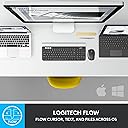
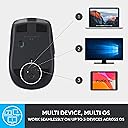
The Logitech MX Anywhere 2S is a premium wireless mouse designed for power users who demand seamless multi-device control. Featuring Logitech Flow technology, it allows effortless navigation and file sharing across three computers via Bluetooth or USB receiver. Its laser sensor tracks on virtually any surface, including glass, while the hyper-fast scroll wheel accelerates productivity. With up to 70 days of battery life and a rapid 3-minute quick charge, this compact, ergonomic mouse is built for professionals who work anywhere and everywhere.
| ASIN | B071VK5KXN |
| Additional Features | Ergonomic Design |
| Antenna Location | Laptop |
| Are Batteries Included | Yes |
| Are Batteries Required | Yes |
| Battery Average Life | 2 months |
| Best Sellers Rank | #4,941 in Computer Mice |
| Brand | Logitech |
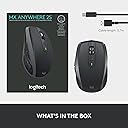
| Built-In Media | mouse, receiver, user guide |
| Button Quantity | 7 |
| Color | Graphite |
| Compatible Devices | Laptop |
| Connectivity Technology | Wireless |
| Customer Reviews | 4.6 out of 5 stars 8,055 Reviews |
| Enclosure Material | Glass |
| Global Trade Identification Number | 00097855131041 |
| Hand Orientation | Ambidextrous, Right |
| Hardware Platform | Mac, PC, iPadOS 13.1 or later (Pointing, clicking, and scrolling will be supported by enabling the “Assistive Touch” accessibility feature.) |
| Item Dimensions L x W | 1.35"L x 2.42"W |
| Item Type Name | Logitech MX Anywhere 2S Wireless Mouse with FLOW Cross-Computer Control and File Sharing for PC and Mac - 910-005132 |
| Item Weight | 100 Grams |
| Manufacturer | Logitech |
| Mfr Part Number | 910-005132 |
| Model Name | 2017 Model |
| Model Number | 2017 Model |
| Movement Detection | Laser |
| Movement Detection Technology | Laser |
| Number of Batteries | 1 Lithium Polymer batteries required. (included) |
| Number of Buttons | 7 |
| Operating System | Mac OS X 10.1 Puma, Windows 10, Windows 7, Windows 8 |
| Power Source | Battery Powered |
| Range | 30.0 feet |
| Special Feature | Ergonomic Design |
| Style Name | Mouse |
| UPC | 097855131041 732083926723 |
| Warranty Description | 1 - year limited warranty |
A**R
My new favorite everyday and travel mouse.
I love this mouse. I had the last generation of this mouse, but it was dying too frequently, maybe lasted two weeks with moderate use. So I bought this one since it has double the battery size and supposedly a 70 day battery life. It came 50% charged so we'll see how well it does. Pros: -Connectivity options to spare. With laptops losing ports it's nice to have bluetooth as a fall back, and when Windows 10 decides to act up and not accept the bluetooth input then it's nice to have the unifying receiver to work with. One thing to note, I don't know if this says it anywhere, but this is a Bluetooth 4.0LE device I know Logitech likes hiding behind some weird name like "Bluetooth Smart". I have BT 4.0 on my PC, and haven't tested to see if it works with older radios. -It plays well with Android. Ever since my NotePro got lollipop (5.0), it stopped accepting mice inputs. Called Samsung and they tried to sell me on their microscopic $50 mouse. At least with this $50 you know you're getting great quality. -Love that I can toggle between 3 devices. Cons: -Minor one is that the "Middle Click" is gone, that toggles the scroll wheel state from free to ratchet. As a result they added a button below the scroll wheel which by default is a gesture activation button, haven't tried it out. I just went into the software and changed it to middle click. The other annoying thing is that it's awkward to hit and not easily doable. I imagine if you have small hands, not an issue, but with my medium male hands, it's not great. -The 2S did away with a "connect" button on the underside. The MX 2 has that button. I like that button since it makes setting up pairing easy and means there isn't an annoying button combo one has to remember when pairing since the power is tied to a toggle switch. Normally with like Bluetooth speakers and headphones, the power is a button and depending how long you press it it determines if it enters pairing mode. This being a switch removes that dual feature of the power button. It feels the same and operates the same as the MX 2 before it. Haven't messed with the "Flow" feature, and will have to see if the battery can withstand my testing. I used to be a huge fan of M510 by them, but only having 3 mouse ports made it annoying having to sacrifice one for a mandatory unifying receiver. For me this mouse is the perfect size, for larger hands, can't say. The back of it juts so high that I think that's what helps make it fit better in multiple hand sizes. Good mouse, with all the buttons you could want for and okay enough software for extended customisation options. The only issue with Logitech Options is that it has a battery level indicator, but it's super vague and when you're charging the mouse it won't tell you how long until it's full. Won't even display charge level percentage. BT 3.0 was built with that option on offer to companies and it has been an option since 3.0, so 4.0 clearly has that feature and the mouse vaguely takes care of it by giving you vague responses and a near useless battery indicator. Percentage at least. Note: Any future updates, revelations and what not will be listed in the comments since Amazon gets rather fickle when it comes to people updating reviews. Sometimes they don't accept the changes. UPDATE: Battery Life Test Claims: 70 days worth, but if you read the manual that's 70 days worth at 8hrs per day or 560hrs max total. My Discover: Around 450hrs My Setup and Use Case: - April 6th got it and used it since then - So about 30 days in, 20% battery life; -30 days at 12hrs average use per day = 360. - 20% = 1/5 left so 5-1= 4. - 360/4 = 90; 90+360= 450 max projected life span -I'm using a 3M mouse pad that is said to increase the battery life of optical mice by a max of 80% -Connected via BlueTooth, not bad. Lasted more than a month, but far from the 70days or 560hrs max total. Maybe you can squeeze more out of it if you use the Unifying receiver, I doubt it. Also this has the same battery size as the last generation mouse (500mA)
B**E
Very versatile and easy to transport
TLDR; Amazing mouse good for gaming, office, or home use that can be used on every surface I've tried. I would definitely recommend this and I will likely buy another one for use at my desktop at some point, as I've loved it so much. I received this mouse to replace a 5 year old Logitech mouse that was starting to cut out and wouldn't receive input all the time. As I often use my computer on many different surfaces in many places, I knew from past frustration that I needed a mouse that would work on almost any surface. After doing a lot of research, I decided to give this one a try, and let me say that I am very pleased that I did. Performance: This mouse will operate on quite truly every surface I've tried so far, even ones that are shiny, soft (like blankets and pillows), or partially reflective, which is where I have previously ran into issues with mice. Battery Life: Battery life is where I think it is a little lacking. I use my mouse heavily throughout the day, probably anywhere from 6-8 hours a day. My previous mice have operated on AA batteries, which in a mouse tends to last for a year or more of heavy use. While I think this mouse has a good battery life, and it operates exactly as advertised, I do find it a nuisance to have to monitor the battery life before going on a trip and charge it every few weeks. This trade off may be due to it taking advantage of Bluetooth technology though, which I will go into next. Versatility: This is another area I've been very impressed in and love. The mouse comes with a dongle like most other wireless mice and is simple plug and play. But where it gets really exciting is if you take advantage of the Bluetooth technology. The mouse is capable of connecting to up to three computers at once via Bluetooth (you change the active computer with a toggle button on the bottom). For someone who switches constantly between personal and work computers this is amazing, but it gets even better. If you download the Logitech software, you can actually use the mouse to copy and paste files from one computer to another. Absolutely brilliant, whoever designed this at Logitech deserves a raise. Connectivity: I bought a second mouse alongside this one at the time, and wish now I had just bought two of these. The other mouse I bought was wireless as well, but it occasionally drops connection which is very aggravating. With this mouse, whether I'm using Bluetooth or dongle, I have never lost connection and even when gaming have never noticed an input lag. Overall, very satisfied with this product. I've had a few bad Logitech products in the past, but they truly keep improving with each iteration and I look forward to what they have in store next. I would recommend to anyone looking for a versatile mouse that they consider this one.
R**D
Battery has only been charged twice and it still had over half life when I plugged it in...
This is quite frankly the best mouse, not only portable/cordless, but also laptop mouse I have ever used. I have been around computers for over 30 years, and have started off with the earliest mice I think were commercially available to the public. I have went through some mice. This feels so nice to maneuver and click let alone scroll with the two speed setting wheel. It has great tracking excellent feedback on clicks and the middle mouse button is not longer necessary on the scroll wheel, something I have always detested(trying to click and scrolling the page instead or not clicking at all and still scrolling/moving an object in program). I have been using this on and off for about 3 months now. It is barely on it's 3rd charge though it wasn't even dead or anywhere close when I plugged it in. I forgot about the software that logitech kinda makes you install when you plug it in if you are connected to the internet at the time. I haven't always liked their suites but most are alright now, as usually everybody has some kind of telemetry connected to their devices through the software/drivers. But this was pretty quick and painless and kinda helped out after installing the software for the mouse. The mouse tracks very well, and the speed at which it operates(dpi) is right in a sweet spot for me, as I do game, but I also program in CAM software and design or modify models in CAD software like solidworks, and mastercam. The middle scroll wheel is adjustable on the fly by simply pressing down to engage the other speed. One is basicly a freewheel scroll, so you can just flick it and it will keep going, while the other is a kinda rough click, that has little "ticks" inbetween each register of scrolling. I absolutely love the mouse and what's funny, is it replaces 3 logi vx revolution. Which I was stunned by since they were so friggin awesome, but discontinued so quickly, it made me mad. I literally found one at bestbuy on their clearance rack, and that was hilarious since I never knew they existed, but come to find them the best mobile laptop mouse in existence. Compact, great battery life, and the dongle fit inside the body. All highly desirable characteristics of the revolution. This mx anywhere 2s takes all that and makes it better. Its even slimmer!!! The only negative I could possibly see somebody saying about the anywhere, is that it doesn't have those two scroll options on the sliding button on the revolution. this is absent on the anywhere but quite frankly I am happy they removed it, as it would always get hit when trying to click in haste while gaming on my laptop. Bottom line, this is quite possibly the best mouse that you can get for a computer, but definitely for a laptop.
G**A
Solid mouse
Wanted to take some time to get to know this mouse before writing my review. Some of the things I took note of was the battery, the software, and how it functions in daily life. Firstly everybody has different priorities when it comes to a computer mouse and some will value certain traits over others. I can just tell you where mine lay and hope that helps you make a good judgement for yourself. My number one preference in a wireless mouse is battery life. So far this thing has blown me away with how good it is I've used this thing a lot and I haven't really had to charge it from the time that I got it. All I did was top it off when I first opened the package up and it's been good to go ever since. I love the fact that it's rechargeable. There has been too many times with other mice that weren't rechargeable where the batteries would die. Which would mean a run to the store to buy batteries, because instead of a mouse I now had a paperweight. I don't like the waist of that batteries either and this solves that for me. The next thing I want to touch on is the software, it works well and has some nice features. I do appreciate that it works with a Mac with is what I'm using it on. The flow software that lets you switch from different computers and effectively work between them is nice, but for me is a thing that I might only use every once in a while. It was free though and a bonus for somebody who works switching between computers often. I mean it even lets you copy and paste files between computers which for some might be pretty handy. As far as every day use goes the mouse does its job and can function on a lot of different surfaces. So far I've tried it on a wood table, glossy desk surface (mainly), and various other surfaces around my house so far it has been working flawlessly so that's another thumbs up. The main gripe I have with this mouse is the scroll wheel it spins fast. What I compare it to is that top on inception. I can give this thing a good spin and it will go for a while, and although this might be good for a wheel on a skateboard this in my opinion is not great for a mouse. I just miss the click. Maybe I'm old fashioned, but to me the click to advance feels better. The speed that this mouse can scroll to doesn't make for a good experience for browsing any interface that I can think of. You just never need to go as fast up or down anything as this mouse can go. This makes using it feel weird like either you're scrolling too quickly or you're trying way too hard to scroll at the right speed (more effort that should be necessary). That's why although I really like this mouse, and it checks off a lot of boxes it's just shy of 5 stars. I will say this 4 ain't bad and I think if you're looking for a good mouse that I feel like is priced fairly, I don't think you'll be disappointed. Logitech puts out great peripherals and this is no different it's just not perfect.
T**N
Best Logi mouse yet - works on ANY surface
Bought my first MX Anywhere 2S in Sept-2018. It exceeded all expectations. I now own 3 of them, one stays with the home computer in my office when working from home on my laptop and one stays in my laptop bag for traveling. A single universal receiver supports both mice from the same device, so I don't need to swap anything when I go on the road. The mouse can connect to 3 different devices within range by simply pressing the channel button on the bottom. It virtually works on any type of surface, even a clear glass table with no backing - yes a clear sheet of glass! I was having all sorts of tracking issues with other mice, whether on worn mouse pads or table tops, having to stick a notepad unde those mice to use them - not true with this mouse! The battery holds a very long charge, weeks upon weeks, and the mouse operates normally when plugged into the USB cable to charge (on or off the laptop). The programmable buttons are very handy and the speed scroll wheel is great for speeding down long web site pages, documents or spreadsheets. The left and right scroll on the wheel is also a feature I've liked on select Logi mice. The mouse is very ergonomic for right-handed people, but the programmable RH-thumb buttons would be useless for a left-handed person. The universal receiver works better than bluetooth mode, don't know if its Wi-Fi interference or what but at least on my Lenovo Ideapad the bluetooth connection kept dropping. I haven't used the Logitech Flow application yet, honestly haven't needed it. May give it a try soon.
K**K
I Love This Mouse
This mouse works with everything, my Samsung S8 Android Phone, my GPD XD+ Android game console, and whatever laptop I plug the usb key into. The quality of the mouse feels great, I've dropped it onto linoleum multiple times and much like any other Logitech mouse I've owned, it's remained as solid as the day I bought it. The battery life is also just fantastic. I use it for hours literally every day and so far, 5 weeks in, I've had to charge it once. Just once. I didn't charge it when I got it, and a few days ago, I finally needed to. I don't even know how long the battery lasts me on regular use because its so long. I should mention, that this is using the USB key and mostly not Bluetooth, so your battery life may differ. There are two cons, however: 1. It's small. Like really small. I have small hands for a man. Not super small, just... Not big. That said, I have to claw grip it with only my fingers touching it at all. This could be seen as a boon for anyone looking to travel with this mouse, which I am, but I'm also looking to use it for some minor gaming and it can be fairly uncomfortable for hours of use. 2. No where to store the USB key. This is only annoying since the mouse is designed to be very portable. If you want to take the mouse with the USB key, you'll need to find another way to ensure you don't lose it. This is, however, a minor complaint as the USB key is SUPER tiny and easy to leave in your computer's USB port 24/7. I'd 100% recommend this for anyone looking for a solid, Bluetooth mouse that also works on PCs without Bluetooth.
M**.
Ubuntu Users
I use Ubuntu 18.04 on a laptop and have been testing different mouse / keyboard combinations. The Logitech MX Anywhere 2S has been the best device and I have settled on it for my setup. While I am not a fan of Logitech (they just killed 3rd party API access to their Harmony Hub and have abandoned me on too many occasions by obsoleting their products deliberately) this is a solid product and I don't have to have false hope Logitech will support it, it just works with Ubuntu. The ability to pair with three different devices is nice; the weight of the mouse is just right for me. I read reviews that differ. Maybe trying so many bad mice, this one stands out as better due to the influence of the once that stunk. But, I have quite a few backup mice regardless. It is noticeably smooth to move and navigate on my desk surface, and the mouse pointer on screen moves with a high level of accuracy and zero latency; incredibly smooth. Wireless mouse / keyboard usage on Ubuntu was an issue for me at the beginning of my testing. I was using a clean install of Ubuntu 18.04. One of my requirements was the use of Bluetooth and not 2.4 or some other crap I have depend on Logitech to supply/support or most likely, disappoint. This mouse uses Bluetooth. In the other mice I tested I needed to install Bluetooth Manager to get the mouse (and keyboard) to work correctly. Human Interface Device is the type of Bluetooth connection needed but I could not get this mode to work with out-of-the-box Ubuntu. (there are some hacks you can google, but don't.) Bluetooth Manager provided enough stability to make the overall system work very well with the wireless mouse and keyboard. One item I never solved; having to hit the keys on the keyboard and press the buttons on the mouse, over and over, to wake them up. Each one needed this attention, separately. This would happen several times a week. Perhaps not much different from my Windows days I guess. This mouse did not required the Bluetooth Manger but I installed it anyway. Interestingly, Bluethooth Manager has no HID option for this mouse like it did with ALL of the other mice I tested. Not sure if that means it only uses HID or what, but it works. I still consider this mouse in testing at this point (this is my 2nd one) and I will update this review if anything changes. Yes, it's a Logitech product, but it is worth holding your noes and buying it. I started testing additional Bluetooth keyboards by ordered (ugh a Logitech) one today and I'll review that one later.
J**Y
Solid, sharp, precision. Words to describe this mouse. Just what I wanted.
So, I'll list all the pro's first, then like the one con at the end. I am so excited with this mouse I had to post the review, even just having it for one day. It is fantastic. I got tired of these $5-$15 mice that were not up to the job. I decided to go up a few levels in price and try this guy out. I am very happy thus far. The left/right clicks are great, side buttons take a little more to press, but not a big deal imo (in my opinion). My main thing was reliability. I have used it quite a bit in the last day. Testing it with regular/ light use during browsing web and computer. Also used it with a game. I have to say it is solid. FOR NOW. I will update in future, but for now, great. The tracking was another big thing and it seems to be very precise and NOT jump all over the screen when I do small mouse movements. I hear it has a long battery life. Its small and contoured downward, like a race car so it feels great to handle. I think the slim profile will help me with hand fatigue/ carpal tunnel syndrome in the future as well. It is rechargeable, you can use the Logitech Options software (download on their website) to configure the mouse. Mainly to reprogram the buttons to your liking. The scroll wheel, a very novel idea. You can have the individual "knotches" when scrolling, or click the mouse wheel and go to the "hyper" scrolling. Really convenient for surfing long web pages, like facebook, etc? I use the hyper scroll for browsing web, and the knotch wheel for gaming. Ok, so connectivity. I, for now, am not going to use it for multiple devices, but that is one of the other major pluses to this mouse. I used bluetooth and it connected, but I switched to the usb receiver just to ensure a stable connection. So, the only two things I can really gripe about is that this mouse is pretty heavy for the size. I really don't mind it, especially if the battery charge last for 70 days straight! The other is there is no hole to put the usb dongle if you don't use it. So, in the end, I'm sure you know my opinion out of box. I say save your money and buy this. Avoid the cheap stuff.
D**T
Make sure you get the right version!
It is a nice mouse with a good feel. BUT the version I have apparently doesn't work with the latest Macs with M1 chips. It works OK as a basic mouse, but if you want to use the feature where you can swipe from one mac to another with the same mouse - then you need MX anywhere 3 which is not made clear. So this one may get passed down to my daughter when I get round to buying another one...
R**T
Super quick, next day delivery. Great product
Arrived the day after I ordered it. The mouse is really comfortable and works on a range of different surfaces; even works on my iPad Pro
B**S
Funktioniert wirklich auf Glastisch
Die Maus ist recht gut und die Bluetooth Verbindung bricht nur manchmal ab. Dann muss man Bluetooth am PC ausschalten und neu einschalten und sie geht wieder. Nachdem ich schon viele wireless Mäuse gehabt habe und fast keine (ausgenommen Logitech M305 – die ist aber sehr klein) gut funktioniert zählt sie m.E. zu den besseren wireless Mäusen. Die Maus ist für Logitech Options geeignet, die Verwendung auf mehreren PC ist aber eher mühsam. Es gibt andere Gratissoftware, die das besser kann und mit jeder Maus funktioniert. Positiv: geht auch ohne eigenen Dongl (der zwar mitgeliefert wird) über normales Bluetooth Für das Funktionieren auf jedem Untergrund gibt es 4 Sterne.
A**Y
Love it
Love it. Works on any kind of surface even on a blanket. Easy to connect and use with a very good grip.
M**R
Amazing Mouse!
I love this mouse, I actually wanted a rechargeable mouse instead of replaceable battery mouse. But this mouse offers more than that. Extra buttons to use, switch between two or 3 devices, smooth scrolling, nice comfortable grip and can be used on any surface which is amazing. I'm currently using it on my laptop and PC at the same time, fast switch button between two devices and loving it.
Trustpilot
3 weeks ago
2 days ago