Buy anything from 5,000+ international stores. One checkout price. No surprise fees. Join 2M+ shoppers on Desertcart.
Desertcart purchases this item on your behalf and handles shipping, customs, and support to India.
๐ Elevate your workspace with power-packed mini computing โ donโt get left behind!
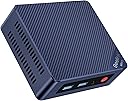
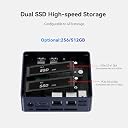
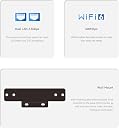
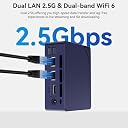
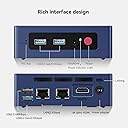
The Beelink MINI S13 is a compact yet powerful mini PC featuring an Intel N150 quad-core processor clocked up to 3.6GHz, 16GB DDR4 RAM, and a 500GB M.2 SATA SSD with expansion options. It supports dual 4K HDMI outputs for enhanced productivity, WiFi 6 and Bluetooth 5.2 for cutting-edge wireless connectivity, and a 2.5G Ethernet port for ultra-fast wired networking. Designed for professionals seeking a sleek, efficient desktop solution, it comes pre-installed with Windows 11 Home and offers lifetime technical support and certifications ensuring reliability.


| ASIN | B0B99VKSPQ |
| Additional Features | Mini pc |
| Aspect Ratio | 16:9 |
| Best Sellers Rank | #2,756 in Computers & Accessories ( See Top 100 in Computers & Accessories ) #97 in Mini Computers |
| Brand | Beelink |
| Built-In Media | Keyboard |
| CPU Model | Celeron |
| CPU Model Number | N150 |
| CPU Model Speed Maximum | 2.9 GHz |
| CPU Speed | 3.6 GHz |
| Color | Black |
| Compatible Devices | Headphone, Keyboard, Monitor, Mouse, Printer, Projector, Speaker |
| Connectivity Technology | Ethernet, HDMI, LAN, Wi-Fi |
| Cooling Method | Air |
| Customer Reviews | 4.2 out of 5 stars 32 Reviews |
| Display Resolution Maximum | 3840x2160 |
| Display Type | HDMI (4K) |
| Graphics Card Description | Integrated |
| Graphics Card Interface | Integrated |
| Graphics Coprocessor | Intel UHD Graphics |
| Graphics Description | Integrated |
| Graphics Ram Type | DDR4 SDRAM |
| Hard Disk Description | SSD |
| Hard Disk Interface | PCIE x 4 |
| Hardware Interface | Ethernet, HDMI |
| Human-Interface Input | Buttons |
| Item Weight | 0.73 Kilograms |
| Keyboard Description | Wired QWERTY Keyboard |
| Keyboard Layout | QWERTY |
| Manufacturer | Shenzhen AZW Technology Co.,Ltd. |
| Memory Slots Available | 1 |
| Memory Speed | 2900 MHz |
| Memory Storage Capacity | 512 GB |
| Model Name | MINI S |
| Model Number | MINIS13 |
| Model Year | 2022 |
| Native Resolution | 3840 x 2160 |
| Number of Component Outputs | 2 |
| Operating System | OS |
| Optical Storage Device | BD-R |
| Personal Computer Design Type | Mini PC |
| Power Plug Type | Type A - 2 pin (North American) |
| Processor Brand | Intel |
| Processor Count | 4 |
| Processor Series | Celeron |
| Processor Socket | BGA 413 |
| Processor Speed | 3.6 GHz |
| RAM Memory Installed | 16 GB |
| RAM Memory Technology | DDR4 |
| RAM Type | SODIMM |
| Ram Memory Maximum Size | 16 GB |
| Resolution | 3840 x 2160 |
| Security Features | Windows Defender, Windows Security |
| Speaker Type | External Speakers Required |
| Specific Uses For Product | Personal |
| Style Name | Minimalist |
| Total Expansion Slots Quantity | 1 |
| Total Number of HDMI Ports | 2 |
| Total Usb Ports | 4 |
| UPC | 810056047740 |
| Unit Count | 1.0 Count |
| Video Output | HDMI |
| Video Output Interface | HDMI |
| Video Processor | Intel |
| Warranty Description | 3 year |
| Wireless Compability | 802.11ac |
| Wireless Network Technology | Wi-Fi |
| Wireless Technology | Wi-Fi |
K**X
Almost exactly one year since I bought this computer and it suddenly stops working.
We bought this computer a year ago. We received it actually less than a year ago, and it has stopped working. It still turns on, but it gets to the load menu where it shows the Beelink name and it won't go any farther. It shows you can hit Del to get to setup or F7 to get to the Boot Menu but NO keyboard inputs will work. The keyboard is powered when the computer is turned on and it gets a signal to the monitor but from that point forward, nothing... Wow, not even one year old and this computer doesn't work at all! Up to this point we had no issues with the computer at all. We have not been doing anything that would tax the computer to the point it would overheat or something but apparently we couldn't depend on it to last a year. I am very disappointed.
N**T
Solid performance for years
Solid performance for years. It shut down because it overheated a couple times, but that could be me pushing it too hard. It eventually stopped working, I took out a star because there was no way to fix it.
X**N
Great Value
Running as a Emby server for movies, win11 by itself is a bargain at $99.99. Didn't bother reconfiguring for a linux distro. replaced the sata m.2 with 2Tb and added a 2TB sata 2.5. I set power button to shut down, so power on no need to log in. Emby is set to run at boot in windows services when done bump the switch, it powers down safely with no need for a monitor or keyboard.
J**C
I really, really wanted to like this mini-pc...
Great features, great performance, great price. Until I opened it up. I wanted to remove the M.2 Sata SSD and replace it with another so I could install pfSense and leave the original SSD intact in case I wanted to go back. Page 3 of the manual shows how to install an SSD - slip the SSD into the slot, press it down and screw it in place. Well, who/what ever installed the SSD screw here must have used a torque wrench. No matter what I tried I could not get the screw out. As a result, I returned it. I would really like to get another one, but if this is a common problem, I'm not sure I want to try again.
K**N
Read this if you are going to use as a server /PLEX
My TIVO keeps giving me issues with antenna quality, plus I have 3 extra TVs that I had to get mini tivo boxes with wifi extenders. This whole setup is just ridiculous just to watch recorded TV. I started to look into building a Plex Server since I already had an 4 tuner HDHomerun in my network. I needed something cheap, powerful enough for Plex, small, quiet and low power. Well, this is where this small PC comes in. I was able to get the base model with a 500gb ssd and 8 gigs of ram for very cheap (around 170, prices bounce on this unit all the time, search for n5105 here on amazon). I added 8 more gigs of ram to go dual channel and added a 2TB WD BLUE 2.5 inch mechanical hard drive for around 80 bucks (for storing media, mechanical HDD is recommended instead of SSD since the memory chips on SSD wear out quicker). So after all said and done, I had a small server with 2.5 tb of storage for around 270. I had no issues installing the memory and the hard drive. After first booting I went through the setup (with wifi and ethernet off). No issues there. Now, here is where I noticed that this is a small pc is not very fast. I started doing all the windows updates on it and it was extremely slow downloading and installing. It took hours to complete them all. Hours compared with my main pc which did them in around 20 mins the last time I formatted and re installed windows 11 on it. After the little pc was done installing updates, I disabled them so as to not have the mini PC download updates and installed them automatically. You dont want your server to reboot after an update right in the middle of recording a show. After all updates installed, I installed Plex Server and configured it. It was a breeze. You can always buy 1 month to try, but I highly recommend you get the lifetime subscription if you decide to keep it. This is so much better than TIVO. Now I can watch my recorded shows using my Fire TV sticks and I can finally get rid of all the TIVO hardware around the house. I made sure I setup windows power management to Max Performance to make sure the CPU is always running at 2.9 ghz and I plugged a small usb fan into one of the ports to blow cool air on the unit. Temps of the CPU do not go over 60c while processing shows and the mechanical drive at the bottom stays cooler. This unit would be absolute perfect if it had an NVME drive instead of a SATA3 drive. I found other n5105 mini pcs with NVME drives but were more expensive. Since you only set it up once, I guess is ok that is slow since you wont be using it. And since you have USB C port in front, you can add even more external storage down the line. For now, 2TB should be plenty. UPDATE: After about 4 months of the computer being on 24/7, the ssd that came pre-installed with windows died on 3/22 (the main drive sees little activity as all the plex tv shows get recorded on a 2tb hard drive) I should have known since they put the cheapest ssd they could find in there. Going to replace it with a WD blue and see how it goes. I also noticed that the WD blue is so quick compared with the pre-installed ssd. I installed windows 10 and did all updates, I was done in 30 minutes compared with hours on the original ssd. The blue comes with a 5 yr warranty and has a SanDisk controller. The computer is snappier now also. I HIGHLY RECOMMEND upgrading to a wd blue or red (not green or black) if you need this machine to be on 24/7
M**.
Great mini pc
Very fast PC , good Price. Amazon is the best.
T**Y
**UPDATE** Dead after 18 months
----------- Update ------------ It has been almost a year since I left this unit unplugged. I decided to try it one more time before disposing of it. I held the CMOS button for 10 seconds without powering it or plugging it in. I plugged it in and it still did not work. I then removed the RAM and tried to power it on, still did not work. I then decided to remove the SSD and power it on with no SSD and no RAM. IT POWERED ON! I then replaced the SSD with a 256 GB Kingston M.2 SSD and put some new laptop RAM in. Still powered on and I was able to install/boot Windows 11. Also tried linux. It has been running for two weeks powered on and off and there are zero issues! So before you throw out that dead Beelink (U59 in my case) try taking out the RAM and SSD and reset the CMOS with the unit unplugged. Plug it in and see if it powers on. Replace each component with new ones if needed and enjoy your unit which you thought was dead. Apologies to Beelink. Looks like my issue after testing was an NVME drive in the SSD slot that was going bad. It looks like the slot is keyed for NVME but it can only use M.2 Sata SSDs. ----------- Original ----------- Was working perfect up until yesterday. Was working on something then suddenly the displays went blank but the power was still on. Couldnโt get the displays to come back to life so I unplugged it (holding the power button down didnโt shut it off). When I plugged it back in and pressed the power button, nothing. Saw a YouTube video where some success was had with resetting the CMOS but tried that and nothing. Itโs basically a doorstop now. Waste of money.
G**N
Wow excellent for the money.
If you want a small footprint daily workstation, this is excellent for the price. Some gaming is ok but only on low resolution and medium quality. Video streaming you tube etc. is good, I tested only on low res. 1680x1050 worked very well. This would also work very well as a home automation controller and video surveillance system. For $150 more than a fully kitted out RPI4 its well worth the money, I am considering buying more. Linux installed and ran very well dual partitioned. Excellent product.
H**N
Computer works great
As this is my desktop replacement it does a very good job. No more waiting for programs to load. Everything is better then promised
P**C
Very loud fan
I agree with many of the reviews that in the mini PC category, this is likely the best built product in this price range. The main issue I have is fan noise... it is brutal and loud. The main culprit is probably the CPU size. I was planning on using this mini-PC for my home office, mostly for internet browsing, MS Office and Youtube. However, in my work I need to open many tabs in Microsoft Edge, and at a certain point the fan goes on. It doesn't take too many open tabs to get the fan to start. And once it turn on, it is simply too loud. The processor is often working in the 50-100% zone, while RAM is 50-75%. Dual channel RAM is required in my opinion. For home use, it really needs to be for light browsing. All the rest works fine.
O**D
very good quality
It is a very small computer but very powerful. Works very well, and it is small, and very compact.
Trustpilot
2 days ago
3 weeks ago