Desertcart purchases this item on your behalf and handles shipping, customs, and support to India.
🎧 Elevate your sound game with pro-grade clarity and seamless workflow!
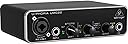
The Behringer UMC22 is a compact 2x2 USB audio interface featuring award-winning Midas mic preamps and 48 kHz resolution. Compatible with major DAWs and equipped with versatile inputs and zero-latency monitoring, it offers professional-grade recording quality in a portable, plug-and-play design ideal for musicians and producers seeking studio-level sound anywhere.


| ASIN | B00FFIGZF6 |
| Audio Input | XLR mic input 1/4" instrument input |
| Best Sellers Rank | 167 in Musical Instruments & DJ ( See Top 100 in Musical Instruments & DJ ) 3 in Computer Audio Interfaces |
| Brand | Behringer |
| Brand Name | Behringer |
| Compatible Devices | Personal Computer |
| Compatible devices | Personal Computer |
| Connectivity Technology | USB |
| Connectivity technology | USB |
| Country of Origin | China |
| Customer Reviews | 4.4 out of 5 stars 12,769 Reviews |
| Frequency Response | 48000 KHz |
| Frequency response | 48000 KHz |
| Global Trade Identification Number | 00696859053863 |
| Item Dimensions D x W x H | 15.6D x 24.4W x 8.8H centimetres |
| Item Weight | 454 g |
| Manufacturer | Behringer |
| Manufacturer Contact Information | Music group commercial BM LTD 17A Brunswick Street, Hamilton HM 10,Bermuda |
| Manufacturer Part Number | UMC22 |
| Maximum Sample Rate | 96 KHz |
| Model Number | UMC22 |
| Number of Channels | 2 |
| Number of Items | 1 |
| Number of channels | 2 |
| Operating System | Linux, Windows, macOS |
| Product Warranty | Company warrants to the customer that the product will be free from defects in materials and workmanship under normal use for a period of one (1) year from the date of purchase of the product by the customer. |
| Supported Software | Tracktion, VST Plug-ins, AU Plug-ins |
| Supported software | Tracktion, VST Plug-ins, AU Plug-ins |
| UPC | 696859053863 |
| Unit Count | 1.0 count |
A**L
Great little box when you get past the fiddly set up process
Ok I was a little dubious on buying a behringer as there aren’t many great reviews out there on some of their stuff, I myself had a few iffy guitar pedals that I had to return, however after a bit of mucking around with the setup and getting it to run through my acid pro 10 suite I have to say I’m really impressed with it, does exactly what it’s supposed to and if you’ve got a reasonably decent set of headphones (over ear cans, not ear buds) you get a really nice monitoring sound, particularly with my bass guitar 🤟 Ok now for the not so great: set up was a bit of a kerfuffle. Unlike most devices that require plugging into pc/laptop via usb, this one doesn’t install any drivers for it, you need to go to behringer website for them and finding the right one might be a bit of a b@ll ache if you’re not used to having to find tge right drivers for stuff. However there is a great video on YouTube, I’m not sure if it’ll allow me to provide a link here but if you simply type in behringer umc22 setup it should come straight up, just do what the man says and you should be away. He takes you through setting it up through his DAW which was different to mine but another quick YouTube video later on setting up through my acid pro I was able to begin recording ideas and whatnot. This AI was well worth the money considering that a lot of them are more expensive, a bonus for me was that I got mine a tenner cheaper due to it having most likely been returned after a user had not been able to set it up. There was nothing wrong with it, just it really can be a bit of a mess around to set up, was probably a bit too much for whoever had it first. How do I know someone else had it first? You can just tell, the usb cable wasn’t packed as you’d imagine a brand spanker, no cable ties, not particularly wound up very well and you could tell the box had been opened. But at a tenner cheaper you can’t grumble So yeah I would definitely recommend this, I’m sure there will be better ones out there but you’ll be paying extra for them when this one really does do the job nicely 🙂🤟
O**U
Working Perfectly.
Perfectly working. Real value for money. Love it 😘
J**C
Updated review: How to get Inst 2 to work on WIn10
REVIEW UPDATED from a 2 star to a 4 star review. --Note to the seller, please let people know upfront that they'll need to take an extra step to enable INST2 on WIN10. It will save the manufacturer unnecessarily bad reviews.--- The issue was that INST 2 didn't initially work - I've now resolved this (see below) Apparently many others have had this issue. I couldn't get Instrument line 2 to work on my Zoom call on my brand new Win10 laptop. To see if it was my cable or the input jack, I tested the line by using a Direct Line to speaker output and was able to get sound to my Bose speaker, so the cable or jack wasn't the issue. I downloaded the newest Behringer drivers, but still no sound coming into the computer from L2. *****The Fix to get INST2 to work***** It looks like Microsoft is the problem. This fix worked for me. 1) Right click on the loudspeaker icon in the Taskbar and select "Sounds" 2) Click on the link "Sound control" (or similar) 3) Close the "Sound Settings" window. 4) In "Sound Control Panel" (or whatever it's named), select the "Recording" tab 5) Ensure that the default device is set to any available device that is NOT the device that you want to change. 6) Right click on the device that you want to change and select "Properties" 7) Select the "Advanced" tab 8) Select the Channels / sample rate that you require (e.g. I selected 2 channels at 16bit) 9) Click "OK" With these steps I got L2 working so I could plug in an instrument. Behringer should really have provided an insert to let purchasers know about this issue, but again, once I did the above, it all worked fine. Why only 4 stars? Firstly, the gain had to be cranked nearly all the way in order to get a decent level of mic sound on the Zoom call. Apparently a Youtube review says the same. The Behringer Support section on their website has no support telephone or email listed. Instead, you have to register on their Tribe website (do I really need another online account?) and go through an extremely slow website and a tedious number of dropdowns and input boxes before your support ticket is created. You receive a "do not reply" email and hope that someone contacts you. On a positive note, I received the email from them with a recommended fix the next day, which was good. Overall, at £39, for a non-pro artist, it's a pretty good deal and a decent product with a good build quality, ideal for Zoom. Again, just be aware of the extra step in Windows required to enable the INST2 (i.e. 2nd line). I hope this helps
B**R
Behringer does it again
I was looking for a small audio interface that was portable and reliable. I already have The Behringer u-phoria 404, Which has fantastic MIDAS mic Pre’s, IVe never had any trouble with that, so I knew this was going to be a reliable piece of kit. It’s casing is mental and the knobs Are smooth It’s a well made unit and gives a good sound. No nasty clipping etc. It’s been ideal for getting ideas recorded quickly with No fuss.. It fits neatly in a bag if you want to take it anywhere to record somewhere else. It’s so easy And quick to set up which is ideal for me. It would suit just about any one , from someone just starting out recording to someone who’s a bit more familiar with the recording process. I really like the portability of this i/o and for the price it’s a bargain. I’ve been using it for a while and it’s been a bit of a work horse . It’s definitely been out through it’s paces and has delivered the goods every time. I’d recommend this to anyone looking for an i/o - whether it be a first i/o , Or for something portable and reliable
S**O
Behringer UMC22 - great value for a low price
For the low price, I'm really impressed with this basic audio interface. Setup for use in Ableton Live 12 on Windows 11 was quick and very straightforward. Within about 10 minutes it was up and running. This is a 2 channel device with a combined jack and powered balanced mic socket, plus a second instrument DI jack socket. Each channel has a simple gain control with a red LED to warn about clipping. Lastly, there's a simple output gain knob with a button to toggle monitoring of the source instrument/mic or the mix. On the initial test, I found that the UMC22 lacked the oomf of my Audient iD4 interface. It also lacked the option of mixing the comparitive volumes of the inputs and mix output. Channel 1 on the UMC22 (combined mic and jack) has a built-in pre-amp, so that can help boost the input signal gain. The output to headphones on the UMC22 also seems a little low. But hey, for £33 this is a great bit of kit for a budget home studio!
M**S
Still going strong after much usage.
Still works perfectly several years later. Never had any problems with this interface and it gets almost daily use.
F**T
Sadly, not good enough.
Solid build with controls having a nice firm feel to them, works almost well enough but the waveform on a recording is asymetrical, the plus side being limited whilst the minus side is full amplitude. The recordings sound ok at normal volume, but when pushed to the limit, the higher peaks on the minus side will cause clipping or distortion. My Behringer Xenyx 302 USB mini mixer does not do this, so will send this UMC22 back and stick to the 302 USB.
S**M
UNC22 Audio Interface.. Easy to set up and use..
Now said it was easy to set up and use but to be honest I wouldn't have known where to begin if I hadn't looked up some good videos on this product on Youtube. If ur new to these types of equipment then get on Youtube good ppl and check out how to set this up with ur microphone. I never knew how great a mic could sound once I connected it up tothis Audio interface but it sounds sweet as a nut guys.. This is a nice bit of kit for the price too. I have only just got it and I made a quick video and listened back thru my headphones and WOW!!! The sound was incredible to me. I had never heard my microphone sound so good before. I didn't realsie I needed this so bad until right now. The boost in sound is incredible. I bought a sound card before, one of those V8 Soundcards and for the life of me I couldn't get it to work for me so enough of that.. I hope this information helps u guys to decide. It's great having this now. I hope u get it and try it out for yourselves and it makes a huge difference to ur podcasting or recording music. Take it easy good ppl
S**N
Günstig gut
Macht was es soll
M**S
Ótimo
Ótimo custo benefício, até o momento não tive problemas.
J**N
Excelente interfaz por su precio
Puedo decir que es la mejor interfaz que se puede conseguir por los 36 euros que me costó. La he usado para grabar mi guitarra y jugar a Rocksmith, y me ha sorprendido gratamente: responde muy rápido, su latencia es bajísima y entrega un sonido muy limpio. Un punto muy a favor es que en distribuciones de Linux como Ubuntu no hay que instalar drivers; funciona perfectamente con solo conectarla. Ahora, para Windows 11, si solo la conectas sin instalar nada, tendrás mucha latencia y bastante ruido de fondo. Por eso es totalmente recomendable usar el driver ASIO nativo de Behringer (versión 2.8.40, que se encuentra fácilmente con una búsqueda de dos minutos en internet). He visto que mucha gente tiene problemas con el driver genérico ASIO4ALL que recomienda la página oficial, pero con la versión 2.8.40 va perfecto. No deja de ser una interfaz básica, pero por su precio es insuperable.
H**D
Top quality
I have been using it for 3 years and i never faced any problem with it. The best quality.
H**Y
good quality and clean design
metal body with good quality, it run stable and provide a clean sound to my expectation. simple and easy to use for a general user, nice to have.
Trustpilot
2 months ago
2 weeks ago