Buy anything from 5,000+ international stores. One checkout price. No surprise fees. Join 2M+ shoppers on Desertcart.
Desertcart purchases this item on your behalf and handles shipping, customs, and support to India.
๐จ๏ธ Elevate your workspace with vibrant, wireless, and efficient printing power!
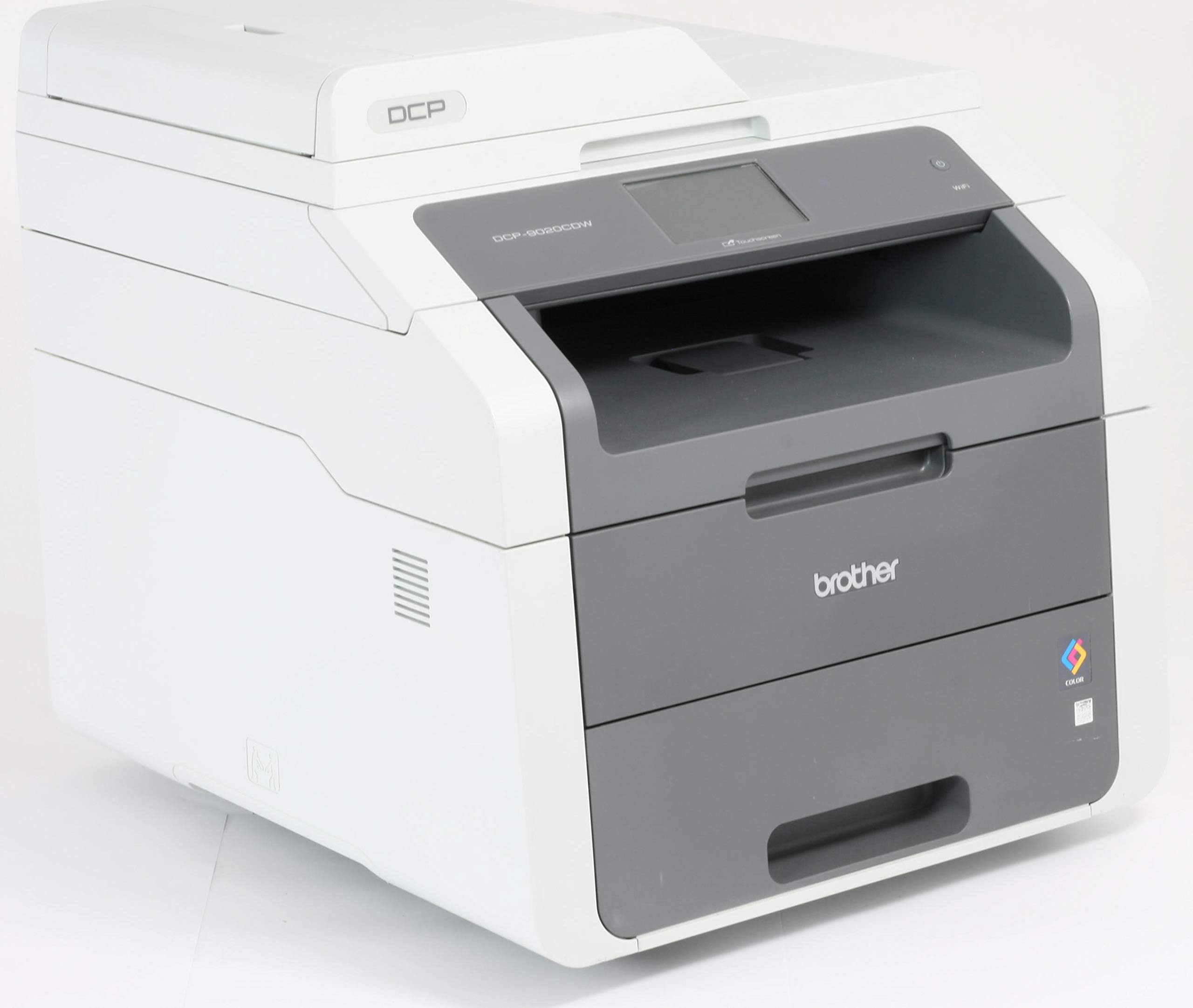
The Brother DCP-9015CDW is a versatile A4 color laser printer offering wireless connectivity (802.11b/g/n), high-resolution 2400 dpi printing, and automatic duplex printing. It combines print, copy, and scan functions in a single device, supports up to 250 sheets input, and delivers up to 16 pages per minute in black and white, making it ideal for professional environments seeking reliable, high-quality output.


| ASIN | B01587PBO4 |
| Additional Printer Functions | All In One |
| B&W Pages per Minute | 18 ppm |
| Brand | Brother |
| Brand Name | Brother |
| Color Pages per Minute | 18 ppm |
| Colour | White |
| Compatible Devices | PC |
| Connectivity technology | Wi-Fi |
| Control Method | App |
| Controller Type | Android |
| Customer Reviews | 4.2 out of 5 stars 228 Reviews |
| Dual-sided printing | Yes |
| Duplex | Automatic |
| Hardware Interface | USB |
| Ink Colour | Assorted |
| Item Type Name | Brother DCP-9015CDW A4 Multifunction Colour Laser Printer |
| Item Weight | 51 Pounds |
| Manufacturer | BROTHER |
| Maximum Copies Per Run | 16 |
| Maximum Copy Resolution Black and White | 2400 dpi |
| Maximum Copy Resolution Color | 2,400 x 600 dpi |
| Maximum Copy Speed Black and White | 16 ppm |
| Maximum Print Resolution Black and White | 2400 dpi |
| Maximum Sheet Capacity | 250 |
| Maximum Supported Paper Size | A4;Legal |
| Maximum print Resolution Color | 2400 Pixels Per Inch |
| Model Name | DCP-9015CDW |
| Model Number | 99999 |
| Model Series | DCP |
| Model name | DCP-9015CDW |
| Network Connectivity Technology | Wi-Fi |
| Number of Trays | 2 |
| Other Special Features of the Product | Network-Ready |
| Paper Size | A4 |
| Print media | Paper (plain) |
| Printer Output Type | Colour |
| Printer Resolution Horizontal Max in Color | 2400 Centimeters |
| Printer Resolution Horizontal in Black and White | 2400 Centimeters |
| Printer Type | Laser |
| Printing technology | Laser |
| Product Warranty | 1 year |
| Resolution | 2400 x 600 |
| Scanner Type | Flatbed |
| Special feature | Network-Ready |
| Specific Uses For Product | Office |
| Total USB Ports | 1 |
| Warranty Type | limited warranty |
S**F
Good for the money
This was bought to replace an inkjet all-in-one, which was no longer cost-effective to run (due to ink drying up between regular but infrequent use). First impression of the product was good - though it can be difficult to appreciate the sheer size (and weight) difference when moving from an inkjet printer! Installation was easy, though I found a slight disparity between what the quick setup guide said, and what actually worked (relating to the shipping tabs holding the toner cartridges in place). The one thing that was awkward about installation is the lack of covering over the individual drum units. In order to remove all the transport packaging, you have to remove all toner / drum units, but the drums are exposed, and are positioned where you would naturally set them down. In the end I removed the packaging a bit at a time which solved the issue. On first startup the printer does spend a fair amount of time clunking and whirring while it prepares for initial setup, but once it's running, it was quick and straightforward to do (set date and time). I did notice a fairly obvious ozone-y smell (which you can get with a laser printer) but presume this was just down to being a new unit. Computer installation was painless, as was setting up the wireless access. All worked as expected without any problems. A couple of minor points: there are 'props' that keep the lids open, but these were very stiff, and it almost felt that you were breaking them when closing them (it wasn't). The lid covering the scanner seems a bit flimsy, but this is just a personal impression. One final comment: after conducting research online, it seems that Brother prevent you using the printer if the toner gets below what the manufacturer deems 'empty'. Therefore, the cartridge may still have toner, but the printer won't allow you to print until it's replaced. However, like most Brother printers there is a hidden 'reset' menu on this model, which allows you to keep using the toner after this point. I found a video online which shows you how to access this; while the video shows a different printer in the same series, I can confirm that it also works with this version. All in all though, it's a good buy, and gives good prints for a reasonable initial cost. While it's not a true 'laser' printer (it uses a cheaper, LED technology) I couldn't see any quality issues with prints which show this.
R**N
Excellent home business printer - crucially: toner can be re-filled!
Works brilliantly, decided at last to never mess about with ink jets again. Nothing to add beyond other reviews which tell you what it does. We print from a pc by cable, wireless from iphones and ipads, and also wirelessly from windows laptops - no problems. Do your research before buying consumables, rather than cheaply re-filled recycled cartridges, or low quality foreign copies that don't last as long so are false economies - get on the internet for very good consumer advice: The 'starter' toner cartridges provided can have 'reset wheels' added which is a simple job as long as you have nimble fingers and can use a screwdriver. This then means they can be put back in and will carry-on for another few hundred pages, honestly! Brother equipment is good in this regard as they don't use small electronic chips on their cartridges. There is a bit of a consumer rip-off going on by many of the major printer manufacturer's whom, as we all suspect - are making a killing on consumables. After adding reset wheels, the time will come when you do need to add more toner, it is possible to do so by obtaining pots of toner that can be poured-into the cartridges (melt a hole, pour-in, plug hole with rubber bung, reset the wheel again, bob's your uncle, saved yourself a couple of hundred pounds) Note: This is top quality toner going into original cartridges, rather than dubious stuff from the far east. As far as I can see, unless you damage the toner cartridges in this process you won't need to buy any replacements for a very long time unless you're a very heavy printer user, and most people don't purchase a printer like this and expect to print half a million pages a month! There's a web-site you can find with all you need to do this plus instructions, I'm not connected in any way just a customer, search for 'diy brother laser you refill toner' or something like that.
E**G
Numerous faults with this printer
---Best to research it well before buying it. Printing is of good quality, but comes with many disadvantages, including: - It is difficult to install - It requires a complex process of re-installing every time you disconnect the internet. - It scans very slowly after the second page. - Sometimes it allows my laptop to connect to it and sometimes it does not. - It does not print as fast as it states. - It take over half a minute to warm up for each first page even if you have printed only 10 seconds earlier. - I have been on the phone with the support team for quite some time to get this printer starter, and they themselves referred to it as OUTDATED version. - The support team confirmed that the CD that comes with it is OUTDATED too and that we have to install the online version. - The online software does not put all feature into work. To my surprise (considering the feedback), overall this printer does no more and no better than a printer I bought for ยฃ35.
C**R
Average, but strangeably likeable.
I've been using this for a few months now, so have a fair idea of how it is performing, and is likely to perform in the future. With that in mind, here is my review. The first thing to mention about this printer is that it is MAHUSIVE! I had read reviews stating that it is big, and it really is, so be prepared to ensure you have plenty of desk space (and that the desk is sturdy, as it's also a heavy beast!). Secondly, I spent WEEKS trying to remedy an annoying problem whereby my PC and iMac would periodically be unable to print to it wirelessly. One minute it would work, the next minute it wouldn't (usually when I was ina rush to get a job prointed, too!), I searched the net for numerous solutions to this (apparently) common problem, none of which seemed to offer any permanent solution... I would get a couple of hours/days of joy, then get the same problem all over again! Fortunately, it appears that Brother have recently released some new drivers (and Windows and Apple have both released OS updates), and as a result of one or both of these things, I've not had the problem recur since... FINGERS CROSSED this is now sorted! With regards to print quality, this is fairly good. The colour-matching seems a bit "off", but generally it is acceptable for a laser printer (a decent inkjet will likely perform much better, but then you get all of the problems associated with inkjets such as blocked nozzles, expensve replacement ink cartridges, etc). When I print from Photoshop, I get Photoshop to take care of the colour-matching, and this produces a much more colour-accurate print, which is more pleasing. Sometimes, I get some waxy-looking lines running along the length of the page... I am presuming this is caused by some sort of rollers/guides running along the paper inside the printer, and though noticeable when viewed up-close, it's not too noticeable from a distance (or if artificial lights are shining directly on the page). The supplied "sample" toners didn't last very long before the printer told me they needed changing, but if you do a search on Google you will find a solution which allows you to reset the toner counter to use it for longer. Obviously I haven't tried this, as I am unsure if it might invalidate the warranty on the printer, but by all accounts it works rather well and extends the life of each toner considerably ;-) It seems that when The printer seems to feed card just fine from the regular paper tray. Sheets of labels wouldn't feed from the regular tray, so I have used the separate sheet feeder for this, which seems to work OK (once you get used to how far-in you need to insert the sheet to get it to start feeding). I've only used the copy feature once, and it produced acceptable results. Overall, if I'm honest, this printer is pretty "average" in terms of results, but for some reason I really quite like it. If you can get it at a good price, and supply it with cheaper "compatible" toners, I think it represents good value and a worthwhile purchase.
A**R
Fantastic Deal
A huge printer, but it is for a small home office, so cannot really complain about the size; just be aware that this is not a small bit of kit. The price is however amazing for such a quality, robust product. The set up was not the easiest of tasks and the instructions supplied were far too simplistic for the setup job in hand. The software installation had a problem installing it in my Windows 10 PC and there were a few software fails in this fairly automated process. Despite this, it still printed without any issues once the software had finally installed and it also scans and copies. So I am not too sure what the worrying error messages were about. It works fine. So far the quality and performance of the printing, copying and scanning is superb. The only problem is that the machine switches it self off after a period of inactivity, rather than sleeping, so you have to keep switching it on when you want to print. This is not ideal. Overall, it is fantastic value and will highly recommend it to anyone who wants a colour laser printer at a low price.
R**I
Printer with no memory
I do NOT recommend this printer. I work in the publishing industry and do a lot of printing at home. I bought this printer because usually laser printers work out cheaper in the long run if you print a lot. It has three different options for set up - using a CD-Rom (so if you've found Noah's old PC you MAY be OK, WPS/AOSS (didn't work for me) or regular wireless set up. When I took delivery, it was easy to set up and run on my wireless network. It prints double-sided at a reasonable speed. The colour printing could be better but I wasn't too worried about that. Then I moved house and therefore my network key and password changed. The printer is now not quite useless to me, but almost. I have a desire to kick it hard every time I use it. To set it up on a new network, you have to clear the previous printer settings (perfectly reasonable) and run the set up again, entering your new network key and password. So far so good. Except it doesn't remember your new settings. So every single time you print, you have to run through the set up again, which means getting on the floor and entering it all again. Every. Time. If you print several times a day, or several times an hour, it will drive you insane. Literally, you set it up, print a document from Word, then switch to another program (Adobe DC, InDesign, etc) and it has already (within seconds) lost the network key and password and disconnected. Astonishingly bad algorithm there, Brother. You only buy a printer this size (bear in mind it weighs 22kg - it's not a small printer) if you use it for professional purposes. It is not fit for purpose. Mine is still inside the guarantee. I have contacted Brother and intend to return it. Incidentally, I tried resetting the network, as the manual recommends AND I tried resetting the entire printer from factory reset. No joy. It simply cannot be set up again. Don't waste your money.
D**N
Good Printer but not for Photographs
Arrived before due date which was great. However, it was not easy to set up. The monochrome printing is good but if you need this to print photographs do not purchase this particular printer. It took 10 minutes just to print one 5x7 photo as you have to use the manual tray and you can only place one sheet at a time. The rollers would not pick up the photo paper and kept saying it was jammed. It is a little noisy but I think this is designed more for a small office rather than a home study. I have downloaded all the software from the Brother website but still have not found how to set up default printing, so I am having to change each time I print out a document. I have not found this printer easy to use compared to other makes I have purchased. I had a Cannon printer before which lasted just over 7 years ..... maybe I should have stuck to the make I knew!
W**O
Great value, great spec for the price, highly recommended!
Like: I really like this printer so far. Really good value. I picked this because it had a low price, cartridge costs were low, had WIFI, a scanner, and dual sided printing. Since installing it I would add that the setup is very easy, no special software or complicated instructions, the screen is colour and easy to read, it looks professional like it should be in an office, the paper tray is large, printing is fast and you can print from your iPhone. Dislikes: Nothing. Itโs big but no bigger than the Dell one I had before. It has no Ethernet port but not a big issue.
Trustpilot
1 month ago
1 month ago