Desertcart purchases this item on your behalf and handles shipping, customs, and support to India.
📡 Unlock your home's ultimate live TV experience—4K, multi-tuner, no limits!
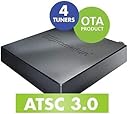
The SiliconDust HDHomeRun Flex 4K ATSC 3.0 is a cutting-edge network TV tuner featuring 4 tuners (2 ATSC 3.0 and 4 ATSC 1.0), enabling simultaneous live TV streaming across multiple devices. It supports full whole-home DVR via USB hard drive without subscription fees, offers broad compatibility with major streaming platforms and devices, and delivers DRM-free NextGen TV 4K content for a premium viewing experience.


| ASIN | B092GCN9NL |
| Analog Video Format | AVI |
| Antenna | Television |
| AntennaDescription | Television |
| Best Sellers Rank | 59,121 in Computers & Accessories ( See Top 100 in Computers & Accessories ) 87 in External TV Tuners & Video Capture Cards |
| Box Contents | HDFX-4K, power adapter |
| Brand | SiliconDust |
| Brand Name | SiliconDust |
| Compatible Devices | Android, FireTV, AppleTV, Roku, Sony, XBox, iPhone, iPad, Win10/11, Mac |
| Compatible devices | Android, FireTV, AppleTV, Roku, Sony, XBox, iPhone, iPad, Win10/11, Mac |
| Connectivity technology | Ethernet |
| Connector Type | usb |
| Connector type | usb |
| Customer Reviews | 4.2 out of 5 stars 1,832 Reviews |
| Includes Remote | No |
| Item Dimensions L x W x H | 17.8L x 12.7W x 5.6H centimetres |
| Manufacturer | Silicondust USA Inc |
| Manufacturer Part Number | HDFX-4K |
| Model Number | HDFX-4K |
| Network Connectivity Technology | Ethernet |
| Number of Items | 1 |
| Product dimensions | 17.8L x 12.7W x 5.6H centimetres |
| Tuner Type | ATSC 3.0 |
| UPC | 850028206010 |
R**N
Great little OTA device
This is kind of lengthy... Previously, for the past 6 years, our household used a “Tablo” as our in-home OTA DVR solution. For that purpose, it worked fairly well. I won’t go into any of the downsides, but the final deal killer was the inability to access it remotely using Roku devices. No matter how many router tweaks and settings such as port forwarding I tried, Roku just couldn’t access it. The only thing that worked was using a smartphone. All we wanted was the ability to access our local news broadcasts and sporting events when out of town. We thought we had found a solution by subscribing to “YouTube TV” which provides local channels as part of the package. Imagine our disappointment when on our first trip out of town, we could not get any of our hometown stations but instead those of where we were at the time. Upon our return, I resolved to finally replace the “Tablo” with a SiliconDust “HDHomeRun Flex 4K”. Operationally, much like the “Tablo”, you connect an OTA antenna to the unit, connect to your home network and then power it up. One of the nice things about the “Tablo” is that you can connect to your home network wirelessly. The “HDHomeRun” requires a wired ethernet connection. This meant we would have to run ethernet cable from our router to where the unit would reside. Fortunately for us this was something we did last year for different reasons but in the process, the “Tablo” was connected directly as well which greatly improved its responsiveness and stability. Unboxing the “HDHomeRun” and connecting it in place of the “Tablo” took only a few minutes. I used the “HDHomeRun” app on my android phone while connected to the same network to finish up firmware upgrades and channel scans. The “HDHomeRun”, when connected to our attic antenna, picked up 52 local ATSC 1.0 channels and 4 ATSC 3.0 stations. Now, the main reason we selected the “HDHomeRun” was its ability to integrate with our “Plex Media Server” which we have had operating for years. Within just minutes, the “HDHomeRun” was setup within Plex which, as part of our lifetime pass, provides a guide for all of the channels the “HDHomeRun” found. Plex also provides native DVR support so no additional storage devices or fees to SiliconDust for their DVR functionality. What Plex won’t do is decode AC-4 audio (blame FFmpeg) which is what the ATSC 3.0 broadcasts come with. Not a huge problem since all of the ATSC 1.0 audio channels work just fine. We anticipate that Plex/FFmpeg will provide the AC-4 decoder eventually as ATSC 3.0 adoption picks up, but the main thing is, since Plex is a server, we can access it remotely which means all of our local channels are available remotely as well. “HDHomeRun” also has a Windows 10 app which was downloaded to test. That worked great and after downloading a couple of drivers it said it needed, including a 99 cent one from Microsoft, I was able to play the ATSC 3.0 channels with audio as well. Some users have complained about channel changes taking a long time. For us this is 2-3 seconds. I challenge anyone to go from one YouTube or Roku channel to another much faster. All in all, to date, this change over has worked out well. It picks up all of the local free channels we could ever need. Subjectively, we also think the image quality is great. If I had a wish list, it would be that the “HDHomeRun” apps provided more native info and/or metadata about each channel such as the kind of audio track being listened to and the video resolution. Kind of like YouTube providing “Stats for Nerds” on each of its videos. We’re not sure if we are future proofed on the ATSC 3.0 roll-out but that was not the only or even main part of the reason for our purchase decision. What we wanted is what we got, and it works very, very well.
V**T
5 stars with a caveat for roku users
This is a quality product for tuning in & recording OTA TV. Paired with a Winegard Elite 7550 Outdoor HDTV Antenna & 2TB external hard drive I purchased separately, I was able to pull in 78 clear channels 37 miles from my local antenna farm. Five ATSC 3.0 channels scanned in, but only 3 ATSC 3.0 actually displayed pictures and sounds; none were broadcasting in 4K so far. I purchased the $35 channel guide & DVR recording capabilities (the whole point of buying this product) separately from SiliconDust online. Here is a rough cost breakdown for my setup: SiliconDust HDHomeRun Flex 4K $200, Winegard Elite 7550 Outdoor HDTV Antenna $150, 2 TB external hard drive; $70, SiliconDust DVR/Channel Guide 1-year service $35, two Onn TV Android boxes $40, 30-foot telescope mounting pole/hardware/coaxial cable/professional installation $460 equals $955 total, a lot of money, but a professional clean weatherproof performance ensemble. Cable TV with DVR (w/o internet) in my area is about $145 a month with NO premium channels, so ostensibly my breakeven is at 7.5 months. I did not want to further complicate my life with a Plex server and/or Channels guide, nor the associated extra costs and complexity, which is not necessary since the SiliconDust UI is top-notch/excellent. ONE CAVEAT: If your TV or streaming device is running Roku software (like mine & millions of others)—my SiliconDust HDHomeRun app was prone to crashing frequently, and the FF/rewind did NOT work AT ALL. I solved this problem by buying/installing two $20 Onn TV Android boxes from Walmart and using the free SiliconDust HDHomeRun Android app from the Google Play Store. Now FF/Rewind works as it should, and the HDHomeRun Android app does not crash. Some internet searching will reveal this is a common SiliconDust HDHomeRun/Roku problem/issue that SiliconDust has been unsuccessfully working on debugging for a long time. It should have been resolved by SiliconDust and/or Roku long ago, and I should NOT have had to figure out this workaround on my own. Still, this is a solid OTA tuner w/DVR capabilities with superb channel tuning and UI that I will give it 5 stars despite my Roku caveat. 6 MONTH UPDATE: SiliconDust HDHomeRun Flex 4K is still a solid choice. I have really warmed up to the excellent UI. The FF/rewind is still working on my Onn TV Android box. I must report the SiliconDust HDHomeRun Onn TV Android app does not load easily, or as it should, like all my other apps. Restarting the Onn TV box is typically necessary, usually 2 times, to bring up the SiliconDust HDHomeRun UI. I am not sure if this is a SiliconDust HDHomeRun Android app issue, a Google bloatware issue, or both. I have yet to try an alternate launcher, which I have some reservations about. SiliconDust has still not fixed the aforementioned Roku app problem. A SiliconDust sad state of affairs. Customers should not have to figure out a Roku workaround. I have given serious thought to trying the newest Tablo (despite having so many problems with an old Tablo Quad, Tablo’s poor customer support, & no hardware repairs offered), or "rounding up" 2 older used model TiVo’s that work with an antenna. Why the latter? I have owned a Tablo Quad, a Silicon Dust HDHomeRun, and 2 TiVo (very old) Premiers—all fed by antennas. TiVo (the most expensive option that works best with a box for each TV) has the best UI, works flawlessly, responds the best by far instantly, and has a one-button auto commercial skip that actually works. 12 MONTH UPDATE: I have now surpassed my breakeven point. I’m in the black with my SiliconDust HDHomeRun/antenna setup vs. cable TV cost by a wide margin. Admittedly, there is some loss with OTA programming vs. cable, but not by $0 vs. $145 a month margin. Not to mention, if I really want to see a program, I can easily find it and stream it. With the last SiliconDust firmware/app update, I have found that the previously discussed SiliconDust HDHomeRun app loading issues do not occur if the app is returned to the Live TV mode before exiting and not left in DVR mode. I have given up on the idea of “rounding up” a used older TiVo since my SiliconDust HDHomeRun is performing better after the latest firmware/app update. You’d also need a TiVo for each TV, and TiVo has really abandoned the OTA DVR business altogether. I recommend SiliconDust HDHomeRun and hold out hope that SiliconDust fixes the Roku app soon to accommodate the FF/Rewind function.
A**R
Expensive with quality
The connecting was simple. The software was medium in difficulty but works well. The picture quality was superior to my previous device. The channels loaded instantly without scanning. I got channels that I didn't get previously. I had one problem with recording programs. I had to pay a $35 yearly subscription fee to locally record. I'm going to see if I can get around that. The instructions to configure it was not detailed enough but I was able to guest on doing it. I had to submit a ticket with the company to get it to record and they responded within a short period of time by email. This device ATSC 3.0 compliant.The agency that oversees ATSC hasn't cleared up what devices will work under ASTC 3.0. I hope that this device will work once they decide on ATSC 3.0.
E**P
Beautiful Picture; Poor Interface
My wife bought me this tuner for Christmas, and I added a 2 TB USB external drive for recording. The picture quality on live viewing and recordings is excellent on both the ATSC 1.0 and NextGen TV ATSC 3.0 channels. The user interface is not intuitive, not quite "user hostile" but also not fully user-friendly. Some comments on the tuner: - I had been using an Amazon Recast previously. The Recast connected to wi-fi wirelessly, and the HomeRun connects via ethernet cable. The hardwired connection is 100% reliable (no dropouts or disconnects), is faster, and the picture is significantly better. - Recordings in ATSC 3.0 have skips and dropouts in both video and audio that do not seem to be present in the ATSC 1.0 recordings. - The external drive is not formatted in NTSC, so it cannot be read directly if plugged into a Windows computer. It can be read from a Linux computer, or a dual-boot Linux/Windows device. Recorded programs also can be copied on the network from the external drive treating the tuner as a network device. - Audio in the ATSC 3.0 recordings, if copied from the external drive, does not play on VLC or Media Player. NextGen TV uses a codec called AC-4, which is not widely available. Playing back through the SiliconDust interface plays the audio properly. - I paid for the 14 day electronic program guide, but only a day or so was displayed at a time. I found out from SiliconDust Tech Support that it is necessary to go to the maximum extent of the guide, exit the app, and restart it to get more future listings. They admitted this needs more work. - Overall navigation in the SiliconDust app is awkward when moving between Live TV, the guide, and recordings. As a result of my dissatisfaction with the SiliconDust interface software, and to provide a more intuitive interface, I investigated Kodi, Plex and Emby as media servers. The AC-4 codec is not available on Kodi and Plex, so there is no audio on ATSC 3.0 playback. I eventually went with Emby, which works well and does play ATSC 3.0 audio from the NextGen TV channels. I installed the Emby server software in Windows on a CTONE mini PC (available from Amazon) and this makes for a much more user-friendly setup. The mini PC has low power consumption, so it can run 24/7 at lower cost than a traditional laptop or desktop. Recorded content can be copied treating the mini PC as a network device, and edited if desired (e.g., to make a personal copy of a major movie that may be broadcast only on rare occasions). Overall, this is a great tuner, best used with a third-party interface.
M**R
Great OTA tuner & DVR... with caveats
Update: I've been so frustrated with the constant freezing. I basically never watch antenna TV anymore because of it and customer support's usual answer along the lines of "it could be worse." In fact, I forgtt all about even having it until I saw the auto payment for another year of the dvr service. I saw it to late to cancel, but I don't renew next year, for certain. I don't even use it anymore until Sundays when I'm trying to watch football on my local station. I miss so many plays because of the freezing and having to restart (and missing every play that happened during that process), but that's not the only problem with live tv. Pausing hardly ever works, and more often than not, when I unpause, it skips right to live and I'm unable to rewind. When I watch something I've recorded, maybe the whole episode will be there... but maybe it crashes. In any case, if i try to pause, it restarts at the beginning. At one point, I blamed the Roku HDHomeRun app, but I later downloaded the app on an Amazon Fire TV, and wouldn't you know it, I have the same problems. I absolutely cannot recommend this product, which makes me sad bc it had a lot of promise, and I paid good money for it. Original review: The only reason I need a tuner/dvr at all is so I can record NFL games—I don't want to miss one while I'm watching another that's being broadcast at the same time, and I want to be able to skip commercials (and sometimes the announcers' chatter). I've tried several OTA receivers/DVRs but finally settled on the SiliconDust HDHomeRun Flex 4K. The SiliconDust HDHomeRun Flex 4K is dead simple to set up: plug in coax cable from the antenna, plug included ethernet cable into the HDHomeRun and your router, plug included power supply in. The HDHomeRun isn't connected to your television, only to your router (and antenna and power)—it streams your OTA channels to your TVs and other devices via app. Viewing OTA (antenna) TV: My two main TVs are Roku Tvs (and a rarely-used 3rd TV uses a Roku device), so I just added the HDHomeRun app. I didn't need to do anything else to view all my OTA channels, not even run a channel scan. I spent a total of about 2 minutes from opening the box to watching TV (and probably 60 seconds of that was bc my arthritic hands had trouble tightening the coax cable). I wasn't missing any of the 77 channels my TV found when the antenna cable was connected directly to the TV. (Incidentally, HDHomerun was not my first choice: I bought a Tablo Dual Lite first, but it could not find as many channels, and not the local networks that broadcast NFL games at all, so I returned it asap.) The picture through the HDHomeRun is clearer than watching when watching from my Dish, which surprised me. Note: Some Samsung TVs cannot get audio when using the HDHomeRun. The site's FAQ says "To hear audio, you need a TV, AV receiver, or soundbar that can decode Dolby Digital or AC3 audio over HDMI. Most modern TVs can do this, though we’ve noticed a few Samsung TVs cannot." DVR: If you want DVR functionality, you'll pay $35/year, and plug in an external hard drive to your HDHomeRun via usb. I tested the DVR functions via the HDHomeRun app on my laptop and on my phone. I started recording a program already in progress. I scheduled recording for a program that would start about a half hour in the future. I used the search bar to schedule recordings of all NFL games, on any channel, at any time. Super easy. The quality of the recording is great. Here's where things get a little less than ideal. I could not for the life of me figure out how to use the DVR functions from the Roku app. I submitted a support ticket to Silicone Dust, and they told me how to find my recordings (just hit the "back" arrow button on the Roku remote), but I can't schedule recordings from the Roku app... yet. I'll paste Silicone Dust's email below: The Roku version of the HDHomeRun app is getting some long overdue updates to help bring it in-line with the HDHomeRun app for other platforms. We'll be adding the ability to schedule recordings, search guide data, and more, in the coming months. When you open the Roku app, it will start playing the last played channel right away. Pressing left/right arrows will bring up the live channel switcher. Icons and guide data might take a moment to load, and we are working to improve those loading times. Pressing "Back" from live TV will bring you to a new "Live/Recorded/Discover/Tasks" screen. Selecting "Live" will bring you back to the live view on whatever channel was being watched before Selecting "Recorded" will show recordings if you are using the HDHomeRun DVR service Selecting "Discover" will give you our guide discover view. Selecting a TV program from "Discover" will show a summery for that program, and will show the current and future episodes (if the program is a TV show and not a movie). If a program is available on more than one channel, you will also see those options listed here. In the future you will be able to use this view to also schedule recordings if you are subscribed to the HDHomeRun DVR service.
Trustpilot
1 month ago
2 months ago