Buy anything from 5,000+ international stores. One checkout price. No surprise fees. Join 2M+ shoppers on Desertcart.
Desertcart purchases this item on your behalf and handles shipping, customs, and support to India.
🏠 Elevate your smart home game with precision, control, and effortless automation!
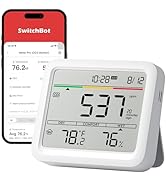
SwitchBot Hub 2 (2nd Gen) is a compact smart home gateway featuring a highly accurate Swiss-made temperature and humidity sensor, adaptive light sensor display, and universal IR remote control. It connects via 2.4GHz WiFi to consolidate all your infrared remotes into one app, supports voice commands through Alexa, Google Home, and Apple HomeKit via Matter, and enables smart automation using environmental triggers and physical smart buttons. Designed for seamless integration and future-proof smart home control.


| ASIN | B0BM8VS13P |
| Batteries Included? | No |
| Batteries Required? | No |
| Best Sellers Rank | #14,254 in Tools & Home Improvement ( See Top 100 in Tools & Home Improvement ) #34 in Home Automation Hubs & Controllers |
| Color | White |
| Customer Reviews | 4.4 4.4 out of 5 stars (11,350) |
| Date First Available | November 14, 2022 |
| Description Pile | No batteries required |
| Included Components | 2m temperature and humidity data cable*1, 3M adhesive*1, 5V 2A adapter*1, Hub 2*1, User Manual*1 |
| Item Package Quantity | 1 |
| Item Weight | 6.7 ounces |
| Item model number | W3202100 |
| Manufacturer | Wonderlabs |
| Material | ABS |
| Measurement Accuracy | ± 0.2℃ / ± 1.8% RH |
| Mounting Type | Tabletop |
| Part Number | W3202100 |
| Power Source | Ac/DC |
| Product Dimensions | 3.15 x 2.76 x 0.91 inches |
| Size | 80 × 70 × 23 mm (3.1 × 2.8 × 0.9 in.) |
| Special Features | Equipped with a light sensor, that helps your device adapt to the local environment, Supports HomeKit via Matter, The Gateway of SwitchBot Products, link SwitchBot to Wi-Fi (Support 2.4GHz), WiFi Smart IR Remote Control, WiFi Thermometer Hygrometer |
| Warranty Description | 2 years |
C**H
Great solution for my needs.
I bought the hub with 4 sensors. Setup was pretty straight forward. Hub integrated easily onto my Wifi network and Alexa environment. I have one sensor in my pump house with an alarm when the temperature drops near freezing. A second is inside a freezer watching for temperatures above 10 degrees. This sensor does not update very often, I think the Bluetooth signal has a hard time getting out. However all I need to do is open it and I have the history of it's performance. The third sensor is inside my small wood drying kiln I use for bowl blank. Here the humidity sensor is very useful. The 4th is inside my workshop so I know what issues I will face with glues and finishes. There are issues with the speed of the updates, probably caused by the distance from the hub, but the data is updated eventually. However the fact that each sensor records readings about every 2 seconds and stores those results helps remediate the slow updates. The data is there. Like I said it fulfills my needs. The app is well designed, robust, and provides a good set of tools to review this recorded data. All in all I would recommend this to anyone who doesn't need instantaneous temperature reading and alarms.
A**N
Works Great With HomeKit and Alexa!
There's was a lot of buzz last year about the HomeKit compatible infrared blaster the Nature Remo Nano. It looks like a great product but unfortunately it is only for the Japanese market. The Switchbot Hub 2, however, beat it to the American market! And I have to say it's great! The update to change the IR blaster over to Matter was seamless and easy. The blaster works like a charm too! If there is anything to nit-pick about, I'd say that the Switchbot's phone app simply doesn't have very many pre-programmed templates to control various devices. Not that they are necessary. The Switchbot's ability to learn IR codes and button from current remote controls is fantastic and easy. As long as you have the remote, Switchbot can learn it! For all the devices I wanted to control, I ended up just creating my own templates using the "Others" category under "IR Appliances". Works great! A note note Apple TV users. Although Switchbot support will tell you it's impossible to control an Apple TV with Switchbot, that's just not true. It controls it fine. ALL Apple TVs can be controlled using IR signals from IR remote controls. You don't even have to mess with settings in the Apple TV. It just works out of the box. The hurdle to overcome, however, is to get a IR remote control for the Apple TV. Only a bluetooth remote comes with the Apple TV 4 and later, not an IR remote. Apple TVs gen 1-3 had IR remotes. You can still buy these older model remotes and Switchbot can learn them just fine, but the gen 4 and later Apple TVs added a new Home button which is not on the older remotes. The new Home button is how you put the Apple TV 4s and later to sleep. Luckily, there are many cheap ($10) 3rd party IR remote controls for the Apple TV 4 and later that have the new Home button. Just buy one of those, and you can use it to teach Switchbot how to control your Apple TV. Switchbot uses Siri Shortcuts to allow Siri to control an Apple TV. Would be nice if it had built in support for Siri, but using Siri Shortcuts works fine. Amazon's Alexa voice assistant can also control the Apple TV with Switchbot. So best of both worlds! I highly recommend Switchbot if you want to use it with Apple's HomeKit. It's not like we have much of a choice in any case. As far as I could tell, Switchbot is currently the ONLY smart home IR blaster in the American market that is compatible with HomeKit. But at least you know it works, and works well! :)
B**T
Easy setup, great features
Installed Jan 6, 2024 - I bought this Switchbot Hub 2 primary as an IR blaster to control an electric fireplace and an older Samsung TV in my bedroom to use my iPhone as the remote. Short story - works well, good app. Bonus: There are 2 physical buttons on the front you can use to trigger devices/scenes. Longer story for enthusiasts: Based on reviews of competing products, I am happy I chose this one, easily worth the extra money. Using the native hub automation you can use the built in temp sensor and set a threshold and corresponding action. Ultimately I plan to do automation via HomeKit but assumed it would take some time before matter functionality worked. So for the short term, using Switchbot hub2 as the automation engine is simple and intuitive. Also the app works with Apple shortcuts on IOS. Widget sort of works, only scenes (switchbot scenes) show up so far, not devices. These are native switchbot devices/scenes, not to be confused with Apple home. Apple HomeKit and Matter- I have done no research on matter, I keep hearing it is coming. I don’t care to promote or consult on it, I’ll use it when it’s ready. That said, I am pretty impressed so far: Upon pairing with HomeKit (read the included directions, they are far better than average) the temp and humidity icons show up immediately in the IOS Home app. Matter seems to be working. It takes a very long time for IR devices to show up in the IOS Home app. Several hours. I have fairly old Apple TV series 4, this could be why it takes a while? Again, it’s worth reading the instructions. Far superior than typical instructions from other device manufacturers. I am pleasantly surprised by this device. I never heard of them before yesterday!
J**R
Pretty reliable hub
Been using the SwitchBot Hub2 for a few weeks now, and overall, it’s honestly pretty great. i’ve got it linked with my smart curtains and blinds, so yeah, my mornings are kind of bougie now. the curtains open, and boom, sunshine while I wake up. love how easy it was to set up, but l wish it had ethernet support. Wi-Fi’s fine most of the time, but when the connection gets wobbly, the hub gets cranky.
R**Y
Works well with Alexa
Appears well made and is easy to set up. Connecting this to my Alexa devices was a tiny bit fiddly, but in the end works like a charm to open large window curtains using the switchbot 3 robots.
A**.
UPDATED: Perfect control for a mitsubishi mini split AC
Update: Company was quick to reach out and send a replacement unit. So far everything has worked flawlessly and connection issues seem to have been resolved. The downside to a mini split is that a normal "smart" thermostat does not work with it, and there is no real scheduling options. Not only does this device allow control of the AC from your home automation system (Alexa, Google Home), but it also allows you to set up profiles and themes to control it to warm up before you climb out of bed, drop temperatures when you leave for the day, and again cool or heat your house prior to arriving home again. It has been running flawlessly now for about 2 months, was easy to set up, and perfect for remote operation or monitoring. UPDATE: After running for several months now, this unit seems to have issues maintaining a wifi connection (and disconnected "remote" no longer works). Wifi disconnects a minimum of 2 times per day, often throwing off the heat schedule (ie: it is cold when we get home from work), rebooting often results in bot being able to connect to ANY wifi network. My desire to recommend this is quickly waining!
K**Y
Will not reliably connect with Switchbot devices
This product is really perplexing. I bought it to connect two Switchbot button pusher devices to WiFi so I could control them while is was on vacation. The Hub 2 connected to WiFi flawlessly and could communicate through the app. But it wouldn't connect to my Switchbot devices. I tried over and over again to "Enable Cloud Services" on the app (this is the term Switchbot uses to describe connecting a device to the Hub). Each time I'd get a message saying the device wasn't close enough to the hub, even though the devices were right next to the Hub. I tried updating the Hub firmware but no help. Finally after about an hour the first device suddenly connected. It was the same frustrating process with the second device. But after they were both connected I could control the Switchbot devices through the app via WiFi. The devices could flip and unflip a switch on an unmanned industrial machine that goes offline sometimes. When I was on vacation the machine went offline. I tried to activate the Switchbot button pusher devices but both had disconnected from the Hub. I couldn't get them to reconnect. I had to pay an employee to go to the location and flip the switch. I thought maybe the Switchbot batteries had run out but when I went to the location both devices worked perfectly via Bluetooth. They just wouldn't connect or stay connected to the WiFi Hub 2. It's tricky to make a device connect via Bluetooth to random phones, but these devices do that flawlessly. It's also tricky to make a device that connects to random WiFi routers but the Hub 2 does that flawlessly. The easy part should be making devices that can connect TO EACH OTHER but the Switchbot devices can't do that reliably. This makes the Hub 2 useless. What's the point of Switchbot automation if it only operates through Bluetooth? If I'm in Bluetooth range I can flip a switch myself.
I**H
Really cool!
okay, so i grabbed the switchbot hub2 and—i gotta say—it’s lowkey clever. i’ve been using it to automate random stuff around my place, like my AC and bedroom lights (way nicer than fumbling for the remote before bed). honestly, setting it up wasn’t *hard*, but it got a little confusing at first (that app’s got a lot going on). now it works. i love telling alexa to fix my life (jk, mostly my living room). not perfect, but it does enough to feel worth it!
R**Y
Prima
Gaat perfect
A**O
Excelente adición a ni smart home
Muy buena adición para integrar mis cortinas y cerraduras a home kit
S**I
användbar och högkvalitativ
S**R
Funktionaler und vielseitiger SwitchBot Hub 2 mit kleinen Einschränkungen
Warum habe ich den SwitchBot Hub 2 gekauft? Ich habe den SwitchBot Hub 2 gekauft, um die Hygrometer über Matter in mein SmartHome zu integrieren. Dies funktionierte ausgezeichnet. Sowohl der Hub 2 als auch die Hygrometer lassen sich über die App manuell in die Apple Home App über Matter einbinden. Integration und Kompatibilität Die Integration war einfach und unkompliziert, was besonders angenehm war. Es gibt jedoch eine Einschränkung, die man beachten sollte: Die Anzahl der Geräte, die man über Matter in die Home App einbinden kann, ist begrenzt. Das bedeutet, dass obwohl das Thermometer und das Hygrometer physisch ein Gerät sind, sie jeweils als separates Gerät zählen. Wenn du also viele dieser Geräte für verschiedene Anwendungen, wie das Messen der Feuchtigkeit in mehreren Gläsern, verwenden möchtest, stößt du schnell an die Grenzen der möglichen Verbindungen. Integrierte IR-Fernbedienung Ein weiteres Highlight des SwitchBot Hub 2 ist die integrierte IR-Fernbedienung. Diese ermöglicht es, IR-Geräte wie Fernseher und Receiver über die App zu steuern. Es ist sogar möglich, Routinen zu erstellen, was diese Funktion noch praktischer macht. Die Nutzung der IR-Fernbedienung hat meinen Alltag wirklich erleichtert und ist eine feine Ergänzung zu meinem SmartHome. Zusätzliche Hygro- und Thermometer-Funktion Der Hub 2 verfügt zudem über ein eingebautes Hygrometer und Thermometer, was eine nette Zusatzfunktion ist. Diese zählen allerdings auch als separate Geräte, wenn sie mit Matter verbunden werden. Das sollte man bei der Planung und Einbindung seiner SmartHome-Geräte im Hinterkopf behalten. Fazit Der SwitchBot Hub 2 ist ein vielseitiges und funktionales Gerät, das die Integration von Hygrometern in ein SmartHome-System ermöglicht. Die einfache Einbindung über Matter und die praktische IR-Fernbedienung machen ihn zu einer wertvollen Ergänzung für jedes SmartHome. Die begrenzte Anzahl an möglichen Gerätverbindungen ist der einzige Minuspunkt, den man bei der Nutzung beachten sollte. Ansonsten überzeugt der Hub 2 durch seine Vielseitigkeit und praktischen Funktionen. Im Übrigen kann man die Entwicklung von Temperatur und Luftfeuchtigkeit über nützliche Diagramme auswerten. Hier ist ein Highlight die Angabe des VPD-Wertes, der für viele seit dem 1.4.2024 eine nützliche Funktion darstellt. ;-) Ich hoffe du findest meine persönlichen Impressionen nützlich.
F**N
Bon produit qui fonctionne bien
Le produit remplit les fonctions pour lesquelles je l'ai acquis. L'intégration à Google Home se fait très facilement. Les informations sont très claires et le suivi de la température et de l'humidité est un plus. De même, l'intégration de la télécommande infrarouge est très bien (les 3 versions proposées ne fonctionnaient pas mais j'ai fait apprendre au HUB la télécommande très facilement) ; cela me permet de connecter ma PAC et de lancer le chauffage/clim à distance ou de mettre en place des règles (si température < 16°C alors allume le chauffage, etc.). Je regrette le fait de ne pas pouvoir le lancer avec Google Assistant ou Google Home (seule la température et l'humidité sont disponibles mais aucune fonction de lancement ; il nécessite un HUB supplémentaire) pour le partage du système à toute personne vivant dans le domicile. Sinon, l'application est claire et simple d'utilisation mais si vous voulez partager la commande, l'autre personne devra créer un compte et installer une application supplémentaire. Cela reste tout de même moins chère que des boitier de connexion pour PAC. Je recommande.
Trustpilot
2 weeks ago
1 week ago