

Desertcart purchases this item on your behalf and handles shipping, customs, and support to India.
๐ Connect Like a Pro โ Never Miss a Pixel!
The RyzzRooa DVI to HDMI Adapter 2-Pack offers bidirectional connectivity with gold-plated, corrosion-resistant connectors and EMI protection. Supporting up to 1920x1200 and 1080p Full HD video, it ensures crisp, smooth visuals across PCs, monitors, HDTVs, and gaming consoles. Designed for durability and ease, it comes with a lifetime warranty, making it an essential upgrade for professionals seeking seamless, high-quality video conversion.
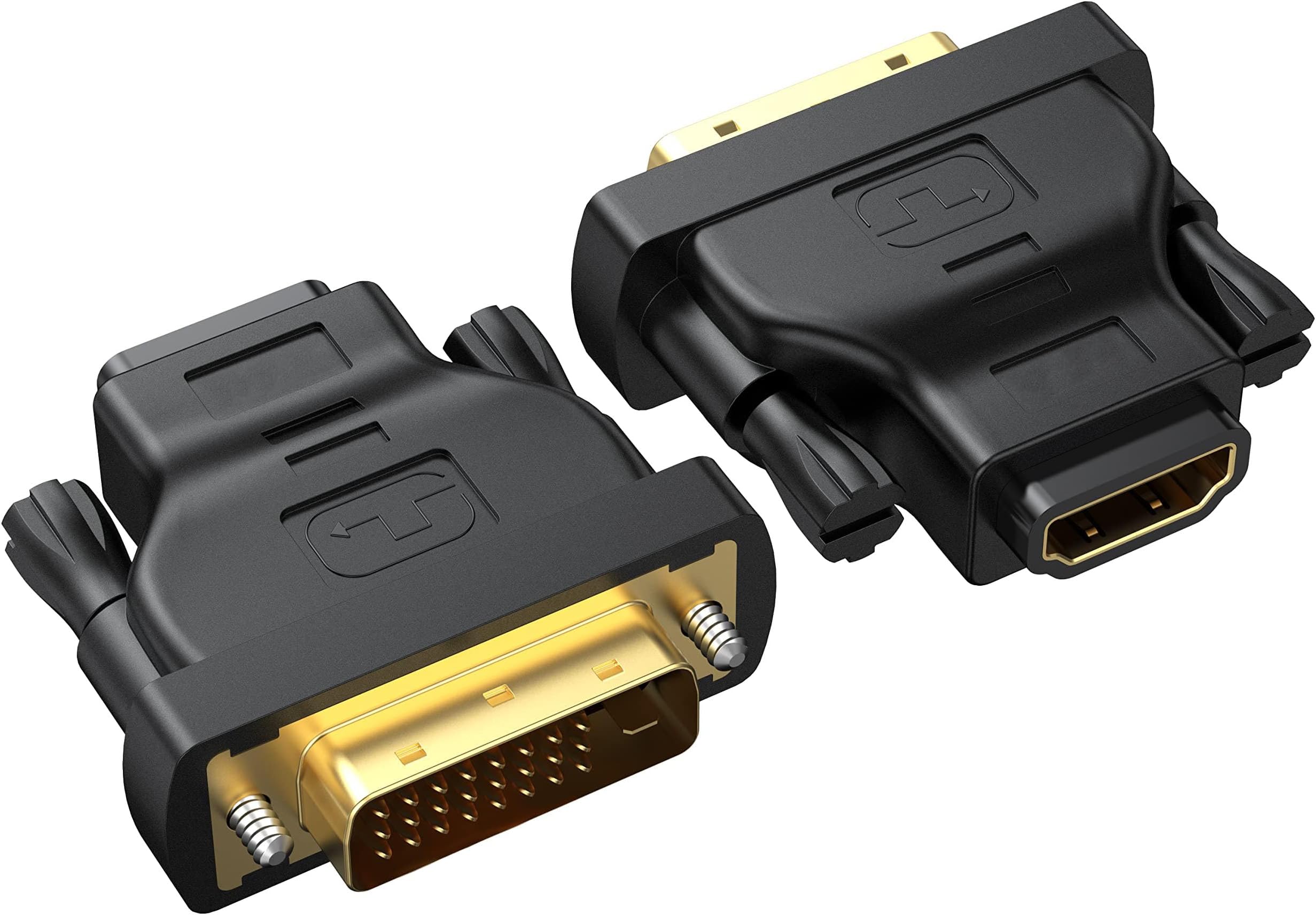


| ASIN | B0C6KPN68W |
| Best Sellers Rank | #89 in DVI-HDMI Adapters |
| Brand | RyzzRooa |
| Color | Black |
| Compatible Devices | Nintendo Switch, Computer, Monitor, HDTV, Projector, Laptop, Desktop, Granphics Card, PS4, PS5 and More Compatible Devices Nintendo Switch, Computer, Monitor, HDTV, Projector, Laptop, Desktop, Granphics Card, PS4, PS5 and More See more |
| Connector Type | DVI, HDMI |
| Customer Reviews | 4.5 out of 5 stars 251 Reviews |
| Finish | Projector |
| Finish Type | Projector |
| Manufacturer | RyzzRooa |
| Mfr Part Number | RYA052920 |
| Model Number | DVI to HDMI Adapter |
| Number of Items | 2 |
| Number of Ports | 1 |
| Package Quantity | 1 |
| Power Plug Type | No Plug |
| Specific Uses For Product | Monitor, PC, TV |
| Warranty Description | After-sales service for 2 years. |
| Warranty Type | Lifetime |
T**C
Oh my...HDMI!
This adapter is awesome. The connection to convert my PC DVI video signal to HDMI was straightforward and strong. The order comes with two adapters that are of high quality. I simply attached my HDMI cable into the adapter after installing and securing it. I now have the ability to use my PC with practically any display that has an HDMI video input. I also noticed that the conversion allowed my new video signal to include audio output. A pleasant surprise, as I believe DVI video doesn't output PC audio. A good value. Enjoy your shopping and peace to you.
P**I
Perfect for Older Monitors
These adapters are a lifesaver if you still have monitors with DVI ports. I connected my PC to an HDMI graphics card with no issues at all. The gold-plated connectors feel solid, and both adapters worked right out of the box. Having two in the pack is great โ I keep one at home and one at the office.
G**G
Convenient and works great
Easy connection from old video card to hdmi monitor. Before I was converting dvi to 9 pin analog to analog, but this is a much simpler and better connection because I can use the monitor's hdmi port.
H**W
10 Adapters, SWEET!
* * * Disclaimer: Item Was Free * * * PROS: Cost, Functions CONS: Quality Control These adapters fit nice and snug with the screws to secure the fit. I did have one that failed out of the 10. The 9 other adapters work well with a clear picture as you would expect. These are used on retro gaming units. NOTE: The cheap HDMI cables will not work. I'm using true 4k HDMI cables. Do I recommend: For the price of 10 working adapters, YES, I strongly recommend.
J**I
Works as advertised.
They connect like they say they should and the price is fair. Seem to function properly, and the picture quality comes through just like it should.
M**A
perfect adapter to keep older tech going
Perfect adapter for using an older monitor as my third since my video card doesn't support DVI. Plug and play, and I have a spare one if I ever need it.
S**O
Works great, doesn't seem to get hot!
Maybe DVI-HDMI doesn't have the circuitry to get hot, but other adaptors do. These are a good way to make use of those DVI outputs and they don't stick out so far that you have to pull your equipment that far from a wall or enclosure. Good grip on HDMI cables.
S**G
Works great, but will need trimming if ports are close together to make them fit
The plus side is these are working flawlessly, no problems there. The downside for me was that I have several ports on a KVM switch that are right next to each other. These have a larger rubber casing around the DVI port side, and it was so big that I couldn't plug into adjacent ports. I needed it to work right away, so I used a pocket knife to trim the plastic on the side of the DVI port that was in my way. The plastic/rubber was very soft and was easy to slice through without too much trouble. Still, I'd have preferred if they kept the casing tight around the port instead of bowing out.
Trustpilot
1 month ago
1 month ago