Desertcart purchases this item on your behalf and handles shipping, customs, and support to India.
🚀 Print Fast, Print Smart, Print Like a Pro!
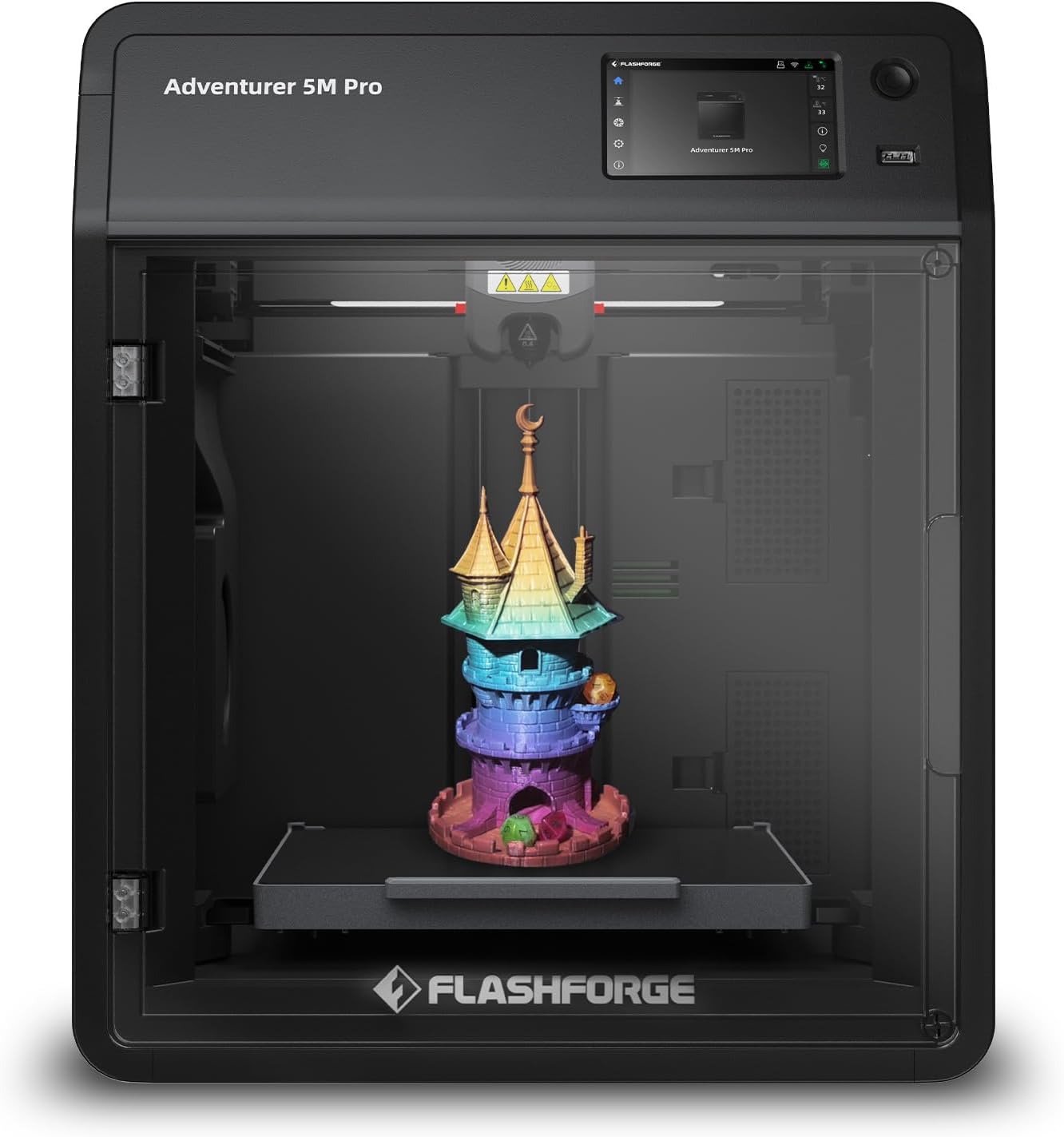
The FLASHFORGE Adventurer 5M Pro is a high-speed, professional-grade 3D printer featuring a CoreXY all-metal frame, 600mm/s travel speed, and a quick-detachable 280°C nozzle. Its one-click auto printing system with automatic bed leveling ensures hassle-free setup and flawless prints. With a versatile 220x220x220mm build volume, real-time app monitoring, and advanced cooling and vibration compensation, it’s designed for both beginners and pros seeking rapid, precise, and reliable 3D printing.


| Best Sellers Rank | #1,429 in Industrial & Scientific ( See Top 100 in Industrial & Scientific ) #3 in 3D Printers |
| Brand | FLASHFORGE |
| Color | Adventurer 5M Pro |
| Compatible Devices | Personal Computer |
| Customer Reviews | 4.0 out of 5 stars 1,048 Reviews |
| Item Weight | 22 pounds |
| Material | Acrylonitrile Butadiene Styrene, Polycarbonate, Polylactic Acid |
| Product Dimensions | 16"D x 14"W x 18"H |
F**N
WOW 5 stars (update)
Final update: As you can see from the whole message, initially there was massive disappointment when receiving this item. Fortunately it seems to have been a rare isolated incident. FlashForge has proven to have OUTSTANDING customer service/ support. They made sure I received the full refund and without waiting a month for Amazon to go through the slow process. They also offered troubleshooting solutions, which unfortunately didn’t help with this specific printer. Furthermore I spent my morning with a buddy who finally unboxed his FlashForge printer of the same model and we have been making prints together non-stop. We were set up and printing in about 15 minutes. Unlike the damaged one I received, the printer heats quickly and runs smooth. The auto level is excellent. It is so user friendly that a child can figure it out. So far today all prints have been successful and we’ve been having lots of fun. Helpful tips to get started: You can edit all the specifications after downloading the computer program.. and it is simple. (Download free prints from Printables.com or Thingiverse.com etc.) once you unzip files and open them in FlashForge you can easily choose size/scale and choose if you want it to create stands and/or a base which really help with most builds. There is a sidebar on the right hand side of the program and scrolling over each option explains what it is for. Knowing that I was refunded in full and the issues were due to damages with that specific device, I will be continuing and looking forward to doing business with FlashForge. (Opening a different model today). The quality customer service and quality product outshines their competitors for sure. Original review: Incredibly disappointed. Massive letdown.. Incredibly disappointed. Even worse, my child was let down. I’m hoping this was a problem with the individual printer but after the initial few preprogrammed prints.. not one print has been successful. Even some of the preprogrammed ones stopped working. I watched what seems like every tutorial, thinking I was doing something wrong. I wasn’t. This printer is designed specifically to be easy to understand and assemble. Unfortunately, the filament would randomly stop feeding, but the printer would continue as if it was printing. So after 35 minutes of printing.. it would stop feeding for 10-30 seconds if not completely.. making the entire print a waste. Wasted a LOT of time, wasted lots of filament, wasted all this money and lead to constant let downs. There was also a major issue with prints not sticking to the tray bed and getting lifted and taken for a ride.. taking it out of the precise location and also tangling it up when I tried very basic single and/multi-part prints. (Yes, even with the glue that they specifically provide to avoid this.) On top of that and other issues like seemingly poor heating, it doesn’t seem to be capable of printing anything that’s not just a reshaped brick. You can build the same stuff with Play-Doh molds.. I am sending it back for a refund and will most definitely be reviewing the process. I truly hope that this company will give me the full refund and takes care of their loyal customers. I am truly hoping this was a one time thing and that I have no issues with future products. — Update 1: Amazon FlashForge seller contacted me and offered a full refund. Considering many factors I don’t know if this will truly be honored/issued. They later sent a troubleshooting message. However, by then I had already tried everything and I had someone who 3D prints for a living come look at it. I was assured I need a refund. I was also told not to replace the wasted filament with my own money. If that affects the refund, then legal action will be taken (cost free for me). I purchased at least 11 spools of FlashForge brand filament, which were not cheap, and another expensive printer (from their website) which I will not open unless/until I receive full refund for this one. How they treat loyal customers will speak volumes. Which is important, especially when investing in a company with so many competitors. At this time, multiple people and two businesses (whom do big YouTube reviews on products they purchase and use) are awaiting results. I hope to and would love to come back with great news of a company that outshines the rest because the alternative would be me left disappointed and them dealing with the results of bad business. I am frustrated and concerned due to the amount of people getting ripped off online these days.
W**D
Outstanding Value and Performance
I am giving this printer 5 stars. I purchased this printer on 2 October, and it has been one of the best technology purchases I have made. Not only has it been easy to use, but it also sparked my imagination and opened the door to countless new projects and ideas. One of the things I appreciate most about the Adventurer 5M Pro is how beginner-friendly it is. Setup was straightforward, and the printer produces excellent results without requiring a steep learning curve. At the same time, it has the speed and features needed to keep up as your skills grow. The print quality has been consistently impressive, and the enclosed Pro design is well worth the additional cost. The enclosure helps create a more controlled printing environment and provides added flexibility when working with different materials. If you’re considering this printer, I strongly recommend spending the extra money for the Pro version. My only real complaint is that I would like to see a larger build volume. That said, the 220 x 220 x 220 mm build area is large enough for most projects, especially for those who are new to 3D printing. While a larger platform would be nice, it has rarely limited what I wanted to create. This printer impressed me enough that I joined the waiting list for the new Creator 5 Pro. In my experience, FlashForge delivers high-quality printers at a price that is often better than the competition. Their products have earned my trust, and I expect to continue purchasing FlashForge printers. Overall, this is an outstanding 3D printer that combines ease of use, speed, quality, and value. Whether you are new to 3D printing or looking for a reliable machine to expand your capabilities, I highly recommend it.
J**N
You will be buying alot of parts
Easy to use and set up but I don't even know where to begin to complain. I've printer 6 things and have had so many issues. The app that's supposed to be on the website just don't work so I spent 5 hours getting a work around to get it on my oc and can only get it to work with stl files on a flash drive. It's normal speed should be standard alot lower instead of full speed ahead when printing. Most prints cant take the speed but honestly not bad at all if slowed just a tad. I had one clog after my second print that was a nightmare and I had to take the entire thing apart to remove the filiment from in the gears but at least it was fixable. Right after recalibration and 2 layers into a print it rammed the head into the plate and snapped it off and bent pins. Took it completely apart again. Managed to fix it and got it working with only having to switch to my .6mm head. Next print went great. No issues at all for 2 hours. Started another print right after and on the 3ed layer as I was watching it, it decided to ram that head into the base plate too and snapped it. Thankfully only damaged the head but this is ridiculous. I know going through parts is common and nothing new but. I already have spear parts on the way and have to buy more now and they are not cheep. I have a spinal injury and was really enjoying this but its just a money pit I really wanted to leave a positive review. If it came with about 4 more heads an extruder full assembly and a couple filiment feeders and an extra bottom plate I'd say it's worth it. I'm willing to change my review if I'm compensated the parts and time. Even if the replacement parts were cheaper to make up for continued replacement I'd even give a 5 stare. There is many positives and nice things about it but the parts and down time is enough to focus on.
M**K
Great printer. Software installation issues.
Lengthy… I apologize. I purchased this after spending several weeks researching 3D printers. Their price points are all over the place and, as to be expected, the more features they have the more expensive they run. The initial reason for wanting a 3D printer is to make custom cutters for polymer clay. After reading dozens of reviews for different printers, I decided that this model from Flashforge would meet our needs and allow for more complicated projects in the future. It arrived the day after I ordered it (yay, Prime). Nice heavy duty box and excellent packing so it arrived in pristine condition. It is an impressive looking piece of equipment and seems to be well built. Unboxing and setup took about 30 minutes and was relatively painless. The relative part came with things that even the FlashForge website doesn’t make clear. So, I’ll have a go at it. There is a fair amount of software you need. The Flashforge website has flashy descriptions of what these do but does not really say what you need to get started. To begin with, you need FlashMaker. This is an app for iPhone, iPad, or an Android device. It is available from the app stores for the related devices. You will not be able to set up the printer without it as you have to make an account to register it and finish the setup. Once you have it, the setup is fairly straightforward and the display/touch screen on the printer guides you through the process easily. It did take a few tries to get it attached to the WiFi network but patience paid off. In the full disclosure department, we am newbies. So there was the need for a 3D application that we could use to create the projects to send to the printer. We didn’t want to spend a fortune on this and after looking at all the options, I found TinkerCAD for the iPad. It is an Autodesk product (think AutoCAD), is web based (though the is an app in the Apple App Store for the iPad that connects you to where you need to be), and it is free. Granted, I am sure if you are going for heavy engineering type 3D, you probably want a higher end application and most likely a higher end printer. I watched 3 YouTube videos on TinkerCAD and I was creating 3D objects in less than an hour. You can design directly in the app though I’ve taken another route for the time being. You’ll still need this in the process though to create the .STL files you will need later. I also learned how to create designs in Procreate on my iPad that could be exported out as PNG files. These need to be converted to .SVG files to be able to use them in TinkerCAD. There are a number of free web based conversion sites available. Then there is printing. Oh boy! Flashforge talks about a number of software applications on their website but it is very unclear what you need them for. Short answer: the .STL files from TinkerCAD need to be converted to .GX files for the printer to use. The printer comes with a thumb drive (USB A) that contains a Software folder with two applications: FlashPrint 5 and Orca-Flashforge. FlashPrint 5 is, as far as I can tell, a more consumer friendly version with fewer bells and whistles than Orca. Herein is the rub. I do almost all my graphics on my iPad and these applications require a desktop/laptop computer running either Windows, MacOS, or Linux. In my case, I have a MacBook Pro running the latest version of MacOS (Sequoia 15.0.1). Much to my surprise, the applications on the thumb drive, would not install as they were considered legacy version and not compatible with my OS. The versions on the drive were updated as of 04/28/24, which was before the latest version of the MacOS was released. I tried Flashforge’s website and had the same issue. The haven’t updated the installers for the newest version. That’s when the panic set in as I was now looking at an expensive device that I could not use. Fortunately we had an older MacBook Air that we had not updated. It is running MacOS Monterey 12.6.1. Crisis averted and I got the applications installed. I was able to import the .STL file and run the slicer to produce the .GX file for printing. If I had installed Orca, I could apparently send the file to the printer via WiFi (my next project). Using FlashPrint 5, I went old school and downloaded the .GX file to the thumb drive. The printer has a USB A port. Popped in the drive, let the printer warm up, and voila! A 3D object. By the way, the HEPA filtration system on the Pro does a great job of keeping the fumes down. Other than the software installer mess, the process was relatively painless and I must say that is it a deeply satisfying experience to handle your first 3D object. In closing, this is a very cool printer and I’d recommend it to anyone who wants a reasonably priced entry level device. Save yourself a world of frustration and make sure you have: 1. Your phone or tablet with Flashmaker installed so you can setup your printer. 2. A computer with the capability of installing FlashPrint 5 and/or Orca-FlashForge* 3. And, of course, a 3D application capable of producing .STL files, which seem to be one of the most common types. Hope this overly long dissertation was helpful. *My guess is the MacOS version prior to Sequoia (MacOS 15) will work based on the dates on the installer files, but that is exactly what it is: a guess). I will be initiating a conversation with Flashforge about getting the installers updated.
J**S
Great machine, definitely worth the money
I am absolutely new to 3D printing. Never had a printer and never used one. Why did I pick this printer: Fully enclosed and ventilated with a filter: Very silent compared to open printers. Also, fewer bad smells. Safe for kids and animals, as the hot parts cannot be touched so easily. Large size: Capable of printing larger models, so no need to print piece by piece. High speed: No endless waiting time to fire up and print the object. WiFi and Ethernet: I prefer to hook up printers and other equipment that do not move via cable, and not via WiFi. Many printers only offer WiFi; this one does both. Can print with all different kinds of filament, not only PLA, but also many others. Built-in camera: My printer lives in my workshop in the basement, while my computer is in my office. It is convenient to see what's going on without having to run down all the time. First impression: Solid machine, well packed, comes with everything you need to start, even a 0.25kg spool of filament, 2 nozzles, a small tool kit, and so on. Set up: Super easy and self-explanatory. Plug it in and follow the instructions in the manual and on the screen. Takes about 10-15 minutes, then you are all set and ready to start. I tried a few of the models that are already in the memory of the printer (a cube, a boat). First few days: I downloaded a few different models from multiple platforms (fidgets, a dragon, a fish), and every part came out great. I meanwhile also received a few other filament colors. Swapping the filament is also no issue, just follow the instructions on the touch screen. I also got an alternative holder for the spool and printed it, as I did not like that the spool is attached to the back of the printer. Makes sense for a printer farm, where they sit side by side, but for me it is easier to have them on the side. Overall impression after a few days and about 10 hours printing time: For me, as a beginner, it is a great tool to start with and to learn how to use 3D printing. This machine has a lot more to offer and is not only for beginners; it's also for way more experienced users. I like the high speed (not only printing, but also heating up and cooling down), the solid construction, and the great print quality. Overall, a great investment and a clear recommendation.
P**E
Great machine, I wish Flashforge will implement my feature requests
It's my first 3D printer and I like it. I chose it because it is enclosed, because there is a lot of dust where I live. Occasionally I use the 5M Pro to dry my filaments, I put something on the bed so the roll is not directly in contact with the hot bed, set the bed to 110°C and let it be inside the printer for several hours. it's a great way to dry filament. I also turn on the internal air fan to have the air circulate inside. but the problem is, that about every 15minutes the bed heater turns off, so I have to babysit it and always turn it back on for hours on end... I told Flashforge to make an option in the firmware so users can set the bed heater timer on for however long they want. If you think that's a good idea please message them too about this request, because it's more likely they will do something when more than one user is requesting it. When performing auto leveling(bed mesh compensation), before the machine starts it scrubs the build plate with the nozzle with considerable force, I want to skip that step because I don't want my build plate scratched, and I can clean the nozzle myself better anyway. On my PC sticker build plate the hot nozzle even melted the plate! But there's no way to skip that scrubbing step. I told Flashforge to add an option in the firmware to skip it, but they haven't done anything, if you think that's a good idea please message them too. One thing I dislike about this machine is that I found out that the air filters only filter the air that is going out of the chamber. More precisely, one filter is for internal air circulation, and the other is used for external air circulation(so the filter filters the chamber air before it leaves the machine). The air intake is not filtered, that causes all the dust in the outside air to enter the printer, which is very disappointing. To make the extruder fan quieter I have cut away the plastic grille in front of it, which has made a big improvement. I also installed a thermal switch inside the PSU so its fan only turns on when needed instead of being on all the time (initially it would only turn off if you turn the printer off from the rear power switch). I posted a video doing this modification titled ''Flashforge AD5M Pro adding thermal switch for PSU fan''
A**S
Great First 3D Printer
If you're looking for your first 3D printer, look no farther. This printer is a little of a lot of worlds: 1) great price - for less than $350, I got a printer that does a lot, and as much as printer that cost a lot more 2) very versatile - it prints a variety of filaments (most varieties of PLA, PETG, ABS, ASA, etc.) and it has 4 nozzles sizes 3) crazy simple to set up 4) incredible results - in no time at all, I was print unbelievably detailed models 5) supplies are plentiful and inexpensive 6) maintenance verges on idiot proof 7) easily manageable footprint I could go on, but I think you get the point. However, I would love to have the same printer in a larger format. Approximately 8” cubed is as large as I can print with the 5M Pro. All in all though, I couldn’t be happier.
D**E
"New" Adventurer 5M Pro Appears Defective or Previously Used
To whom it may concern, I purchased a brand new Flashforge Adventurer 5M Pro, and at this point I have to ask a serious question: Did you sell me a refurbished or previously used printer at the price of a new one? From the moment I took it out of the box, it has had problems. The very first thing I noticed was a strange noise coming from the fan on the front of the extruder assembly. I thought it was odd right out of the box, but the noise has continued and appears to be coming directly from that fan. I removed the magnetic front cover on the extruder assembly to inspect it. This cover is magnetic and intended to be removable, so please don't respond by claiming that inspecting it voids my warranty. Once removed, I found the round inspection/QC sticker partially peeled off, and the four wire solder joints look poorly done. It honestly does not look like the quality I would expect from a brand new printer. The initial homing and bed leveling procedure gouged and scraped my PEI build plate in two different locations. My build plate was damaged before I even completed my first print. Since then, I've continued having numerous issues: My PC frequently refuses to send files because it says the printer is "Machine Busy" when it clearly is not. After almost every print, the printer locks up. The fan on the side of the extruder keeps running loudly, but the touchscreen becomes unresponsive and won't let me do anything. This even happens if the printer has been sitting overnight after finishing a print. The fan is still running and the printer won't respond until I power cycle it. The extruder also makes abnormal noises during printing. Before you suggest it, I have already performed a factory reset and gone through all of the basic troubleshooting. Please do not ask me to simply reset it again. I take excellent care of my equipment. This printer has not been abused, modified, or misused. I also have timestamped videos from the moment I opened the box through the first prints documenting these issues. At this point, I expect Flashforge to make this right. Whether that means replacing this printer with one that has been properly inspected or providing another acceptable solution, I expect a prompt response. If this is the level of quality control being shipped as "new," I will make sure potential customers know exactly what my experience has been. I would much rather tell people that Flashforge stood behind its product and made the situation right. I look forward to your response.
Trustpilot
2 weeks ago
1 month ago