Desertcart purchases this item on your behalf and handles shipping, customs, and support to India.
🚀 Upgrade your connection, upgrade your life!
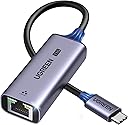
The UGREEN USB C to Ethernet Adapter delivers blazing 2.5Gbps wired internet speeds via a cutting-edge Realtek RTL8156BG chip, ensuring low power consumption and cool operation. Its sleek aluminum build offers durability and style, while plug-and-play USB-C compatibility instantly upgrades laptops, tablets, and smartphones lacking Ethernet ports. Perfect for professionals demanding stable, high-speed connections for streaming, gaming, and large data transfers across a wide range of devices.


| ASIN | B0CD1FDKT1 |
| Best Sellers Rank | #12 in USB Computer Network Adapters |
| Brand | UGREEN |
| Color | Space Grey |
| Compatible Devices | Desktop, Laptop, Smartphone, Tablet |
| Compatible Operating System Family | Android, Windows |
| Customer Reviews | 4.6 out of 5 stars 3,496 Reviews |
| Data Link Protocol | Ethernet |
| Data Transfer Rate | 2.5 gigabits_per_second |
| External Testing Certification | 177202201739 |
| Hardware Interface | USB 3.0 Type C |
| Item Dimensions L x W x H | 2.4"L x 1"W x 0.6"H |
| Item Highlight | Type C (Thunderbolt 4/3 Compatible) to RJ45 Network Internet, Compatible for NAS, MacBook Air/Pro, XPS, iPhone 17 Pro/Max |
| Item Weight | 33.5 g |
| Manufacturer | Ugreen Group Limited |
| Mfr Part Number | UG-USBC-25052 |
| Minimum Required Operating System Version | Android 13.0, Windows 11 |
| Model Number | UG-USBC-25052 |
| Number of Items | 1 |
| Number of Packs | 1 |
| Product Dimensions | 2.4"L x 1"W x 0.6"H |
| Unit Count | 1 Count |
K**Y
Solid, Well‑Built Adapter with Excellent Performance
I bought this adapter for my M1 MacBook Air so I could properly test the speeds on my new 2Gb internet service. During installation, my old cheap USB‑C Ethernet adapter kept capping out at 1Gb, and even the tech suggested the adapter was the bottleneck. After he left, I ordered this UGREEN model. I’ve had great luck with their products before and it did not disappoint. It has a solid, heavier feel with what seems like a metal casing, and it worked instantly. macOS recognized it right away with no drivers needed. I simply turned off Wi‑Fi, plugged it in, connected the Ethernet cable, and I was online immediately. My very first speed test hit right at 2Gb, and it’s been consistently fast and stable ever since. I also haven’t noticed any heat issues at all. Overall, a fantastic upgrade and absolutely worth it if you need true multi‑gig speeds on a Mac.
P**Y
Solid USB-C Upgrade for 2.5GbE - Good Value and Performance - Good for Mac Users
I’ve been using this Ugreen adapter for a 6 months now and it’s become one of my go-to accessories. If you have a device like the M1 MacBook Pro or Mac Mini that’s limited to 1Gb Ethernet, this adapter is a great way to unlock faster speeds, especially if you’re upgrading your home or office network to 2.5GbE. I have everything connected to a 10Gb switch after I upgraded my Synology NAS and needed a way to improve access to it for storage. Setup was truly plug and play, just connect the Ethernet cable to one end, plug the USB-C into your device, and you’re good to go. I noticed an immediate improvement in transfer speeds when moving large files to my NAS. This is perfect for anyone working with media or large data sets where Wi-Fi just doesn’t cut it. I was initially capped at 200MB/s. It more than doubled when I used the adapter to 200MB/s At around $20, it’s excellent value when compared to higher-end adapters that cost much more but often deliver the same result. It’s compact, feels well made, and I’ve had zero issues with performance or stability. It does get slightly warm during long transfers, but I haven’t seen any drop in connection quality or speed. If you’re trying to squeeze more speed out of your Mac Mini, laptop, or even a docked tablet, this is a solid upgrade. I keep mine on the desk and switch it between devices as needed. Highly recommended for anyone moving to a 2.5Gb network or needing faster wired performance.
M**N
Exactly As Advertised - Mac Friendly
Ordered this adapter for my M1 Mac Mini after my ISP upgraded me to 2gb fiber internet. The internal NIC was capped at 1gb so I wasn’t getting my full speed. Plugged in this adapter and did a quick reboot and boom! Speeds are great and consistent. Have had zero issues with data loss or lagging. Highly recommend.
K**S
Exactly as described and better for me
I have an Apple Imac which limits you to only 1Gig...Got this and my 1.3 Gig plan now gets 2.0 gig with Speedtest. So all i can say is Wow...this is great. Not sure I really need all speed but at least i'm finally getting what I am paying for and more!
C**H
Reliable network speed tests and smb speeds
Got this on prime day for about $20 USD. For the price and quality it was definitely worth! Works perfectly and as you would expect. No driver installations or dropped connections so far, just plug and play. Sleek design, gets a little warm (which is expected) but not hot at all. Tested on compatible internal network speeds which showed to be reliable and fast Hardware tested on: - base m4 mac mini connected via usb c ugreen 2.5g adapter - over cat7 ethernet cable (overkill but cat6/cat5e under 100meters/328ft should be enough) - 2.5g ethernet switch - 2.5g port on nas iperf3 tests: - iperf3 tests from base m4 mac mini to another 2.5g device on a 2.5g switch - shows average bitrates of ~2.35 Gbits/sec smb tests from a usb3 connected to base m4 mac mini: - only took ~2mins to transfer 31.31 GB for 11 files in varying sizes - which on average came out to around a transfer rate of 2.087gbps - which is about 260.88 Megabytes per second - i'd imagine this would even be slightly faster for files directly on the mac but wanted to test with a real scenario - probably closer 290-300 Megabytes per second for files stored on the device rather than usb3 have not had a need to test this on mobile yet but iphones with the 10g usbc (and probably just usbc in general) should be fine i'm sure if you're looking into buying one of these you already know all this but some things to keep in mind. your mileage may vary based on your cable length and runs/environment surrounding your network/cables for any electromagnetic interference. but generally as long as you have 2.5gb compatible ports and cabling and you should be good to go!
R**.
Great speed, connection sometimes blocked but there is a solution.
I wanted to take advantage of my 3gb fiber connection, and the best way was to connect my Mac M1 via Ethernet. This looked like a good solution. It started pretty good. I could almost max out my 2.5gb port on my switch. Then a strange thing started happening. At odd, but consistent, intervals, my connection would stop and say it was 'blocked'. If I waited, it would come back to active. If I switched Thunderbolt ports, it would come back instantly. Annoying. After a couple of days trying different ports, cables, DHCP vs static IP, and WiFi working flawlessly, I figured it was something in the Mac. Many Google searches directed me to the Thunderbolt Bridge. Apparently, this feature is to directly connect two Macs together IP for a high-speed connection. But it has been known to cause my issue. I removed the Thunderbolt Bridge service (I can add it back later if needed), rebooted, and have been working great for over a day now. Hopefully, this might help someone in the future.
D**.
Works great after updating driver on Mac
It works great. The only thing is that when connected for the first time (to my macbook pro with Mac OS Tahoe 26.4.1) I was having speeds of ~134 MBps, so I downloaded the Realtek driver (ver. RTL8156B(G)), using the version MAC OS 10.9 to 10.15 (very old: 2020/12/21) from the list shown in their website. I installed it and when it finished, it showed a message saying that Mac OS blocked a system extension; I ignored that and just restart my MacBook Pro. After restarting it worked as expected: speeds of ~2 gpbs (due to my internet only allowing that). The good thing is that I took the USB-C adapter and used it in another macbook pro, I didn't have to download or install the Realtek driver, it seems it updated the firmware in the adapter, I think.
S**S
Installation instructions are flaky, but unit works well when installed
I bought this because I wanted a simple way to upgrade an old tower PC to support 2.5gig Ethernet and I thought it would be easy. Well, it wasn't. The user manual that came with the unit had instructions to download drivers. After a lot of work, I found them, but the files were empty. Then I noticed that a new USB device, a CD rom drive, had been added to my PC. I unplugged the adapter and went into device manager and deleted the device and its files. When I plugged the unit back in, it was recognized as a NIC and started working. The unit runs at 2.5gig and seems to work well but I keep wondering if, the next time I have to unplug it, it will go back to looking like a CD drive. Oh, I did not need drivers. The unit is installed automatically under Windows 10.
N**Y
🌟
🌟
P**O
Buena calidad, bien construido, y muy rápido
El adaptador se ve genial, acabado en metal, bien construido, velocidad altísima de 2.5Gbps, el último chipset de Realtek para LAN... es una maravilla. Es compatible con Android, y no hace falta instalar nada, es plug and play. En Windows sí que hay que instalar los drivers de la página del fabricante, o también Windows Update los busca solo (no sé si la última versión). Funciona fenomenal, aunque claro está, para disfrutar de estas velocidades hay que conectarlo a un USB 3.0 o superior (lo digo especialmente por Android, que es muy común tener un móvil con USB 2.0). El precio es un pelín elevado, pero bueno, es un producto de calidad, es justo. Lo podrían haber hecho Plug and Play para Windows también, no sé si es posible.
B**D
Gets the job done
Works well with MacBooks , iPads and iPhones 16 pro max. And it reaches 2.5 GB
A**R
Does the job !!
Just as advertised works really well. Tested with macbook , iPhone 16 pro max and a ipad
J**N
Amazing
Amazing
Trustpilot
1 week ago
4 days ago