โจ๏ธ๐ฑ๏ธ Cut the cord, command your workspace with precision and style!
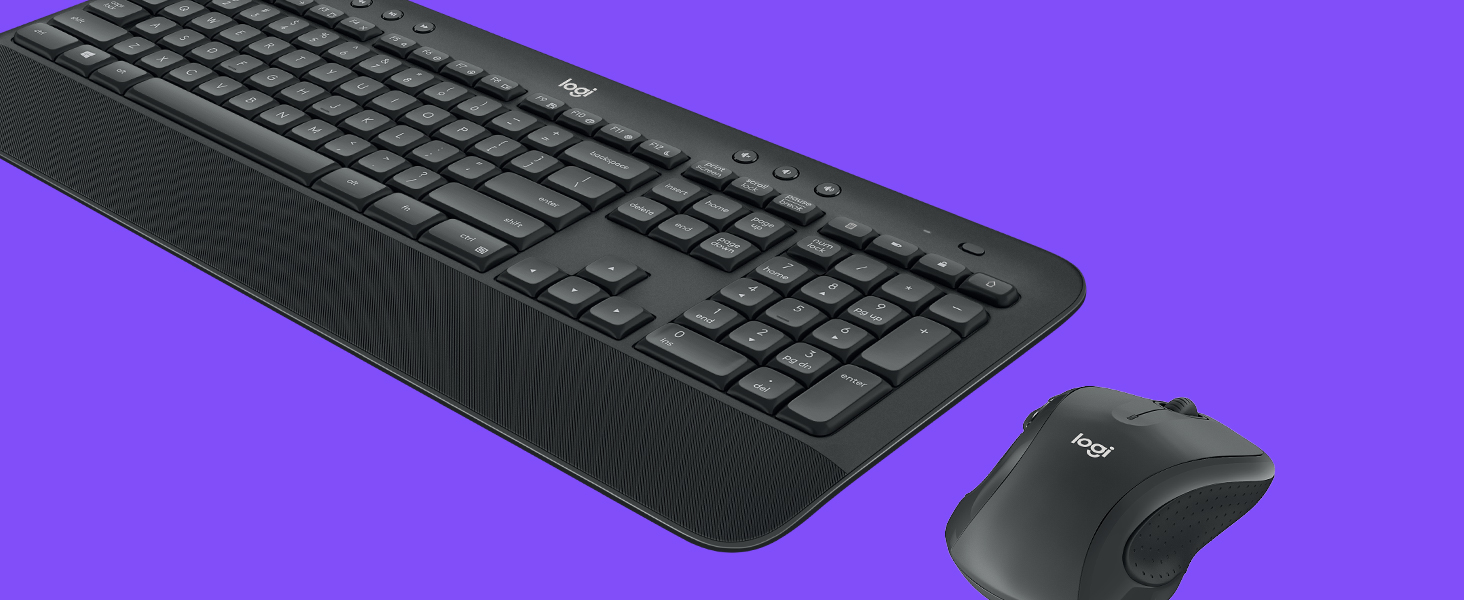
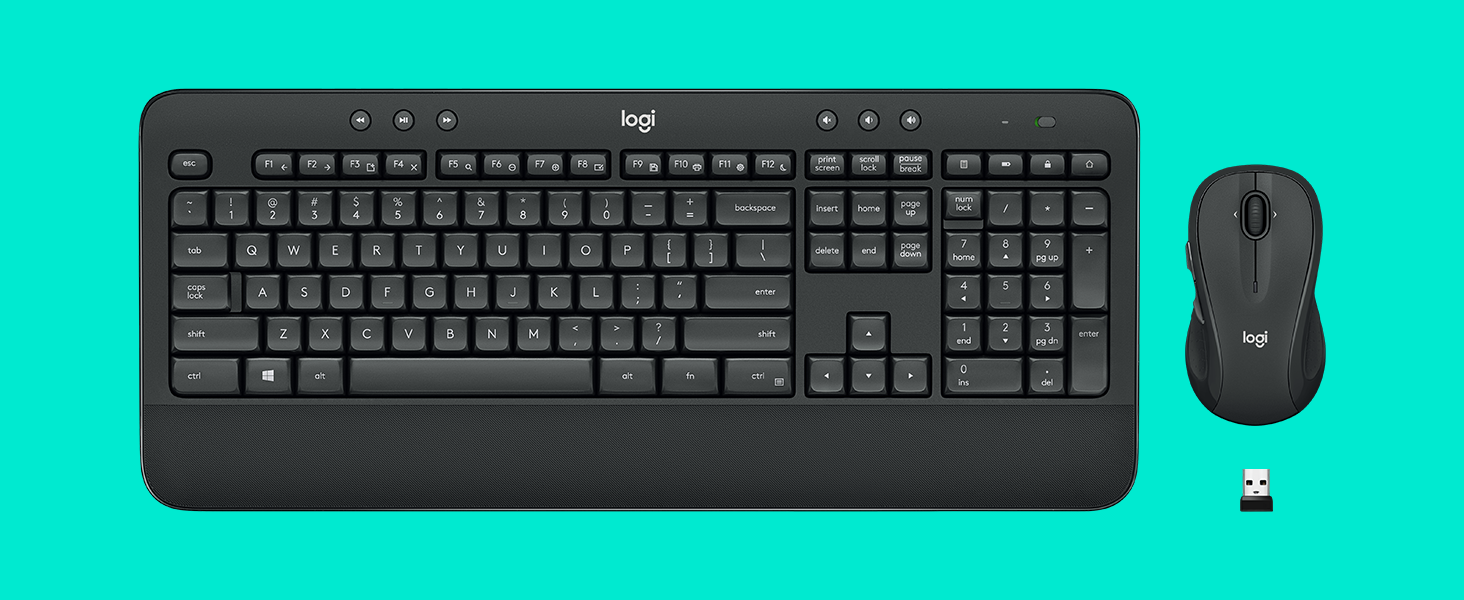
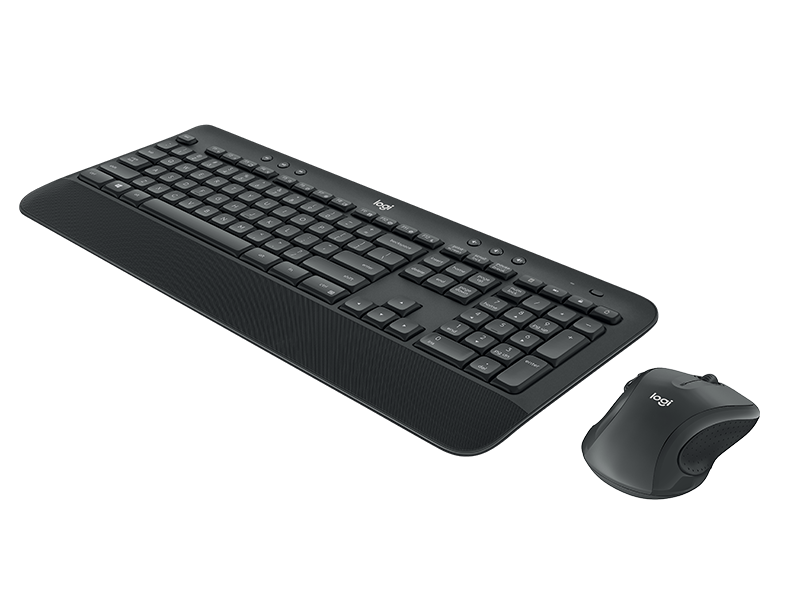
The Logitech MK545 Advanced Wireless Keyboard and Mouse Combo delivers a professional-grade typing and navigation experience with a full-size, noise-reduced keyboard featuring a textured palm rest and adjustable tilt legs. Its ambidextrous mouse offers laser-grade tracking for precise control. Both devices connect seamlessly via a single USB receiver with encrypted wireless technology, providing up to 10 meters of reliable, lag-free freedomโperfect for millennial managers craving comfort, efficiency, and clutter-free desks.
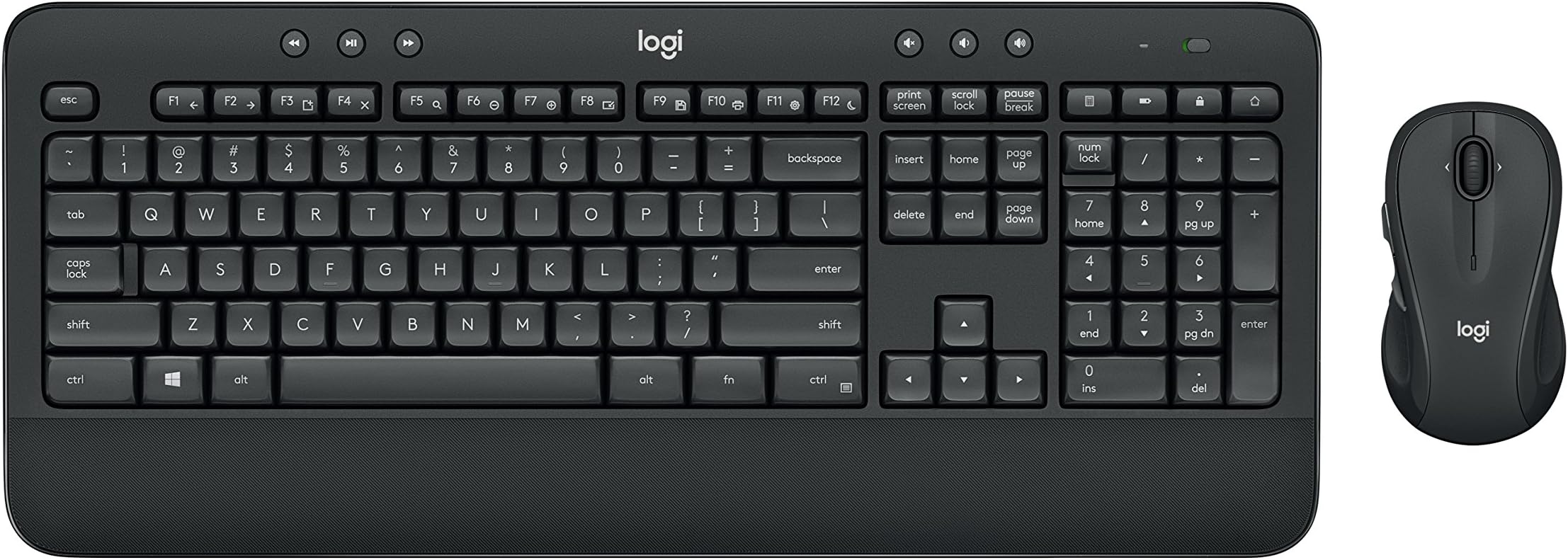


| ASIN | B079HR85C3 |
| Antenna Location | At home |
| Are Batteries Required | Yes |
| Best Sellers Rank | #1,034 in Computer Keyboard & Mouse Combos |
| Brand | Logitech |
| Built-In Media | keyboard, mouse, user guide |
| Color | Black |
| Compatible Devices | Personal Computer |
| Compatible Operating System Family | Windows |
| Connectivity Technology | Usb |
| Customer Reviews | 4.5 out of 5 stars 11,190 Reviews |
| Global Trade Identification Number | 00097855137319 |
| Hand Orientation | Ambidextrous |
| Item Type Name | Logitech 920-008695 MK545 Advanced Wireless Keyboard and Mouse Combo |
| Item Weight | 2 Pounds |
| Keyboard Description | Indoor |
| Keyboard Layout | QWERTY |
| Manufacturer | Logitech |
| Mfr Part Number | 920-008695 |
| Minimum Required Operating System Version | Windows 7 |
| Model Number | 920-008695 |
| Movement Detection | Laser |
| Number of Batteries | 2 AAA batteries required. (included) |
| Number of Keys | 104 |
| Operating System | Windows 7, 10, 11 or later, Chrome OS |
| Other Special Features of the Product | Laser Projection, Wrist Rest |
| Power Source | Battery Powered |
| Special Feature | Laser Projection, Wrist Rest |
| UPC | 097855137319 |
| Unit Count | 1.0 Count |
| Warranty Description | 1-year Limited hardware warranty |
S**M
The Roller Coaster of Keyboard Wonders - Lighter Than Air, Quirkier Than a Circus Clown!
Hold onto your hats, folks, because I'm about to spill the beans on the Logitech MK545 Advanced Wireless Keyboard and Mouse Combo. Brace yourselves for a wild keyboard ride, with a few bumps along the way! Let's start with the pros, because who doesn't love a good pros-and-cons show? This combo is lighter than a helium-filled marshmallow on a diet. It practically floats on air! Setting it up is as easy as pie, or maybe even easier. I'm talking pie-level simplicity here. And let's not forget those sweet keyboard switches - they're like tiny, magical elves performing a synchronized typing ballet. So satisfying! Now, the ergonomics and size of this thing? Talk about a match made in keyboard heaven! It fits my hands like a tailored glove made by a genius fashion designer who specializes in hand-friendly couture. And did I mention it's wireless? Oh, the freedom! No more wrangling with wires like a clumsy cowboy herding cattle. But now, let's bring on the cons, the minor hiccups in this keyboard extravaganza. First off, I've had to change the batteries once already, and my keyboard seems to have a taste for them. I feel like I'm feeding it more batteries than a hungry toddler devours cookies! And seriously, Logitech, why no USB charging option? It's like the combo missed the memo on 21st-century convenience. We're in the wireless age, people! But wait, there's more! The sleep mode button on this thing is a bit of a diva. It wants to be the center of attention, but really, it should have its own button, like a spoiled celebrity demanding a personal entourage. Come on, Logitech, give the sleep mode button some humble pie! But despite these quirky cons, I can't deny that the Logitech MK545 combo has stolen a piece of my heart. It's brought joy, comfort, and a touch of keyboard magic to my computing adventures. Just make sure to stock up on batteries, invest in a charging dock, and maybe give that sleep mode button a little talking-to. So, my friends, get ready to buckle up and embark on a thrilling ride with the Logitech MK545 Advanced Wireless Keyboard and Mouse Combo! It's a roller coaster of lightness, ease, and keyboard dreams, with a few surprises along the way. Enjoy the ride!
S**.
Can't believe I waited so long to cut the cable!
Preface: This is a review of the keyboard only. I already own a wireless mouse (MX Master also from Logitech!) and thus set the mouse aside. Prepreface: I've owned the product for ~1 week. Thus no reliability issues so far but then again, it's only been a week. The keyboard works great! I have plenty of Logitech products and the unifying receiver was one of the big reasons why I picked a Logitech keyboard over a different brand. I was able to connect to my pre-existing unifying receiver with 0 issues. No issues at all with connectivity. I wake up in the morning, start typing, and letters show up. It just works! I've also played games on it and there's no noticeable input delay either. Ergonomically, the wrist rest is a wrist saver! However, not everything is perfect. Couple of minor cons to look out for: - The wrist rest material is a rubbery textured material. You know the type. It's going to wear off and gather grim. - There's no right windows key. I didn't know keyboards existed without the right windows key. - The top right shortcut keys. I hate them. I despise them. I can't disable them. One is a battery light indicator. Cute. 1 opens up your calculator app. Why the heck would I need a keyboard shortcut for that? 1 locks your computer. I hate hitting that. And the last one, the very top right key, is a monster. It opens up your web browser home page, using your CURRENT tab. While writing THIS review, I accidentally hit that godforsaken button and it deleted my review. It doesn't ask, there's no confirmation for leaving a form. Homepage. Watching a YouTube video and grab the corner of your keyboard to adjust it and hit the key? Homepage. Inputting numbers through the numpad and accidentally hit the key while trying to type -? Homepage. Drop everything and go directly to homepage. I'm making it a bigger deal than it should be because I'm still rating the keyboard 5 stars!
K**G
Love the Keyboard! If you experience connection lost issue, read this.
A few months ago, I bought a new laptop and this keyboard and mouse combo. Strange things happened since then. The keyboard and mouse kept losing connection. I thought it was a problem with my new laptop because I have never heard of similar problems with mice and keyboards. I then tried and moved my laptop to different positions, from the right of my desk to the middle and from the middle to the left. None of those moves worked. I got very frustrated and I just wanted to break the keyboard and mouse every time the connection was lost. I had to unplug the receiver and put it back in for it to work. I also almost wanted to return my laptop, keyboard, and mouse. But I was like, no that doesn't make any sense and I really like the keyboard, so I went ahead and did some research about the compatibility of these new devices. I found out that there is a known problem of interference between USB 3.0 which my laptop has and 2.4GHz signal which most keyboard and mouse use, including this combo. The keyboard and mouse with 2.4GHz work better with USB 2.0. So I further looked to see if there are adapters that can fix this known problem. Thank god! Yes, with a little adaptor, my keyboard and mouse work just perfectly fine! Again, I love this keyboard and of course, my new laptop and so didn't want to just return them. Phew!! Problem solved! I'm so so happy! For those of you who experience a similar issue, try my solution. Here is the link to the adapter that I bought. https://www.amazon.com/Syntech-Adapter-Thunderbolt-Compatible-ChromeBook/dp/B082V3C83D/ref=pd_rhf_ee_p_img_13?_encoding=UTF8&psc=1&refRID=6S9V0XRNKRGRNBP0WRWB
R**E
Previous Model Variations Looked Better, But It's Equally Reliable.
I'm picky about having a mouse with back and forward buttons, and media controls on a keyboard. Logitech makes good products overall, and this one is comparable to others I've owned. Generally speaking you can get the most bang for your buck with Logitech in terms of quality and affordability, they aren't the best or the worse, but they are well rounded and you will rarely run into an issue with their products. I have a previous model of this keyboard which I bought refurbished, and eventually had problem with some input lagging and the space bar key needing to be mashed to get it to register an input. I took it apart and put it back together with no obvious causes, so I chalked it up to potential problems that weren't really fixed when it was refurbished. It still lasted a full year of regular use. I still have it in storage because I like the mouse. As such, I bought this one as a direct replacement, bought it used and have had no issues, it's only a couple of months old though. My main complaint is that I feel Logitech took a big step backwards in terms of styling. I don't buy their products for their looks, I buy them for their functionality, and the styling changes they made fortunately don't really help or hurt the functionality of it, but I did like the older more prominent buttons over the more low profile ones this has. Amazon won't let me upload photos, so I can't really show you If you wan't a keyboard to use for videogames, don't use any wireless keyboard or mouse, the input lag will make it difficult to play anything more complicated than Farmville.
R**Y
Hooked right up!
I bought this keyboard mouse combo from Logitech based solely on past experiences and known quality. I was not disappointed. My wife works from home and needed a wireless setup so I chose Logitech. It is nicely laid out and smooth to the touch. The rest on the lower edge of the keyboard is made of a softer type of rubber material and is easy to rest your wrists or hands on. The keys are quiet when pressed and not making a bunch of racket. With the 3 different leg height adjustments you cant go wrong with picking the proper incline for you.. A very nice keyboard. The mouse is designed very ergonomically. Coupled with the various button layouts and programmability, the feel is really nice. It also has a very smooth soft rubber type material on the edges of the mouse that allows you to grip it very comfortably. My wife loves it. Both the keyboard and mouse hooked up via Bluetooth immediately with out any delay at all. Up and running literally in seconds.. While my wife is not using it for gaming with her application, I can see how this combo would be a great addition for any gaming computer. Especially the mouse! All in all a very good purchase. You wont be disappointed at all with your purchase.
G**E
It's perfect for my needs - Updated 11/6/2023
This replaced a Logitech MK520. I'm using it with my new M1 Mac Mini, and it works perfectly. To prevent any USB 3 device noise signal interference, I have the dongle on a 6' USB 2.0 extension cable, set a few feet from the Mac itself. This ensures that, when I use a USB 3 device with the Mac, it doesn't degrade the 2.4GHz wireless signal of the keyboard/mouse. I learned that lesson with a prior mini PC. The keyboard is the perfect height and angle, and the keys have just the right resistance. The mouse is fantastic, and just the right size. I don't care for small mice, so this one is perfect. And the battery life is nice in both units. I would definitely recommend this keyboard/mouse combo. Update 11/6/2023: I've now purchased a second combo. Some of the keys on the first keyboard started being a little harder to push recently, so it was time for a new one. I'm still using the same mouse though, and will keep the new one as a spare. So, the original keyboard lasted for about 2.5 years, and that's with being used every day. That's pretty darn good. Though the new keyboard looks exactly the same, it weighs about two thirds of the old one, so they've updated the internal components, which is nice. I would most certainly still recommend this combo. A keyboard lasting 2.5 years of daily use before any issues and a mouse that's still going strong after the same amount of time is fantastic.
G**L
Pretty good replacement for K520; 4.5 stars
VERDICT: 4.45 stars (among brand name, budget, wireless combos). An above-average general use keyboard + mouse for home office. Nice gift for someone wanting a nice, quiet wireless setup for home/work, or casual gaming. A decent price for a combo (just under 50 bucks), considering that we've seen far worse keyboards alone for around the same price. BEST FEATURES: + Batteries included; 2 Duracell AAs were present in both mouse & keyboard. + Keyboard (K545 model) has 3 height settings (flat, 4 degrees, 8 degrees) and a non-detachable wrist rest (not padded but OK). + Low-profile but not 'chiclet keys that are relatively quiet. Membrane type (not mechanical), with some spill resistance. + Dedicated on-off switch on both mouse & keyboard. Some dedicated (and reprogrammable) keys -- including volume controls and calculator. + Keyboard & mouse work with a Logitech Unifying USB dongle (included if you don't already have one). + If needed, you can use Logi Options software to customize some keys/buttons and make other adjustments on both mouse & keyboard. + Mouse is a M510 wireless, average/medium sized, with reprogrammable keys (via Logi Options software), but does not have all the speed adjustments a true 'gaming' mouse would have. It's fine for casual gaming, or office work. - Logi Unifying receiver (the little USB dongle) is included, if you don't already have one. Range is approx. 5 to 10 meters (15+ feet). MINOR DISLIKES (no points deducted): Some of the extra keys could have been better chosen or placed, and the white lettering on the keycaps is thinner than ideal (but still ok). Mouse has no 'speed' adjustment buttons, but the pointer speed can be tweaked a bit under Windows accessibility or mouse properties if needed. NOT GOOD (minus 0.2 points): The included tiny paperwork was useless; miniscule text, and it was only the required safety/use stuff; for a real manual or instructions, you'll need to look online-- search for "logitech k545 keyboard manual". Considering how many nice features (esp. reprogrammable keys) you'd never know about without proper, legible, documentation, the lack of such here is unforgivable. Spend that extra 20 cents, Logitech!
B**.
Rock solid ergonomics
We tried a lower-priced variant for a home office setup and ended up returning it for this Logitech. The keyboard has a very satisfying tactile response, the mouse tracks perfectly, it's just no-nonsense comfort and productivity. Note that this version requires the usb dongle, no bluetooth option. One thing I observed is that certain usb hubs do cause lag with input (MacBook Pro), so if the keyboard/mouse aren't responding perfectly, try direct-connecting the usb dongle first!
D**O
Excellent Service
Quality items at outstanding price with delivery in just 5 days from Germany via DHL which is much quicker than estimated. Excellent service.
W**G
Perfect in pretty much every way for basic computer tasks
This is pretty much as good as it gets for membrane keyboards. As always, Logitech has delivered a quality product. The keys have a nice amount of travel and a good amount of tactile feedback. For its features it has dedicated media buttons, customisable keys, and a nice palm rest. The deck is large, with a comfortably large layout of keys, and the plastic construction has almost no perceptible deck flex. The mouse, while secondary to the keyboard, cannot be ignored either. It has a comfortable size to it with accurate tracking, customisable forward and back keys, as well as left-to-right scrolling. This isn't the best mouse in the world by any means but it's definitely a decent one. It must be noted that this keyboard will not provide a great gaming performance, but bear in mind that the intended market for this keyboard is the business/productivity side of computer accessories.
M**K
Surprisingly enjoyable
I've never really shopped for a keyboard or mouse. I'd pick up the store or bargain brand. When my last new cheapo wireless keyboard and mouse combo. died, I decided to upgrade. I selected this Logitech MK545. It has a natural and comfortable feel. The wristrest is perfect and I appreciate the slightly textured feel. The mouse is substantial and has a contoured. grip. It is precise and the only thing I don't particularly like is the mouse wheel has measured movement, not free movement. Sort of like a clock with a second hand that jumps every second, instead of a smooth, free-sweeping second hand. Some people may even like that feature. I am impressed.
A**H
Good keyboard layout and mouse size.
I type a lot for my work, so it was a surprise that my Microsoft Sculpt keyboard and mouse started wearing-off sooner than I expected. The Logitech MK545 combo felt like a good simple replacement. Its keyboard has a good layout, with just the right keys and not crowded than what's necessary. It has standard function keys, a calculator key, Windows lock key (handy), media buttons, and volume keys (takes a few presses to work at times). Typing is soft and comfortable. Keyboard build quality is decent, but it can be better at this price point. Hand-rest should've been a little longer for full placement. The mouse is just the right size for my hand, not too small and not too big. But Logitech should make the mouse clicks a bit softer. Overall a good combo for everyday use in home or office.
A**S
Defective equipment supplied.
Having had to work from home for 6 weeks and developed back pain from hunching over my laptop, I was relieved when this product was delivered. It was expensive, but I thought it would be worth it. Unfortunately, the box was open and a key component missing on arrival. So now I have to go through all the inconvenience of returning it and still do not have a solution!
Trustpilot
4 days ago
1 week ago