
Desertcart purchases this item on your behalf and handles shipping, customs, and support to India.
โฐ Own your time, automate your life.
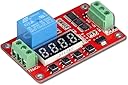
The UCTRONICS DC 12V Programmable Multifunction Time Delay Relay Module offers precise timing control from 0.1 seconds up to 270 hours with 18 versatile delay modes. Featuring a clear segment LED display, reverse polarity protection, and auto power-saving functions, itโs designed for seamless integration in smart homes and industrial automation. Its memory retention ensures settings persist through power cycles, making it a reliable and energy-efficient choice for professionals seeking advanced, programmable relay control.
| Asin | B07BT32T1M |
| Best Sellers Rank | #17,990 in Automotive (See Top 100 in Automotive) #2 in Automotive Replacement Relay Control Module Relays |
| Brand Name | UCTRONICS |
| Coil Voltage | 12 volts |
| Connector Type | Screw |
| Contact Current Rating | 0.01 A |
| Contact Material | Silver |
| Contact Type | Normally Open |
| Current Rating | 5.5 milliamps |
| Customer Reviews | 4.4 4.4 out of 5 stars (307) 4.4 out of 5 stars |
| Item Weight | 1.44 ounces |
| Manufacturer | UCTRONICS |
| Maximum Switching Voltage | 12 volts |
| Minimum Switching Voltage | 12 volts_of_direct_current |
| Model | U6030 |
| Mounting Type | DIN Rail Mount |
| Number Of Items | 1 |
| Operation Mode | Automatic |
| Part Number | U6030 |
| Specification Met | Ma |
User
Great multi function timer after learning how to program
Read the setup procedure below to understand how to program this timer.However, after learning how to program it, I ran it through 111,000 cycles with 2 seconds on and 2 seconds off. It worked beautifully and never missed a beat. I had it connected to a relay control board so it would turn the relays on for 2 seconds then they'd be off for 2 seconds then back on for 2 seconds and so on. Over 100,000 cycles without a failure. Not bad, especially considering the price.The instructions that come with it are limited. Here is another explanation of how to program this timer.1st.....To set up the timer...Press and Hold the SET button... this puts it into program modeTo Select the functionQuick presses of the Set button will step through the four functions. The function selected is indicated by the small blue LED just to the right of the readout. These functions are:MO... When this light is illuminated you can select the Mode. you select 1-18 (see the instruction sheet that came with the timerT1 ... When this light is illuminated you can set the time for T1T2 ... When this light is illuminated you can set the time for T2NX ... When this light is illuminated you can set the multiplier for the time of T1 and T2MO - the MODE OF THE TIMER. Set to between 1 and 18 based on how you want the timer to work.See the instruction sheet that came with the timer for a limited explanation of the modes. It's best toexperiment with a couple before choosing a final ModeT1 - FIRST TIME PERIOD DELAY. Based on the mode selected, this is the delay from first receiving the input trigger pulse until the second action T2, happens. Look at the graphs provided with the timer for further explanations. Make sure you understand what happens at power up compared to the what happens when the trigger pulse is applied.T2 - SECOND TIME PERIOD DELAY. Based on the mode selected, this is triggered by the completion of the T1 delay and in some modes reapplication of the trigger. T2 determines the delay until the next action happens.NX - NUMBER MULTIPLIER. Used to set the values of T1 and T2 to greater than 9999 seconds. The default value of NX is 0101. To determine the actual time delay, T1 is multiplied by the left two digits of NX. The resulting value is the delay in seconds used by timer.. Similarly, the right two digits of NX are the multiplier for T2. As an example, imagine T1 = 2000, T2 = 4000, and NX = 0105. Then the actual time delay would be 2,000 seconds (2000 x 01) for T1 and 20,000 (4000 x 05) for T2. A setting of NX to zero appears to do nothing.
User
Cheap and works
Cheap and did what it needed it to do. My use was simple, but it can be adjusted in a lot of ways making it versatile.
User
Explanation of MO, T1, T2, and NX
The timer is very versatile and powerful. However, programming is a near mystery based on incomplete documentation.Based on my limited experimentation, here is a start at an explanation of the four major programming parameters. I hope any errors in my guesses will be corrected in comments; do look at those.MO - the MODE OF THE TIMER. Set to between 1 and 18 based on how you want the timer to work (Mode 10 is turn on when triggered, followed by a programmable delay until turn off).T1 - FIRST TIME PERIOD DELAY. Based on the mode selected, this is the delay from first receiving the input trigger pulse until the second action happens. Look at the graphs provided with the timer for further explanations. For Mode 10, the trigger closes the output relay and T1 determines when the output relay opens. For Mode 13, this is the delay from the trigger until the relay closes. T1 is in seconds. See NX for how to make larger.T2 - SECOND TIME PERIOD DELAY. Based on the mode selected, this is triggered by the completion of the T1 delay. T2 determines the delay until the next action happens. For Mode 10, there is no next action so the setting does not matter. For Mode 13, this is the delay from when the relay closes until it opens. T2 is in seconds. See NX for how to make larger.NX - NUMBER MULTIPLIER. Used to set the values of T1 and/or T2 to greater than 9999 seconds. The default value of NX is 0101. To determine the actual time delay, T1 is multiplied by the first two digits of NX. The resulting value is the delay in seconds used by timer.. Similarly, the last two digits of NX are the multiplier for T2. As an example, imagine T1 = 2000, T2 = 4000, and NX = 0105. Then the actual time delay would be 2,000 seconds (2000 x 01) for T1 and 20,000 (4000 x 05) for T2. A setting of NX to zero appears to mean do nothing.
User
Great product, but read instructions carefully, and timing is NOT as described
WOW! Love these little TD relays! So much less expensive than the more traditional kind. However, study the instructions closely and experiment with them first. The manual is hard to decipher, as it is written by Asians who don't write English very well. Otherwise, this is a great little unit and I will buy again when the need arises.IMPORTANT UPDATE: The instruction manual says the NX setting multiplies the T1 and T2 timer settings by 1 second amounts. For example, NX=01 and T1=15, timeout is 15 seconds. That is FALSE! The time base is 0.1 second, not 1 second. The above example yields 1.5 seconds, not 15 seconds. In one of my uses I need a 6 hour timeout, so NX=50 and T1=4320. In other words, 50 * 0.1 * 4320 = 21600 seconds, which is 6 hours. The software does not agree with the manual. Removing 1 star for this discrepancy.
User
It can be set to turn itself off!
Excellent timer. The instructions are a bit obtuse, but once you figure out the sequence of short and long presses, programming it is easy. One special note - my use required that the timer be shut off completely once the countdown was completed (to avoid draining a hard-to-access battery.) Put the timer in auto-start, count-down mode (mode 2 in my version) and wire it so that the timerโs 12V power source is routed from the battery to the + terminal through the NO relay contact. Start the countdown by temporarily applying 12V to the + terminal. This starts the timer, which closes the relay and temporarily supplies 12V to the + terminal. When the timer reaches zero, the power supply is interrupted, and the timer goes completely off. Perfect.
User
Easy to program
Works well
User
Time Delay On/Off Relay Module
Failed. To be fair here, I have requested a replacement so this might have been just a bad one. I was able to figure out the programming of it and it working in a bench test type setup. I thought I smelled something which turned out to be a single component overheating. I shut it off quickly but apparently the damage was done. Now it โwasโ working then it just wasnโt. I checked all of my connections, insuring no miss-wiring, no shorting anything. I ended up using mode 3 when things went downhill. Has me wondering if this can only be powered on briefly as opposed to my thinking it could be on constantly?
User
PERFECT! Exactly what I was looking for! :)
Just arrived today and this is the PERFECT device for my application. I needed a device to enforce a hard time limit on the water valve for a water fountain and this did the trick. I used function 01 with a time limit of 120 (seconds = 2 minutes) and leveraged the COM and NC terminals. The water valve is energized when power is applied to the device and then shuts off after 2 minutes. No more worrying about my flower bed and yard being flooded because the home automation glitched. (This already happened once where the water fountain "refilled" for over an hour before I realized the mistake.) At $12 it's a good value, in fact I purchased another one to keep on hand as a backup in case I need to replace the one I installed.Pros:* Good value* Works exactly as expected* Digital interface for changing settings* CompactCons:* It's not free ;)* Doesn't do laundry ;)
User
Very handy
Love these devices... so handy! Works great and remembers perfect. Using with a relay and a non-contact liquid level sensor in my RDWC.
User
Doesnt work
Bought 2 units and both are unuseable. When power up, they show ''0'' and the button doesnt work and cant set anything.
Trustpilot
1 week ago
4 days ago