


Desertcart purchases this item on your behalf and handles shipping, customs, and support to India.
๐ฏ Master your multi-device workspace with Hearvoโs 8K KVM switch โ because productivity deserves no compromises!
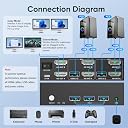
The Hearvo 8K@60Hz HDMI KVM Switch enables professional-grade control of two computers and two monitors via a single keyboard and mouse. Supporting ultra-high 8K resolution and HDCP 2.3, it ensures crystal-clear visuals and secure content playback. Equipped with three USB 3.0 ports for fast peripheral sharing and dual switching options (physical button and wired remote), it streamlines complex setups with plug-and-play simplicity and adaptive EDID technology. Ideal for multitasking pros seeking a clutter-free, efficient workspace.




| ASIN | B0G3V3RS9J |
| Best Sellers Rank | #161,821 in Computers & Accessories ( See Top 100 in Computers & Accessories ) #389 in KVM Switches |
| Brand | Hearvo |
| Brand Name | Hearvo |
| Circuit Type | 2-way |
| Colour | Elegant Black |
| Compatible Devices | PCs, laptops, PS4, keyboards, mice, scanners, printers, flash drives |
| Connectivity Protocol | Wired |
| Connector Type | Plug In |
| Contact Material | Aluminium |
| Contact Type | Normally Open |
| Control Method | Push Button |
| Control Type | Manual |
| Controller Type | Push Button |
| Country of Origin | USA |
| Current Rating | 1 Amps |
| Customer Reviews | 3.5 out of 5 stars 21 Reviews |
| Included Components | kvm |
| International Protection Rating | IP20 |
| Item Dimensions | 15.2 x 12.7 x 2.5 Centimeters |
| Manufacturer | Hearvo |
| Material Type | Aluminium |
| Model Number | STK-S7229H2-AA |
| Mounting Type | Desktop Installation |
| Number of Items | 1 |
| Number of Positions | 1 |
| Operating Voltage | 5 Volts (DC) |
| Operation Mode | ON-ON-ON |
| Part Number | S7229H2 |
| Specification Met | Hdmi |
| Switch Type | Push Button |
| Terminal | Hdmi |
| Unit Count | 1.0 Count |
| Upper Temperature Rating | 80 Degrees Fahrenheit |
B**E
5 stars after 6 mo switching Win/Linux
After 6 months use I only have had two hiccups where mouse/keyboard stopped working. Unplug/replug at the computer fixed. Have Win10 and Linux Mint machines. Both happened on Win system. Hard to test for exact fault, but my gut is itโs a WinGlitch not the KVM. The remote switch is super useful to place where most convenient. Would recco.
D**R
Strange Artifacts on Channel 2
This is not a KVM for daily use. PC1 works just fine but when switching to PC2, there are artifacts on the screen. I changed HDMI cables between computer and KVM as well as between the KVM and monitors. Save your money and buy a better product. I will be returning this
J**F
Exactly what my home office needed
Right out of the box this is exactly what I needed to switch between my home PC and my work Laptop without buying 2 more monitors. Easy and fast setup. Now I can use 2 of my 3 large monitors from my home PC setup for work at the push of a button, and still keep one dedicated to the home PC. Since I use both computers throughout the day I didn't hook up the keybord or mouse sharing options, this was just for the easy of monitor switching. Only had it on for a few hours but I am super happy with it so far.
F**E
Not very reliable for me.
Constantly disconnecting and reconnecting or just goes blank. The first month or so it worked fine but lately for some reason it just disconnects for no reason. I'm using the same equipment since day one. All the connections are secure. It's not like it's switching from one PC to the next it just disconnects my wired keyboard and wired mouse. I'd be in the middle of gaming or watching sports or a movie and then blank screen, dead mouse and dead keyboard. I have to physically turn the power button off and then back on again and it works again sometimes for 5 minutes and sometimes for hours. I don't like that when I'm in an important part of a game my thoughts are "please don't shut down" instead of concentrating on the game.
G**G
Okay, not great.
use of the USB slots for both don't work. I still needed two keyboards and two mice to run this. But does at least allow me to "switch" back and forth with the screen. I say screen bc only the MAC side works with both screens the PC side doesn't.
Trustpilot
3 days ago
2 days ago