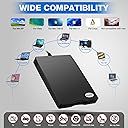
Desertcart purchases this item on your behalf and handles shipping, customs, and support to India.
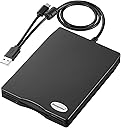
Floppy Disk Reader 3.5 inch USB Floppy Disk Drive External 3 1/2 Floppy disc Reader Portable Floppy Diskette Drive USB C for PC Laptop Notebook Computer with Windows 11/10 Review: Worked very well for me - This floppy disc reader came with plenty of (clear) instructions, including troubleshooting suggestions, but really I plugged it in and it worked well from the start. Was able to read my old floppy discs and copy some data over to my computer no bother. Review: Perfect - It works fine under my Windows 11 Pro and Ubuntu OS. I didnโt need to install or change anything under both OS - just plug in and use it.


| ASIN | B0C33XQYQ8 |
| Best Sellers Rank | 167,088 in Computers & Accessories ( See Top 100 in Computers & Accessories ) 11 in Tape Libraries |
| Box Contents | Floppy Disk Drive |
| Brand | Chuanganzhuo |
| Brand Name | Chuanganzhuo |
| Cache Memory Installed Size | 1.44 MB |
| Color | Black |
| Compatible Devices | Laptop, Desktop, PC |
| Connectivity technology | USB |
| Customer Package Type | FFP |
| Customer Reviews | 4.3 out of 5 stars 399 Reviews |
| Data Transfer Rate | 1.44 Megabits Per Second |
| Digital Storage Capacity | 1.44 MB |
| Digital storage capacity | 1.44 MB |
| Enclosure Material | Polycarbonate |
| Form Factor | 3.5-inch |
| Hard Disk Description | Floppy Disk Drive |
| Hard Disk Form Factor | 3.5 Inches |
| Hard Disk Interface | USB 1.1 |
| Hard Disk Rotational Speed | 3E+2 RPM |
| Hard disk form factor | 3.5 Inches |
| Hard disk interface | USB 1.1 |
| Hard-Drive Size | 1.44 MB |
| Hardware Connectivity | USB |
| Hardware Platform | PC |
| Installation Type | External Hard Drive |
| Item Dimensions L x W x Thickness | 16L x 16W x 16Th millimetres |
| Manufacturer | Chuanganzhuo |
| Manufacturer Part Number | CAZED-006U |
| Media Speed | 1 MB/s |
| Model Name | ACM-006C |
| Model Number | ACM-006C |
| Network Connectivity Technology | USB |
| Number of Items | 1 |
| Product Features | Portable |
| Read Speed | 0.35 Megabytes Per Second |
| Special feature | Portable |
| Specific Uses For Product | Personal |
| UPC | 889269579355 |
| Unit Count | 1.0 count |
A**M
Worked very well for me
This floppy disc reader came with plenty of (clear) instructions, including troubleshooting suggestions, but really I plugged it in and it worked well from the start. Was able to read my old floppy discs and copy some data over to my computer no bother.
H**O
Perfect
It works fine under my Windows 11 Pro and Ubuntu OS. I didnโt need to install or change anything under both OS - just plug in and use it.
M**R
Funciona correctamente
Fรกcil de conectar al ordenador pero es tardada la lectura de los discos. Sรญ la cantidad de discos que requiere leer es alta no lo recomiendo serรญa una inversiรณn sobre todo de tiempo.
J**F
Good product. Able to store and read data off the floppy disk. Make sure you use the refresh button
EDIT: seller explained to me that you must right click the windows 11 explorer and click "refresh" in order to update the contents of the device and read the data off the newly inserted floppy disk. Its also described in troubleshooting section 3 page 9 of the manual. Thanks! Does not work as expected. Here is how this works: If you insert a floppy disk ( lets call it A1 ) with data on it, read the data, then close the file explorer and remove the floppy disk, and re-enter the floppy disk drive on your computer ( windows 11 ) you will still see the data even though the floppy disk was taken out. In tech speak, I think the drive ( adapter ) stores a cache of the data of the previous floppy disk that was inserted. Furthermore, if you insert any further floppy disks ( B1, C1, D1, etc., etc. ,) - let's say B1 for this example, this disk will read the same data as A1 UNTIL you unplug the device, and plug it back in using the B1 floppy disk. Meaning, if you want accurate readings of multiple disks ( let's say you have a stack of floppy disks to go through ) - if you want to read all the disks, you have to unplug and plug it in each time, other wise when you are reading one floppy disk it will always read the data on the previous floppy disk inserted. Bad design. Doesn't work as expected but it is one of the only floppy disk readers on the market and once I figured out how to use it I was able to get the job done with a lot of time and effort. I feel sorry for the usb-c port on my windows 11 computer. EDIT: seller explained to me that you must right click the windows 11 explorer and click "refresh" in order to update the contents of the device and read the data off the newly inserted floppy disk. Its also described in troubleshooting section 3 page 9 of the manual. Thanks!
B**Z
Its Time To Easily Review, Sort, Transfer and Dispose My Old Floppy Disks Collection
The last built-in 3.5 floppy disk reader I had (have) is in an old Windows XP PC tower I built. This USB reader solves the problem to have 3.5 floppy read capability at my newly built Windows 11 PC to take on the project to review, sort, and download any important information I have on about 200 floppy disks. It worked plug-and-play compatibility right out of the box as long as you follow the instruction to plug it into a USB socket directly sticking out from the motherboard. Even trying a high quality USB extension cable compromised the ability to actually transfer the files. Because it is USB powered, it will continue to spin, even without a disk inserted, so only plug it in when needed. Device Manager reveals it is actually a TEAC drive inside with good read speed. Attractively encased. At the bargain price under $20 it is a value.
J**S
Inexpensive alternative for those 3.5" floppies
It filled a purpose; I had over 300 3.5" floppies that hadn't seen a computer in almost 20 years, so I needed to scope them for data. I pulled hundreds of old photos and correspondences off those floppies - there were 5 or 6 floppies that refused to be read, understandable because of the age. It has a USB-2 connector with a small USB-C cable on it. It was compatible with Windows 11 connecting effortlessly, no software needed. Small instruction pamphlet is included, but my main takeaway is to eject the drive (in File Explorer) before removing the floppy from the drive - it then reads the next floppy effortlessly. Good value for the price if you have a stack of floppies. Somehow through all those floppies I never thought to check (for the helluva it) if this disk will write to a floppy...but it works!
Trustpilot
1 month ago
3 weeks ago