Desertcart purchases this item on your behalf and handles shipping, customs, and support to India.
⌨️ Elevate your typing game with comfort and style — because your wrists deserve it!
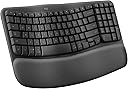
The Logitech Wave Keys Wireless Ergonomic Keyboard in Rose combines a compact, wave-shaped key layout with a cushioned memory foam palm rest to promote natural typing posture and reduce strain. Featuring dual wireless connectivity via Bluetooth and Logi Bolt Receiver, it supports seamless switching between multiple devices and operating systems. With up to 3 years of battery life and customizable shortcuts through the Logi Options+ app, this keyboard is designed for professionals seeking ergonomic comfort and productivity in a stylish, eco-conscious package.


| ASIN | B0BTNY72VD |
| Additional Features | Wrist Rest |
| Antenna Location | Office |
| Best Sellers Rank | #64,748 in Computers ( See Top 100 in Computers ) #1,710 in Computer Keyboards |
| Brand | Logitech |
| Built-In Media | 1 product |
| Button Quantity | 19 |
| Color | Gray, Off-white |
| Compatible Devices | Laptop, PC |
| Compatible Operating System Family | Windows |
| Compatible devices | Laptop, PC |
| Connectivity Technology | Bluetooth |
| Connectivity technology | Bluetooth |
| Customer Reviews | 4.3 out of 5 stars 2,440 Reviews |
| EU Spare Part Availability Duration | 3 Years |
| Enclosure Material | Plastic |
| Generation | 1 |
| Global Trade Identification Number | 00097855191533 |
| Hand Orientation | Ambidextrous |
| Is Electric | Yes |
| Item Dimensions L x W x H | 37.6L x 21.9W x 3H centimeters |
| Item Weight | 2.1 Pounds |
| Keyboard Backlighting Color Support | Single Color |
| Keyboard Description | Membrane |
| Keyboard Layout | QWERTY |
| Keyboard description | Membrane |
| Language | English |
| Manufacturer | Logitech |
| Mfr Part Number | 920-011898 |
| Model Name | Wave Keys |
| Model Number | 920-011898 |
| Number of Batteries Required | 1 |
| Number of Keys | 101 |
| Number of Sections | 1 |
| Power Source | Battery Powered |
| Recommended uses for product | Office |
| Special features | Wrist Rest |
| Style Name | 2023 Model |
| Switch Type | Linear |
| UPC | 097855191533 |
| Unit Count | 1.0 Count |
P**R
Usb alıcısı yok
Merhaba klavyenin içinden usb alıcı çıkmadı göndermenizi rica ediyorum
M**B
Best keyboard I've owned
I have been using this keyboard for work and personal use for 2 days and am loving it so far. It's perfect for my needs and here's why: 1. It has all the functions I need and then some 2. It's just the right size. I was using a separate keyboard for my personal pc than for my work laptop and the other keyboard is much larger, not leaving much room for my mousepad in the desk tray. 3. It connects seamlessly to both, my laptop and desktop so I don't even have to use the other keyboard now! I wasn't looking for that but is a HUGE plus now that I have it setup. You can save 3 connected devices and switch between them using F1, F2, and F3. This was a huge help since I use the same monitor for both devices (I bought an hdmi splitter for that) but would have to use 2 different keyboard/mouse each time I switched. Now I only use 2 different mouses (mice?) which I'll probably upgrade as well. 4. The keys have good response without being noisy. You can hear them, which I prefer, and feel the feedback, also preferred, but you don't have to press hard and don't get the loud click-clack of old school keyboards. 5. It's comfortable to use, at least for me. The palm rest cushion is soft but seems like it will hold up for a long time. The major keys are reachable without lifting my palm and there was minimal adjustment from my much larger keyboard. 6. Very easy setup (I use Windows...can't speak to Mac, Google OS, etc.). As soon as I turned on the keyboard, it paired with my laptop. I had to do absolutely nothing for setup (see note below). The ONLY very small con I have is that it doesn't tell you anywhere in the packaged instructions that you can pair multiple devices. I knew this from another reviewer. Even then, I had to search how to do it, because it's not obvious on the Logitech website. Once I figured it out, it was very easy to do (have your laptop/pc/whatever search for bluetooth devices and hold down the button F1/2/3 button that you want to assign to that device. The device will then discover the keyboard and you're good to go). Other Notes: I would recommend this keyboard to anyone. It's pricier than other keyboards I've bought but I didn't add a con for that because I believe it's definitely worth it. You can change how the function keys work using their application and even setup "smart actions" which will do a bunch of stuff like opening your favorite apps and a bunch of other stuff. All of this stuff is configurable too, although, I haven't tried to use it yet. I just needed a keyboard so I didn't have to use my laptop keyboard but got many features I didn't even know I needed! Get this keyboard!
M**R
Versatile & sturdy
Good quality, took some time to fet used to the key placement. Sturdy & compact
B**D
Extraordinario
Excelente producto tengo mas de un año usándolo y funciona perfecto
C**L
lindo
cómodo lindo color precioso
Trustpilot
1 month ago
2 weeks ago