

Desertcart purchases this item on your behalf and handles shipping, customs, and support to India.
🖼️ Print Like a Pro, Connect Like a Boss!
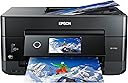
The Epson Expression Premium XP-7100 is a wireless all-in-one inkjet printer designed for home and creative projects. It delivers sharp, vibrant prints with a 5-color ink system, supports borderless photos up to 8x10 inches, and features a 30-page Auto Document Feeder with automatic duplexing. With a 4.3-inch touchscreen and versatile wireless connectivity including Wi-Fi Direct, it enables seamless printing from multiple devices, making it an ideal choice for productivity and photo enthusiasts alike.


| Additional Printer Functions | All In One |
| Asin | B07FN93WW7 |
| B W Pages Per Minute | 15.8 pages_per_minute |
| Best Sellers Rank | #7,950 in Office Products (See Top 100 in Office Products) #3 in Desktop Photo Printers |
| Brand | Epson |
| Built In Media | 5 Claria Premium ink cartridges: 1x 410 Black ink cartridge, 3x 410 color ink cartridges: Cyan, Magenta and Yellow, 1x 410 Photo Black ink cartridge, CD-ROM containing software and drivers (Windows and Mac), Expression Premium XP-7100 color inkjet printer, Power Cord, Setup and instruction manuals |
| Color | Black |
| Color Depth | 24 bpp |
| Color Pages Per Minute | 1 pages_per_minute |
| Compatible Cartridge | Epson Genuine Ink Cartridges designed for XP-7100 model |
| Compatible Devices | Laptops, PC, Smartphones |
| Control Method | Voice |
| Controller Type | Amazon Alexa, Vera |
| Customer Reviews | 4.1 4.1 out of 5 stars (3,879) 4.1 out of 5 stars |
| Display Type | LCD |
| Duplex | Automatic |
| Global Trade Identification Number | 00010343922693, 00010343937697, 00010343942622, 00010343943674 |
| Hardware Interface | Ethernet, Secure Digital Card, USB |
| Ink Color | Black, Cyan, Magenta, Yellow |
| Item Dimensions D X W X H | 17.2"D x 19"W x 8.1"H |
| Item Type Name | Epson Expression Premium XP-7100 Wireless Color Photo Printer with ADF, Scanner and Copier |
| Item Weight | 21.5 pounds |
| Manufacturer | Epson |
| Maximum Copies Per Run | 60 |
| Maximum Copy Resolution Black And White | 4800 dpi |
| Maximum Copy Resolution Color | 4800 dpi |
| Maximum Copy Speed Black And White | 15.8 pages_per_minute |
| Maximum Media Size | 8.5 x 11 inch |
| Maximum Print Resolution Black And White | 4800 dpi |
| Maximum Print Resolution Color | 4800 dpi |
| Maximum Sheet Capacity | 30 |
| Model Name | XP Expression Premium XP-7100 |
| Model Number | C11CH03201 |
| Model Series | XP |
| Number Of Ethernet Ports | 1 |
| Number Of Trays | 1 |
| Other Special Features Of The Product | Auto Document Feeder, Borderless Printing, Memory Card Slot, Touch ScreenCD Printing, Two Sided Printing |
| Output Sheet Capacity | 30 |
| Paper Size | 4 inch x 6 inches |
| Power Consumption | 13 watts |
| Print Media | Paper (plain) |
| Printer Connectivity Type | Wireless |
| Printer Output Type | Color |
| Printer Type | Inkjet |
| Resolution | 4800 |
| Scanner Type | Photo |
| Series Number | 11 |
| Specific Uses For Product | Home |
| Total Usb Ports | 1 |
| Unit Count | 1 Count |
| Upc | 010343937697 010343943674 010343922693 010343942622 |
| Warranty Description | Warranty |
| Warranty Type | Limited Warranty |
| Wattage | 13 watts |
User
🙂 Great printer with an even better price.
I just happened to stumble across the Epson XP-7100 while looking for a small photo printer capable of using Letter size paper. The store did not have print samples and I knew nothing about it so I put off the purchase to do some more research. I came across a PC Magazine article titled The Best Photo Printers for 2019. The XP-7100 was listed a one of seven listed as an Editors' Choice, but the 7100 was the only Legal size printer with 2 others not fitting the bill and the remaining 4 being large formats costing 2-10 times as much. With a price of $129, I decided to take a chance.The XP-7100 arrived well packaged and heavier than expected (usually a good sign). It is a elegant contemporary design which takes up very little space and looks good anywhere. No ADF or trays sticking out. Setup was easy and straight forward with the quick setup sheet. The 4.3 inch control screen is a delight with its intuitive interface and bright touch screen. Once the ink cartridges are installed, just push the power button (the only button) and the control panels automatically tilts outward for a better viewing angle. After printing a few test sheets for printer head alignment, it was time to set up WiFi (unless you go with USB). WiFi setup was easy. Just select your network and enter its password (if secured). Last step is to install the software and driver on the computer. The CD did not auto run as it was supposed to so I manually opened the CD in File Explorer. At the root level are two app files. EPWizard.exe and Setup.exe. I ran the EPWizard.exe and everything installed fine. WiFi tried to locate the printer and it failed. This was resolved with a simple Restart of the computer.My first few prints were to test different papers and quality setting. The printer has 2 trays supporting cards, photos, envelops and basically anything A4 or Letter size and smaller. It even includes a CD tray to print on CDs. A motorized output tray retracts back into the printer (along with the control panel) when you power off. As far as construction, the port for the power cable is a little wobbly. I do not know what that is about. Some reviewers wrote the printer is flimsy. The trays do not have rollers or bearing, so yes they are a little flimsy to reduce friction, but tighten into place once fully extended. This is common among printers and helps keep cost down. As for the body, it does have thin panels (available in different colors) which are simply not acceptable for a laptop. Oh wait, this is a non-portable printer meant to, at most, be moved from place to place a few times. Remove from box and place on desk.I purchased the printer mainly for its photographic printing abilities. My first real print was a Student of the Month article (about my daughter) from the website of the local newspaper. The photo and text would be a great test of the printers capabilities so I imported the article at 300 dpi with vector text. I printed it with high quality settings and used Epson Ultra-Premium Glossy Photo Paper. The results were phenomenal. The color photo was vibrant and the blending of the 4 photo colors was seamless. Text (some of it 5pt in size) was very crisp and could rival laser printers. The printer is fast for an inkjet on high settings. I estimate around 35 seconds for the 8.5 x 11 print.I’ll add a follow up on the scanner, ADF, and media ports but for now the 7100 is a very impressive photo printer which can be had as low as $99. Of course they will make up for the losses, and then some, with ink and paper sales.
User
Excellent Printer for Windows , WiFi print enabled Android Tablets & Cell Phones
The un-packaging and initial set up on Windows 7 Home Premium was much easier than I had thought it would be . The WiFi & USB connections were made almost with out effort . The connection with my cell phone & Android Tablet were event free. The Hammermill Print App & the Epson Print App both recognized the printer . The Driver Installation showed SD Over USB driver Fail , but I think its because I did not have an SD card in the slot and most likely never will . It will probably become active when I insert an SD card for the first time , or it might be a Windows 7 issue , but it is a feature I would never use any way . Other than this , it performs really well . The initial adjusting of the print heads is a bit tedious , but necessary , and it really doesn't take much time , just a few pages of paper . The CD /DVD printer software that came with this printer is Excellent ! Some one finally wrote a DVD / CD printer program that is easy to use , intuitive and produces great results on Ink Jet Printable CD/DVD's . I still use my third party software for printing the Case Inserts . The print quality is superb and the colors are spot on . The ink can be a bit pricey ( Epson 410XL ) , but since I will use it 90% of the time to print CD/DVD's & Case Inserts , and not as a default printer , I can live with it . I did find some 410XL third party ink on Amazon.com that actually had a 5 star rating for this printer and they were very reasonably priced for a set of all 5 cartridges . I hope these 3rd party cartridges work as well as they are rated . We shall see . I don't use Windows 10, but others reviewing this printer comment on its use with Windows 10 .
User
Overall Good Printer
Easy to use, but a little annoying sometimes. Some devices will default the paper type to the wrong type but it will look normal, and it will end up jamming every time you print. Annoying, but easy fix and not really the printers fault. Only real negative is how much ink it uses. It also won’t print even in black and white if one of the colors is empty
User
Absolute crap
Absolute crap.Have had it for 3 months. Unboxing and initial set up went flawlessly. Network config was quick and easy.Initial prints were flawless. Crisp, clear and quick even for full color photos.Over the course of 3 months I've printed a hand full of full pages w txt, 3 5x8 color photos and 3 full page color game maps.Went to print a page today and just dead. printer hangs trying to clean the heads or something. Reboot of the printer has no effect. Reinstall of the device/drivers has no effect. Ink is more than half gone with the above print jobs.DO NOT WASTE YOUR MONEY. Epson has really lost a lot of good will from me with this POS. Only $150, so I guess I got what I paid for, but they used to make some decent printer for this money. Not anymore.Stay away. You have been warned.
User
Definite Recommend
Had this for about a month now and ZERO regrets.Takes a bit to learn all the different trays and settings but, it was well worth the money. I've printed on over 100 CD and the quality is amazing, and I still have a lot of ink left. Printed many sheets as well. I printed shipping labels. The multiple trays on here lets you do just about anything you need. Had a few bad prints, but it was because I had to calibrate the printer. Love this printer!
User
Everything worked well but some setup info hard to find
First of all, I had to go to a bricks-and-mortar store to find out where the paper tray was. I wanted to put the printer into a utility closet with an outlet and print without moving it, and until I could see the paper tray, I couldn't purchase it. Just showing the front of the printer without the open paper tray was not enough.I set up this printer with my MacBook Pro running OS 10.14.6.The power button is all black -- it lights up nicely when it. is on but is a bit difficult to find when it's off, although the setup sheet does show the location.I had trouble getting AirPrint to work. The setup sheet gives you enough information to get what I think is called Direct Print to work over your wireless network, but that's not enough for AirPrint -- you have to set up Wifi Infrastructure Mode, and the Epson online help is no help. Using Google, I eventually found an Epson YouTube video that showed how to do this from the printer's front control panel. Before I downloaded and used the 7100 User Guide, I also set up Epson Connect and the iPrint app, and after they did not help with AirPrint, I wondered if I would ever use them at all (but I did use iPrint, see below!). These different wireless print options and a one-sentence description of what each is good for should be on the Setup Sheet.Color print from MS Word, Excel, and Notes on iPhone and iPad worked perfectly the first time (once I had AirPrint).Then I started checking functions from the User's Guide, including several I've never done with any other printer.Duplex color copy and scan worked perfectly the first time, even though my input was an old and slightlywrinkled drawing. I did both from the Automatic Feeder Tray with the printer control panel.Photo print from Preview came out really well, even though I had only Another Brand photo paper instead of the Epson Ultra Premium Glossy paper I prefer.Photo print from a camera memory card, using the front printer control panel, also came out very well (my photo wasn't so great, so I won't say it was excellent yet) and I was able to preview what was on the memory card and select a layout right from that panel, without my computer. I didn't try transferring those photos from the printer to the computer because I put the memory card away before I saw that was possible, but I did confirm the Mac could see the printer over the network.I checked the printer supply levels from the printers and scanners icon in System Preferences.Finally I printed a layout of four 4x6 photos from my iPhone using iPrint. Worked fine.I am amazed at what this printer can do.
User
This is a great printer !
Let me start off by saying I am 71 years old. I’m not computer illiterate, but I like things easy to install. This printer has. Touch screen that makes installation a breeze. It found my WiFi very quickly and I was able to have it recognized by my windows computer, my Mac laptop and my iPhone without any issues. It was great value for the money and seems to print well from all devices.
User
Prints well but scanned documents are skewed!
Bought this to replace a 13-year-old Artisan 810 which still works fine and prints EXCEPTIONAL photos, only problem is the scanner gave up (scanned images with overlapping vertical banding strips) which prompted me for a new printer. I'd like to stay with Epson so the XP-7100 seems to be a good choice. In comparison it is much more compact, but it packs many newer features such as double-sided copy/scanning, AirPrint, faster WiFi, etc.. The major differences between my Artisan 810 and the XP-7100 is I lose the Fax feature, and the XP-7100 only uses 3 color ink cartridges compared to my old Artisan with 6! This pretty much tells you who's king when it comes to photo-printing. Though the XP-7100 technically uses 'five' ink cartridges, but out of the bunch two are Black! Good thing is both printers still includes the CD/DVD/BD disc-printing feature so that's still a plus in my book!The printer prints well overall, even on plain paper which my older printer lacks. Texts are rather sharp on document printing - even when using the lowest-grade plain paper, but my gripe on this printer is the scanner; which I do mostly than print. Scanned images are askew and distorted when using the flatbed scanner and results are much worse when using the ADF feature. Most people would probably not mind (or even realize this) but this is a definite NO NO for me at any cost! There is a 'skew correct' feature from a separate Epson scan software which can be use but I'd have to do it from my computer instead selecting from the printer/scanner unit itself and that is another NO NO. I do on-the-fly scanning, meaning docs laid on the unit and utilizing its front 4.3" touchscreen panel. Speaking of which, the option to select is more of a task compared to my old one.In order to do anything - whether to copy or scan; you'd have to first:Press scan,Choose printer,Press 'Save' to initiateCompared to on my Artisan 810:Choose scan or copy,Press/select printer and the task starts at once!Flatbed and page orientation:Document orientation is now faced on the opposite end of the bed, on the lower-right corner instead of the upper-left corner where the scanning rod begins. This means it has to travel all the way to the opposite end to capture the top page/image. This slows down the scan process quite a bit especially if you choose for a smaller scan/copy area, say for B6 size (4x9-6x9) whereas the scanner rod would just slightly slide to the nearby scan to capture and process.Wifi:Epson is still iffy about this issue. I find at multiple times my pc isn't detected unless I do a reboot. Printing is fine, but 'scan to pc' is a major issue as it will not work unless your pc is detected. This is managed by Epson 'Event Manager' which is notoriously known for sleeping and not knowing when to wake up. Again, I do most scans than print so the majority of people might not realize this.Photo printing:Still good compared to others such as Canon and HP as nothing beats an Epson when it comes to photo-printing EXCEPT my Artisan 810 still holds title with 'lab quality' prints.Pros:Fast print/scan via WiFiAirPrintBeautiful prints with sharp texts on docs, yields exceptional colorAdjustable 4.3" color touchscreen pad control with good tactile responseMotorized slide-out tray to capture printed contentsTop ADF cover folds flat when not in useFull duplex double-sided print/scan/copyCD/DVD media printing capabilityGood photo quality prints (when using photo paper)Overall good compact size unitCons:Scanned or copied results are 'askew' and distorted with no fixPaper tray capacity is smallUses only 3 color ink cartridgesWifi is inconsistent (very common Epson problem)No fax feature (which I still use but seldom)Slow blinking 'standby' white ringed power light is annoying, especially at night. This feature is non-adjustable, but others such as printer standby duration in minutes, sound, touchscreen brightness, etc can be.
User
Nice printer!
Prints fine, and it prints quietly. Hoping that the ink will last long.
User
Great printer!
This is the perfect printer! Like how the tray automatically comes out when you submit a print, no more papers all over the floor
User
Does everyone
A lot of negative reviews. Even then I think it’s due to unrealistic expectations. Here’s what I like: prints are of exceptional quality. I’ve always liked Epson for that. I’ve started to print Audio CD’s and Blue ray as well. Great prints! Only printer in this price range that can do that. And do it well.Don’t like: it’s terribly slow. The internal software needs patience. Print costs are high. Then again which ink jet printer isn’t?All in all well worth it and a bargain if on sale!
User
Amazing and easy to use
Works great. Easy to use
User
This printer is an ink hog and jams frequently
I bought this printer in Aug 2019 it died May 2020, it lasted nine months. It is an incredible ink hog, it wont let you do anything, like clearing paper jams unless all the ink cartridges are full. You can't switch to photo black if you run out of regular black ink. It currently is in a paper jam loop; but won't let me fix it until i change ink cartridges.I highly recommend that you do not invest your money in this piece of ***t. I will never buy an Epson printer again.It also wants me to update software drivers ever week. This is the worst printer i have had in 20 years. I will go back to HP or Canon.
Trustpilot
2 months ago
2 weeks ago