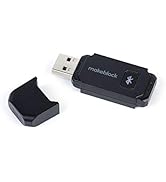
in Kurzform:* Der "Bluetooth Dongle" ist weit mehr als ein normaler Bluetooth-Stick - er erlaubt den Betrieb des mBot sowohl im Scratch-Mode als auch im Upload-Mode, hat also sozusagen die Funktionalität eines "drahtlosen Kabels". Entsprechend erscheint er im mBlock-Verbindungsmenü auch als "USB" (COM-Port), nicht als "Bluetooth". Gerade der wichtige Upload-Mode ist über eine Standard-Bluetoothverbindung nicht zugänglich (zumindest in mBlock v3 bzw. mBlock v5.01), nur mit dem Dongle.* Der Verbindungsaufbau PC zu mBot erfolgt über den "Bluetooth Dongle" wesentlich schneller und unproblematischer als mit einem internen oder externen Standard-Bluetoothadapter, zudem ist die Verbindung stabiler.Etwas ausführlicher:Man kann den mBot zwar über einen generischen Bluetoothadapter aus mBlock heraus ansprechen, das funktioniert leider aber nicht sehr zuverlässig, und man handelt sich etliche Beschränkungen ein: Mit der aktuellen mBlock-Version [v5.01] klappt es nur mit Bluetooth 4.0, es ist weder abwärts- noch aufwärtskompatibel. Das Koppeln dauert lange und geht nicht verläßlich (zumindest bei unseren beiden Rechnern). Zudem steht ausschließlich der Scratch-Mode zur Verfügung, bei dem das erstellte Programm auf dem PC läuft und per Bluetooth nur Laufzeit-Steuerbefehle an den mBot übertragen werden. Ein Upload des eigentlichen Programmcodes auf den mBot (so daß er ohne PC-Verbindung auf dem mBot selbst abgearbeitet wird) ist leider nicht über normales Bluetooth möglich. Da Upload der viel häufiger benötigte Modus ist, stöpselt man ständig das Kabel ein und aus.... (Scratch-Mode ist zwar nutzerfreundlicher, aber viel zu langsam schon bei einfachen Timinganforderungen, zudem wird bei nicht perfekter Funkverbindung gerne mal ein zufälliger Programmschritt ausgelassen - das verdirbt schnell den Spaß.)Der "Bluetooth-Dongle" hingegen vereinfacht das Leben enorm: An den PC gesteckt (plug & play unter Win10), einmal auf die Pairing-Taste gedrückt und den mBot verbunden - die Bluetooth-Verbindung ist augenblicklich da! Das Pairing bleibt erhalten, beim nächsten Mal muß nur noch der mBot eingeschaltet werden und ist direkt wieder gekoppelt. In der mBlock-Software erscheint der Dongle genau wie ein Kabel, und funktioniert auch wie ein Kabel - nur eben ohne :-) Das schafft Flexibilität: Sowohl Scratch-Mode, als auch Upload gehen nun drahtlos - zudem kann man bequem zwischen beiden Modi wechseln, da der für die Rückkehr zu Scratch-Mode nötige Reset der mBot Firmware nun auch drahtlos möglich ist!Obgleich man sich sicherlich gewünscht hätte, daß das alles bereits mit generischen Bluetoothadaptern ginge, ist es unter den gegebenen Umständen eine absolut lohnenswerte Anschaffung.NB: der Hersteller-Listenpreis ist 14,99 Euro - sofern der Dongle hier nur anderweitig zu Mondpreisen angeboten wird, sorgt eine Mail an den freundlichen Makeblock-Service für raschen Nachschub :-)